
For a time I was running three OSes, each on its own physical drive:
- Windows 11
- Linux Mint
- CachyOS
Technically, four, but my Mac Studio (circa 2022) mostly sits powered off these days.
Up until yesterday all three were working fine. Windows 11 and CachyOS still are. I was noodling around in Mint and it needed updates, as OSes do, so I installed them and it suggested I reboot, so I rebooted. It came back with errors, crashes, and weirdness. I tried some fixes, including boot repair, but could not get the system running stable. I’d also not created any backups prior to the screwy update. Whoops! I thought about my options and decided I’d give Mint a break for a bit (a major update is due next month, I’ll probably give it another go then) and so today I installed Ubuntu over top of it.
Yep, plain old Ubuntu, with its Snaps and GNOME and all that.
My experience so far:
Snaps have been glitchy. In one app, the mouse pointer was tiny. In a weather app (Mousam) it would not let me add a location, rendering the app useless.
I installed Bazaar, the Flatpak store, and enabled full Flatpak support. The Flatpak version of Mousam worked perfectly. The mouse pointer was likewise correctly rendered in a Flatpak version of the program in question.
So, Snaps…not so impressive, but easy to work around for third party stuff.
Next, GNOME, the desktop environment (DE) Ubuntu comes with my default.
GNOME feels very smooth. Windows open and close and resize without any hesitation. I generally like the look, too. The corners are maybe a tad too rounded, but pretty nice overall.
But if you like options, GNOME stinks. Its main competitor is KDE Plasma (which I use on CachyOS) and it offers far more customization. Some of this verges on overkill or esoteric, but a lot is just sensible stuff you expect and ends up being hidden away in GNOME.
Example: The default mouse pointer in GNOME is quite small on a 4K 32″ screen. I went into mouse and display/appearance options to bump up the pointer size. But the option isn’t in those places. It’s under Accessibility:
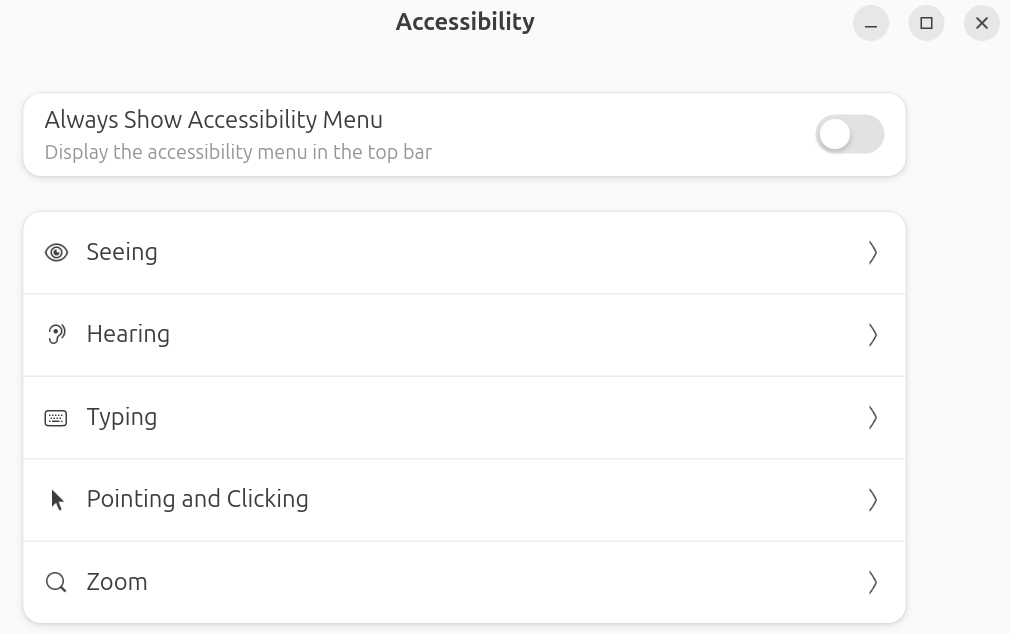
But not under Pointing and Clicking! It’s under Seeing. See? But at least the option is there. For a lot of stuff, no options exist, which means you have to resort to extensions and other add-ons to do any real customization. I like customization. GNOME does not.
On the other hand, the general approach of GNOME on the desktop is one I got used to pretty quickly, and again, it feels very smooth. Click an icon to bring up a list of all apps, click another to show all open programs. Everything feels very snappy (er) and close at hand, so it feels faster, somehow, compared to Plasma, even though it really isn’t.
I’ll keep exploring Ubuntu and GNOME for the time being, but suspect I’ll keep spending most of my time in CachyOS and Windows 11.