I’m not sure if this is really Part 7, but it feels close enough.
The other night I thought1, “Wouldn’t it be fun to replace the Cinnamon desktop of Linux Mint with the GNOME desktop used by Ubuntu?” It worked, but was a little glitchy. I decided to uninstall it. Instead, I made Mint unbootable.
After some valiant attempts at repair, I ended up fixing the issue by completely re-installing Mint. I am very good at this now. And it actually went pretty fast. I did have a backup made, but it did not work, for reasons. Probably because I made it unbootable, too.
Anyway, lesson learned! If I want to play around with GNOME, I will do so in Ubuntu, which is still installed in another partition and which I have yet to make unbootable.
Here is a picture of a mint. Or a box of mints, which is close enough.
Today, after a few hiccups, I installed Ubuntu, splitting the drive that has Linux Mint installed roughly equally between the two. The GRUB1GRand Unified Bootloader bootloader was automatically recognized by Ubuntu, and it simply added the Ubuntu-related options to it. And, of course, made Ubuntu the default option.
As I’d just re-installed Mint, I didn’t spend too much time puttering around, but I puttered a bit. My initial impression is that I think I prefer the GNOME desktop to Cinnamon, but prefer the overall greater customization of Mint. Also, I think I will limit myself to four operating systems for now, because this is all quite silly (they are Windows 11, macOS 14 Sonoma, Linux Mint and Ubuntu).
Cinnamon is fine as a desktop environment. In fact, if you’re coming from Windows, it will feel extremely comfortable, but that familiarity made me realize that a Start menu with a bunch of pop-out menus of apps is maybe not the best way to present options (Cinnamon emulates the Windows XP/7 era of the Start menu, which is probably not as good as you might remember).
Anyway, I am now thinking of installing GNOME on Mint, which will likely be a bad idea, but I love a challenge, or something.
And I’m in a puttering mindset these days. I think it’s helping me to unwind. Or unravel. We’ll find out.
Also, unrelated, I love cinnamon toast and now I want some.
On my iPhone and iPad, app updates are pretty much a daily thing. And the update notes are typically “Bug fixes and improvements”, which is so generic it tells me nothing, other than the developers are not actively trying to make the app worse.
I could run automatic updates, but that cedes too much control, and an update could go sideways. If I approve each update, I may hear about a bad one before applying it and avoid some trouble.
For a time, that red badge on the App Store icon showing me the number of updates bothered me, but something clicked in my brain that made me just not care about it anymore. So now I don’t update my apps and the badge number goes up, and I’m fine with that.
I still go in and selectively update some apps here and there, usually if the update seems useful or adds something that sounds enticing (this is rare).
Anyway, this is just one small piece in me achieving my own personal kind of Zen. More to come!
After installing the new internal SSD, I decided to nuke my install of Pop!_OS before really giving it much chance, despite the fact that it actually ran PowerWash Simulator in Steam without any issues, something I could never get to work in Mint.
Instead, I re-installed Mint and so far it’s been working fine. I feel like Mint offers more customization, or at least makes it more obvious and visible than Pop!_OS and I likes me some customization. There were a few things I’d apparently forgotten from last time, though. A few observations on Linux Mint 22:
Signal has to be installed by running three separate terminal commands. I’m surprised there is no flatpack or AppImage for it. Maybe a security thing? UPDATE: I misremembered from my earlier Mint installation. There was an unofficial flatpack, but in Mint 22 only authorized flatpacks will show in the software manager by default.
I still don’t like the look of the app icons. It gives me Windows 8 vibes. These are not good vibes.
I really like desklets. I always put one up that shows the time.
I suspect gaming will still be iffy, as the Nvidia drivers feel a bit weird. I also had an issue with a phantom third display and I’ve already forgotten how it went away. I think I just chose an older Nvidia driver.
The biggest knock–which is a positive for some–is probably how closely Mint hews to Windows. You have the Start menu, the taskbar, the system tray, all of them renamed slightly, but working fundamentally the same way.
I installed the Grub Customizer, which allows you to set Windows (for example) as the primary boot option in the menu when you restart the PC (after 10 seconds it defaults to the default and starts loading). Unfortunately, this isn’t made specifically for Linux Mint, so it shows a bunch of Ubuntu options and I didn’t like it, so I got rid of it. At least it still has a boot launcher, unlike Pop!_OS.
The biggest issues remains apps:
No TickTick, though the web version works
No Diarium (I have toyed with both Joplin and RedNotebook to see if they can substitute)
Graphics software is interesting, possibly doable?
I’ll keep puttering around. In fact, I’m typing this in Mint! I may experiment by putting together my next birding gallery in Mint. We’ll see.
I might also go back to Pop!_OS because I didn’t give it much of a chance and the Cosmic GUI is coming.
Come back soon for more Linux tragedy and farce!
Now to reboot the system and see what happens, ho ho.
Yes, the title is part sarcasm. But only part, because the worst part of adding an internal 2.5 inch SATA SSD to my PC was getting the computer to sit on the set of wheels I use to keep it off the carpet (to reduce dust ingress). I eventually gave up on the wheel and now the PC is elevated on a sturdy box.
But I missed that two opposing wheels were still locked (my bad), so I’ll probably go back to the wheels eventually.
As for the installation, I was smart enough to make sure I had all parts before proceeding, then gave the internals of the PC a good cleaning (minimal dust since the last time). Once ready for the work I gathered the needed tools and took the PC to the kitchen counter, where I could work in good light and at a sensible height. This helped so much that I did not use any colourful metaphors during the installation.
The drive was successfully installed and will now be (at least temporarily) the home for my Linux adventures. The reason for going internal is the external drive (an M2. SSD in an enclosure and connected via USB 3.0) would very occasionally lose connection to the system, which means the OS just kind of dies and could get corrupted, etc. So right now that drive is going to be more like phat temporary storage or something.
I’ll have another post about my Linux misadventures soon.™
Also, I’ve decided that when I eventually build my next PC, I’m going all out on internal connections on the motherboard, no matter the expense. What I want:
Probably 3 M.2 slots for SSDs. Yes, 3! I don’t want to run out of internal storage, and I don’t want to have to plug in external storage.
But if I do need to plug things, in I want USB-C and not just internal headers, but at least 1-2 external ports supporting a minimum of 20 GB transfer speed.
Maybe even Thunderbolt or USB 4 to go all the way to 40 GB.
And covered in RGB lighting! Just kidding. I do not want my PC to be a source of light.
I put “AI” in quotes because it’s not really about intelligence at all, people just glommed to the term because it:
Already existed
Sounds futuristic
Sounds high-tech
Google released an ad that has been airing during the Paris 2024 Summer Olympics (as an aside, this is the first Olympics that has been known probably as much for its meme generation as the athletic competition) which showed a father helping his young daughter write a fan letter to Olympic athlete Sydney McLaughlin-Levrone–by using Google’s Gemini AI.
The ad (and Google’s defense of “it tested well”) is wildly tone-deaf and a prime example of how people don’t want AI to work. Leave the creative stuff to humans, AI can handle the drudgery. And yet a lot of the big AI push is the exact opposite.
I’m not saying I wish I had to defrag disks again, mind you. This just recalls a simpler time and, perhaps, one where you were more directly in control with what happened on your home computer1Speaking of nostalgia, I remember when people consciously drew a distinction between a work computer and a home computer.
First, the name is twee and annoying to type, so I give them some credit for so effortlessly mimicking one of the worst aspects of Apple. But it is a superficial aspect, so let’s move on.
Installation
I have a spare 1 TB M2 SSD (holy initialisms1Yes, I am finally learning to stop using ‘acronym’ when the letters don’t actually make a pronounceable word, like SCUBA or NASA, though I suppose there might be someone out there who pronounces SSD as ‘sssdee”, Batman) in an enclosure and attached to my PC via USB 3.0, so transfer speeds are not terrible. I chose Advanced options during install and was able to get the OS in place without consulting any documentation. Victory!
What I didn’t realize at the time is that Pop!_OS doesn’t install a boot manager when you install it alongside another OS, so every time I restart my PC, it automatically boots into Pop!_OS, which is nice for it, but bad for me, because my primary operating system on the PC is still Windows 11. The interim fix is to tap F8 while rebooting, then select the Windows drive. Windows 11 loads normally after this. There are methods of creating a boot manager with Pop!_OS, but none are exactly simple, so I’ll probably leave it for now.
This does mean that removing the OS later will be simpler, since all I’ll need to do is boot into Windows 11’s recovery mode and execute this command at the command prompt:
bootrec.exe /fixmbr
As mentioned in a previous post, I kept getting pop-ups that the OS wasn’t working during install and had to keep dismissing them. This was annoying, but only added a bit of time to the install. Once done, it was simple enough to download my most-used apps from the Pop app store:
Thunderbird
Signal
Discord
Some apps I use are already included, most notably Firefox, but the list of apps I use that aren’t available at all in Linux remains a little too long:
Diarium (daily journal)
TickTick (to do list/reminders)
Affinity Designer (vector drawing)
Affinity Photo
Pixelmator Photo
Media Player (yes, I like it and use it!)
There are other apps I use, but haven’t installed yet. I used the Pop!_OS ISO with Nvidia drivers included, so this in theory means gaming should be simpler to set up. I’ll find out when I install Steam.
Built-in applications
Other than Firefox, you get the LibreOffice suite and a bunch of usual utilities like a calculator and such. I may tinker with LibreOffice to see how well it works with Word and Excel files (which I regrettably still use with others).
A lot of the included applications are more like applets–minimal, but functional. There is a built-in weather app, but it’s much simpler than the one in Windows 11 (though it doesn’t run ads, which the one in Windows 11 now does, to my noted chagrin). I may have more thoughts on these as I poke around.
User Interface and Design
The closest comparison to the GUI Pop!_OS uses is probably macOS. There is a dock, and also a bar that runs atop the display, reminiscent of the menu bar on Macs. It offers a decent amount of customization and in the end it didn’t feel like it was blatantly copying macOS. The “super” key (Windows key) defaults to a command line launcher, which is one of those handy things I now miss when it’s not available in any OS.
The system defaults to dark mode, but I’ve recently become a light mode convert, and switching over is easy. The title bars on windows still remain dark, which is a style choice I’m not sure if I agree with. I haven’t looked too much into customization here, so I’ll definitely have more thoughts on this later.
The system itself felt reasonably responsive, with moving windows, clicking and dragging all feeling zippy enough. My hardware was all configured automagically, including:
Bluetooth
Wi-Fi
Brother printer
Mouse (settings for this are minimal, we’ll see how that works out)
More to come
The fun par comes the next time I restart the PC and see if Pop!_OS loads smoothly or blows up. I’ll post more thoughts then, from within the OS itself (yes, I am being all ironic by writing this post on the Windows 11 side of things).
I got in a silly mood again and decided to mess around again with Linux. That can only lead to trouble!
This time I decided to swap out of Linux Mint and try Pop_OS, a distro made by System76, a company that sells PC hardware with the OS pre-installed, so you know they’re committed!
I made a boo boo when removing Mint. The proper order is:
Remove the GRUB bootloader that gives you a menu to choose Mint or Windows when restarting the PC
Remove or format the Linux partition (in this case, a separate SSD)
I did this in the reverse order, which meant I had to do a bunch of other stuff to fix things. Thank you, internet, for still being at least useful enough to provide the steps to take!
Once I had Linux Mint gone, I booted from the Pop_OS USB stick and the installation went fine-ish. I would keep getting “Pop_OS has stopped working” pop-ups during the process and would have to wait before I could click them away. They would often come back multiple times, but in the end it was annoying and didn’t kill the process or anything.
I’m typing on Pop_OS now!
Why did I switch? A few reasons, but mostly to try something different as a point of comparison, and also because Pop_OS is different. Mint follows a lot of Windows conventions, for better or for worse, where Pop_OS does things a little differently with its UI. It’s maybe a bit more Mac-like, but not really Mac-like. It’s more its own thing, and I like that they are trying something a little different.
Now, the scary part: I haven’t rebooted to see what happens. In theory, I should get a menu and be able to choose Windows or Pop_OS. If that doesn’t happen, I may need to do the old bootrec.exe /fixmbr again, or other trickery to get Windows to load, because as nice as Pop_OS might be (I perhaps have a few more reservations than initially), it ain’t gonna replace Windows. Not yet, anyway.
In my next Linux update, I’ll talk a bit about new apps I’m testing to replace some of the Windows and Mac apps I regularly use. Fun! Sort of!
This is mainly for myself, but also for anyone reading this. It’s true, not all comments are bad, but this morning I found myself reading a brief article on The Verge about running macOS on an iPad (the article was short because the real “article” is a YouTube video). There are dozens of comments from readers and while none are offensive or particularly displaying ignorance, it’s a rehash of all the same old Mac vs. iPad arguments I’ve seen before, and it made me realize I could be spending my time in other, possibly more productive ways
Like writing this blog post warning others not to spend time doing what I just did.
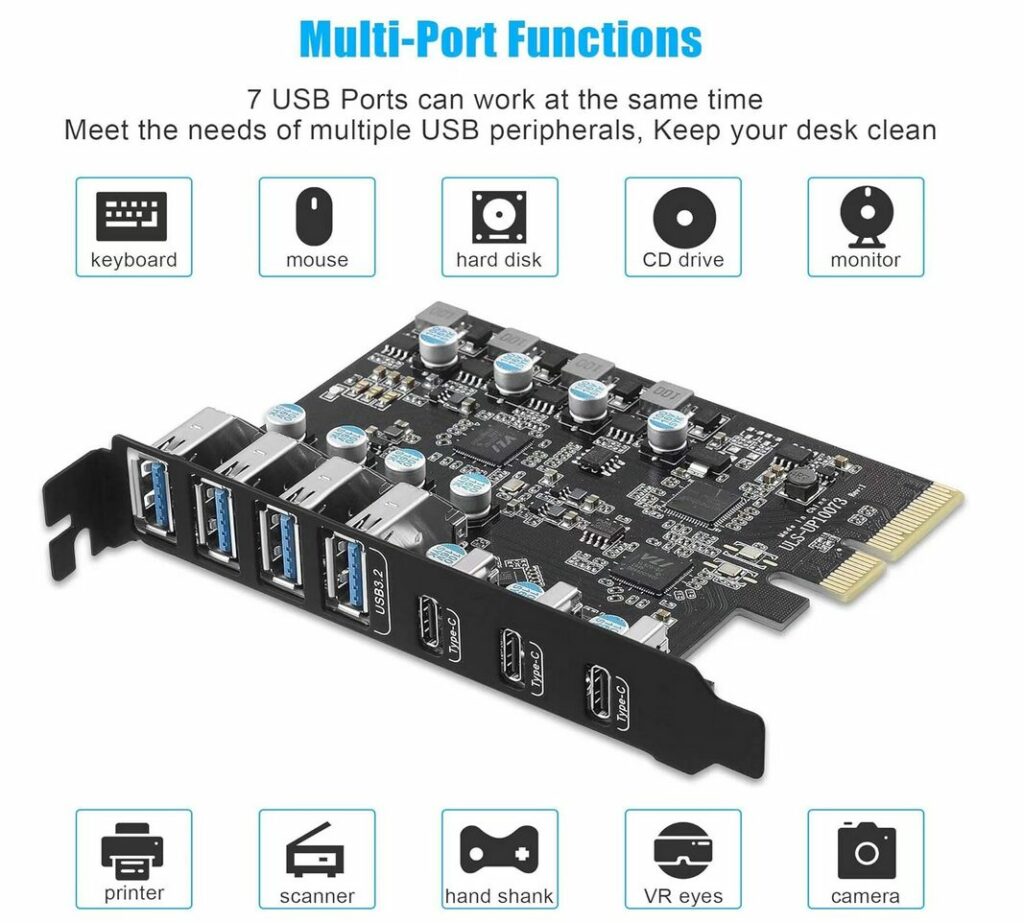
It had been a while since I’d looked at USB-C PCI cards for my PC (which does not have any built-in USB-C ports), so I thought I’d look again and found the one below. It’s compatible with a wide range of devices and peripherals, including, of course, the hand shank.
This blog post doesn’t really say anything new (Facebook is bad, and overrun with bots and AI sludge), but I do like the images the author chose to highlight, especially the cats on a rollercoaster, billed by the bot posting as “Great photograph.”