Running from a Ghost

A Ghost host, to be precise.

Last year, I began my search for a WordPress replacement in earnest, and signed up for a yearly plan using Ghost via https://www.magicpages.co/.

I have no complaints about the service or support, but 20 years of using WordPress proved a bigger hurdle to overcome than I thought. I really like some aspects of Ghost, but just as often I run into limits. It’s possible some of the limits might be theme-related, or could be overcome with CSS or something else, but I find I have little patience anymore to go down these rabbit holes to get things to work the way I want. WP is far from perfect (I could write a book–probably just from my posts highlighting WP’s issues) but I know it and have adapted to its flaws and weird bits.

I feel Ghost is close, but not quite it. Or maybe it is and I’m not willing to put in the effort.

Either way, I’m sticking with WP for at least a little bit longer. I’ll continue to ponder a move, but the urgency is no longer there.

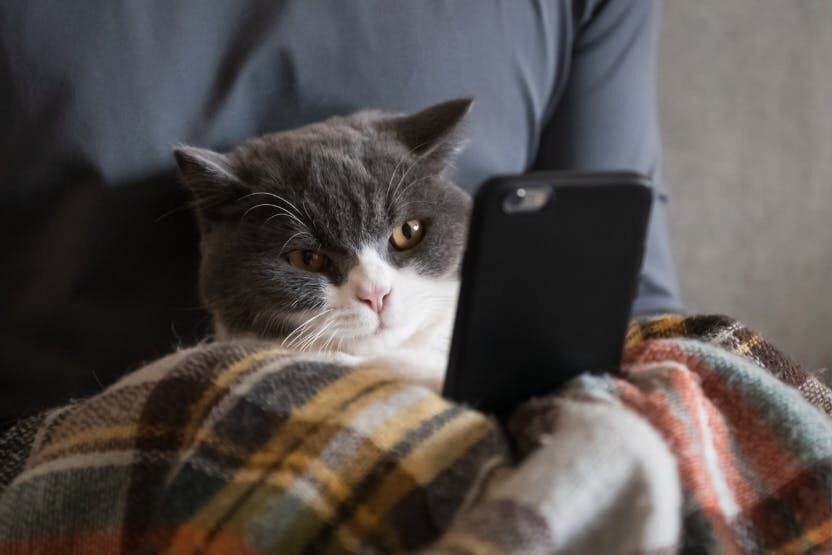
Here is a cat:

My tech is very selectively killing itself

I’ve had two cases recently where a device I have continues to work perfectly in every way, except for its primary purpose.

Last year, my camera, a Canon EOS M50, was experiencing occasional glitches, but I learned to live with them. Then one day, while out solo shooting birds at Piper Spit, it stopped taking photos. It would act like it was taking a photo, but would not actually finish the job.

I went through its settings and everything on the camera–including shooting and recording video–worked perfectly. It just stopped taking photos.

I ended up getting a new camera. It takes photos.

The other happened just recently. My iPhone 12 has occasionally sent a call directly to voicemail for no apparent reason. Now it rotates through several behaviours:

  • Call immediately goes to voicemail, I get alerted to a “missed call.”
  • Phone rings, I pick up, but the time on the call stays at 0:00. The person calling goes straight to voicemail.
  • Best of all, sometimes the phone doesn’t alert me to a call at all, not even putting a missed call in the call history.
  • What it doesn’t do: Actually allow me to take a phone call. I can still make calls without issue.

I did a cursory search on this and found a “Telus neighbourhoods” thread with dozens of replies reporting the same issue–but on every make and model of phone under the sun, both Android and iPhone. A multitude of “Changing this one random setting fixed it for me!” posts suggest the problem likely comes and goes based on the whims of the Telus network. It’s possible getting a new phone wouldn’t even solve the issue.

For now, I’m giving it time to see if it goes away (I did update and reboot my phone, as well as twiddle the dial on a few phone-related settings). If it doesn’t, I’ll probably grudgingly get a new phone.

Next up: A fan that refuses to blow air.

I started building my new PC

Yes, it is time for my once-a-decade PC build project. Terrifying. Enough time has passed since the previous build that I’ve almost forgotten that each time I do this, I swear I will never do it again.

All the parts are gathered. I cleared a space. I grounded myself, both against static and mentally. I put down the motherboard on the space I’d cleared (I planned to install everything on the motherboard before putting it in the case, save for the video card). I peeled all the plastic film off parts of it, something I’d never had to do on a motherboard before. I installed the ram (I used my iPhone’s Magnifier app to read the correct slot layout on the PCB).

And then I stopped, because the SSDs were next and the quick start guide that came with the motherboard seemed to not mention anything about how to install these and it was not immediately obvious, as the M.2 slots were hidden with shrouds and heat sinks and whatnot, with no clear way (to me) to access them. I contemplated looking online.

Then I actually just called it quits. For the day. Apparently my patience for this sort of thing has ebbed a bit since the last time.

But a friend with the same motherboard1This is why it’s handy to buy components that friends own offered tips and I’m ready to go for the next attempt. Maybe tomorrow. Maybe!

When smartwatches go dumb

I’ve seen references to sleep tracking via smartwatches being about 80% accurate, best at sleep start/stop times and kind of sketchy on the rest. This is sometimes presented in the context of, “Would you trust a heart rate monitor that was only 80% accurate?” The answer, sensibly, is no.

And so it is with my Garmin Forerunner 255. When I bought it two years ago, it replaced a Series 5 Apple Watch on my wrist. I lost a lot of smartwatch functionality–I can now see messages, but can’t reply on watch. Nearly all of my iPhone’s ecosystem is cut off from it. It mainly tracks steps, heart rate and my workouts–mostly runs.

I accepted the trade-offs and don’t miss the things it doesn’t do. For running, I prefer it over the Apple Watch, because the screen isn’t touch and it operates just as well in the rain as it does when it’s sunny. The interface is controlled by buttons, which can be easily pressed when wearing gloves. It’s functional and works.

Because the battery life is so good (I charge it when I jump in the shower–this is all it needs to stay topped up), I use it for sleep tracking.

Two nights ago, it gushed about how great my sleep was and gave me a score of 83/100 (Good). Last night it did the opposite, giving me a score of 60/100, which is only 1% above “Poor”. It said stress was high, I was restless and awake a lot. I just generally had a lousy sleep.

Except when I woke this morning, I didn’t feel I’d had a lousy sleep. I felt good. I felt rested.

Was my watch lying to me or was I lying to myself? Maybe both my watch and my body/mind were engaged in some fibbing? I have no way to know for sure, short of taking a scientifically sound sleep test.

But it did remind me of times past when the sleep stats didn’t match my perceived experience and that 80% estimate of accuracy. Smart devices can be helpful, but they can misdirect to where they cause stress that would not otherwise exist. I’m more mindful of that now than I was two years ago when I got the watch, so “bad” sleep nights that don’t feel bad to me don’t get me down, they just make me go, “Hmm.” And most of the time the watch’s report matches my experience, so I don’t think much about it at all.

Ironically, part of the reasoning for the low sleep score was the watch’s claim of yesterday being stressful. In the morning, the band snapped in two and I couldn’t find anywhere local that sells replacement bands. I ended up grudgingly ordering a knock-off band from Amazon, then used a bunch of gorilla tape to put the original band back together (for now). So if there was stress yesterday, it was the watch that caused it. 😛

My awesome watchband repair job.

Bottom line: Don’t let a smart device dictate your mood or life. Think of them as what they are–imperfect advisors.

Harper grammar checker: Private and fast (so far)

I’ve been using LanguageTool to check my spelling (and to a lesser degree, grammar) here on my blog and it’s been fine, other than being kind of obsessed with commas. I recently came across Harper, which is an entirely offline, private grammar checker and started trying it out today.

My impressions so far:

  • No obsession with commas
  • It seems a tad more basic, but covers the essentials
  • UI is functional, but could be a little nicer
  • It really is fast
  • No AI!
  • It is distributed by Automattic, so if you have issues with the creator of WordPress, you may want to stay clear

I’m going to stick with it for a while, but if this sounds interesting to you, it’s available as an extension for Firefox and other browsers. Learn more about it here.

Software I use in 2025

Because I like lists!

A note, to start: My Mac Studio has largely sat idle or even powered off for most of 2025. I’m not sure why, exactly, but at some point I just found I didn’t enjoy using macOS anymore. It could be as simple as I’m much more used to the things that annoy me on Windows. Whatever the case, I will not be including Mac software below.

I will also not be listing any phone apps.

What I will be listing:

  • Software I use in Windows 11
  • Software I use in Linux Mint
  • Progressive Web Apps (PWAs) I use in both (or even the Mac, should I turn it back on)

Windows 11

  • Browser: Firefox. Backup: Vivaldi.
  • Diary/Journal: Diarium
  • Tasks: TickTick
  • Email: Fastmail (I use the web-based version)
  • Blogging: WordPress (I have tried many alternatives, none have stuck so far)
  • Text Editor: This is complicated. I can’t make up my mind, so I’m dabbling with all of these to varying degrees:
    • Obsidian
    • Notepad (built-in Windows app)
    • Notepad++
    • Zed
  • Messaging: Signal
  • Group chat: Discord
  • Social media: I am only on Mastodon now, I use the Phanpy web app as the client.
  • Music: The built-in Windows Media Player
  • Word Processor: I don’t use one much these days, but when I do, it’s LibreOffice Writer.
  • Fiction writing, with the caveat that I haven’t done much for the past few years:
    • Scrivener
    • novelWriter
  • Photo editing:
    • Affinity Photo
    • Photos (the built-in app)
    • Luminar Neo
  • Drawing: I do this on a tablet now, so nothing here
  • Audio editing: Audacity (I rarely do audio editing, though)
  • Video editing: DaVinci Resolve (I rarely do video editing)
  • RSS reader: Good question! I keep flipping through a bunch.
  • Read later: Folio (browser extension for Firefox)

The apps listed above that are paid:

  • Diarium (one-time purchase through the Microsoft Store)
  • TickTick (optional yearly subscription to open more features)
  • Affinity Photo (one-time purchase. This was before Affinity Studio launched, which is completely free but gates AI features behind a Canva subscription)
  • Luminar Neo (one-time purchase)
  • Scrivener (one-time purchase)

Linux Mint

  • Browser: Firefox. Backup: Vivaldi.
  • Diary/Journal: Zed
  • Tasks: TickTick (web version, as no native Linux version exists)
  • Email: Fastmail (I use the web-based version)
  • Blogging: WordPress
  • Text Editor: This is complicated. I can’t make up my mind, so I’m dabbling with all of these to varying degrees:
    • Obsidian
    • Sublime Text
    • Zed
  • Messaging: Signal
  • Group chat: Discord
  • Social media: I am only on Mastodon now, I use the Phanpy web app as the client.
  • Music: Rhythmbox (included with Mint). Backup: VLC Player.
  • Word Processor: LibreOffice Writer (included with Mint)
  • Fiction writing, with the caveat that I haven’t done much for the past few years:
    • Scrivener (I have the Windows version running through Lutris)
    • novelWriter
  • Photo editing:
    • Pix (included with Mint)
  • Drawing: I do this on a tablet now, so nothing here
  • Audio editing: Audacity (I rarely do audio editing, though)
  • Video editing: I have not done this on Mint.
  • RSS reader: Newsflash
  • Read later: Folio (browser extension for Firefox)

As you can see, there is a lot of overlap with Windows, which shows how much Linux software has matured in recent years. The one place I feel it lags is in photo/graphics editing (no, I will not use Gimp, the interface just repels me, for some reason1Also, they really should just change the name.).

Paid programs in Linux Mint are the same as Windows.

I think I covered all major categories, but if I’ve forgotten something, I’ll edit it in later.

The promise of computing, the reality

The first two paragraphs of the Mastodon post below resonate with me–my first computer was an Atari 400, but my second and “real” computer (the 400 was basically a gaming machine) was a Commodore 64. And I had an Amiga, too. The C64 and Atari 400 were completely offline, my Amiga and Atari ST connected to BBSes via 33.6 baud modem. It wasn’t until I had my first PC that I ventured out onto the internet at large, but even then, circa 1996 or so, the whole world of computers, rapidly evolving in performance and capabilities, still held such tremendous promise. I had absolutely no conception of how it might all be turned against us and exploited by capitalist companies more interested in earning ever-expanding profits, no matter the cost to the world, or the individual. I just enjoyed it in the moment, whether it was doodling with a Koalapad on my C64, writing short stories using ProWrite on my Amiga, or discovering weird blogs on my Windows 98 PC. Or starting my own weird blog (this one, to be specific).

datarama on Mastodon:

@Tattie I think one of the reasons I never really got into retrocomputing – despite nerding out with a C64 or an Amiga sure did feel a lot more fun than computing in the current day – is that what made it feel so great back then was that it felt like I could just make out the contours of the future, and it looked like it would be amazing. So much creativity waiting to be unlocked! We’d make kinds of art not even conceived yet! We’d be making wonderful discoveries!

Now I live in that future, and it fucking sucks. The fruit of all those great discoveries have turned out to be mostly figuring out new ways to spy on people and manipulate them – and now, to declare all-out war against even the concept of human creativity. My C64 still runs (I no longer have a working Amiga), but playing around with it won’t bring back that feeling of a promised future of wonders – all I see is that it turned out to become a present full of horrors instead.

I’m sure part of all this – from a purely personal perspective – is just that I’ve hit the point where I’m supposed to be having my regularly-scheduled midlife crisis. “Did I waste my entire life?” sure does feel to fit the stereotype. I’ve thought about trying to retrain to do something else, but I honestly have no idea what that could even be. I’m disabled, I’m getting old, and there’s not a whole lot I can do that anyone would want to pay me for that isn’t related to software development. (I’m currently an embedded dev; prior to that I taught CS at a community college for ten years.)— datarama (@datarama@hachyderm.io)

I still dabble in retrocomputing and gaming, not because I have any illusions about things being better back then. They were simpler, and that had its own charm, but mostly it’s just straight-up nostalgia for being younger, and for the technology I geeked out on so much growing and improving year after year, with the possibilities of that growth suggesting so many great things to come–even if that fantastic tomorrow ultimately never arrived. Instead, we got Facebook and AI slop. 😛 This isn’t to downplay all the technological advances in computing since the 1980s and 90s, of course. I love great graphics as much as the next person, it’s just a shame so much of it is done now in service of garbage.

But you know what? It’s also not just nostalgia, it’s about looking back on a time when people wanted to make money off computer hardware and software, of course, but many also cared about providing a quality experience, whether it was through improvements to a word processor, a great sequel to a favourite game or better specs on the hardware that made everything run a little bit smoother. And as I noted in my recent reminisce on software stores, we used to have what now seems like a crazy number of not just operating systems, but dedicated hardware for each OS, and many companies–that today wouldn’t think of doing more than developing an app only for iOS (with IAP, ads, or both)–would release a game or program on five different platforms, because none of them were truly dominant (the PC won out in the end, of course).

Some still carry on that spirit of just wanting to make good things (and sometimes make money from it) from the early days of computing–indies, mainly–so it’s not completely gone. We just need to choose what and who we support, to keep the things we valued back in the early days from disappearing.

37 app updates (more to come, presumably)

The urge to update apps on my phone has pretty much vanished. I’ll only update now if something breaks.

There was a spike in the last day or so. I’m guessing a lot of apps have received updates recently to deal with various iOS 26 shenanigans (I am still on iOS 18). I’ll probably at least look at the updates soon, because it’s a good way to remind myself of apps I may not even use anymore and can uninstall.

A good description of Mastodon

Which I found, of course, on Mastodon, in the form of a linked article.

The article in question is here: A Mastodon Migration From Bluesky Would Be Different

And the quote from that article, made by a user named Pallenberg:

I’m going back to the Fediverse. Back to Mastodon. To the nerds, the hobbyists, the idealists. The people who don’t talk about reach, but about relevance. To those who understand that decentralization isn’t nostalgic, it’s the future. That digital sovereignty isn’t a gimmick, it’s a survival strategy.

Yes, the Fediverse is sometimes clunky, nerdy, uncomfortable. But it belongs to us. It’s not over-regulated, not driven by capital, not buggered up by algorithms. It’s what social media once aspired to be: A network of people, not brands.