I swear I have not gone full phone hipster, whatever that would look like.
Phone #1: My first cellphone, a Samsung M320, purchased for $40 in 2009. Yes, I still have it and yes, it still works (for a bit before the battery sputters out). Its main use today is to act like a communicator from the original Star Trek, so I can flip it open and say clever things, like, “One to beam up.”
Phone #2: My iPhone 12, purchased for a lot more than $40 in January 2021. It still works fine, though the Liquid Glass update kind of killed any desire I had to use it.
Phone #3: The replacement for Phone #2 and my newest phone, a Samsung Galaxy S26. It’s the base model and seems nice enough after I adjusted the settings to my liking.
As I’ve mentioned before, I have an iPhone 12 I bought in January 2021, making it now a little over five years old. This is the longest I’ve ever had a phone that didn’t plug into a wall outlet.
But late last year it started exhibiting an annoying issue (that also had an unintended perk as a side effect): It stopped passing through phone calls.
I can make calls the same as always, but when someone calls me, they get sent directly to voicemail. Often, I don’t even get a notification that a call has happened. If my phone does ring, the caller gets sent to VM while I stare at a not-actually-happening call where the time on the call never advances past 0:00.
The perk is it saves me from ever having to take a call, which is nice in a 1990s-no-cellphone kind of way.
But it is not helpful when someone, like a doctor, needs to call me.
I tried various ways of fixing the issue, but always felt it was likely bad hardware. I’d resisted two final fixes:
Updating to iOS 26
Doing a full erase and reset of the phone
I’d already ruled out the second option, because I’d just rather get a new phone at that point, and I’d resisted the first option because I deeply dislike the look of “Liquid Glass” and the bugs and weird, unwelcome changes made in iOS 26.
But then I thought, it’s up to 26.4.1 now, and I knew all the steps to take to tamp down the (IMO) ugly look of the new UI design, so I went ahead and updated.
It made no difference. The phone is still broken.
But so I’m not just griping, as fun as it is, here are the steps I took to minimize the look of Liquid Glass, with most of these settings found, logically, in the Settings app:
Under Display, I changed Liquid Glass from Clear to Tinted
Under Accessibility:
Display and Tex Size: Turn on Reduce Transparency
Motion: Turn on Reduce Motion (this one is essential to cutting down the insane bounciness they added to everything)
Lock Screen > Customize: Set the clock from Glass to Solid
This mostly reduces the home screen and other app pages to looking like before, except with the weird glassy outlines on icons, which look terrible and you can do nothing about. This also doesn’t affect the awful choices Apple made in its native apps, like Apple Music, an app that was already pretty clunky and now is somehow even worse. But it’s mostly tolerable after making these adjustments.
Last night I decided to try installing Kubuntu again. I first deleted the EFI partition that had weirdly been created on my backup HDD that I mainly use for bird photographs. The creation of this partition is something that I missed before during a previous attempt.
I then ran the Kubuntu installer, selected my secondary SSD and it correctly created an EFI partition on that. When I restarted, the (somewhat ugly) Grub menu appeared, allowing me to select Kubuntu or Windows. Woo.
But now I think I’d like to try Mint again, I think I prefer Cinnamon over KDE. I am never satisfied. 😛
I thought my new PC would be well-prepared for Linux–it has an AMD CPU and an AMD GPU, just like Linux distros love.
And in reality, I have installed a few distros with some success:
Linux Mint, my old standby
Kubuntu (Ubuntu, but with the KDE environment)
KDE Neon (for when you want the very latest KDE)
Pop_OS (to try out the Cosmic DE1Desktop Environment)
The problem in each case was a variation of one of the following:
The distro would not see my Windows 11 install and thus not create a proper dual-boot setup.
The distro WOULD see Windows 11, but would still not create a dual boot setup, either by error or design (some distros will not do this without you going in with a hammer and fixing it yourself).
This would lead to things like having to mash the F8 key when switching OSes, which is a pain compared to a nice Grub menu. I faffed about on several of the distros, convinced I could sort it out. I could not.
I tried a bunch of things to help distros see Windows 11, from disabling fast boot, to twiddling with various BIOS settings, to unplugging USB drives. None of this has made any difference.
I thought about taking the SSD from my old PC with Linux Mint on it and adding it to the new PC, but this has its own problems:
Probably needing to run some kind of boot repair to get Grub working properly.
The old system has an Nvidia card and I don’t know how gracefully Mint would handle suddenly running on an AMD system before the right drivers could be installed.
Also, opening up both PCs and moving the drive is just a hassle, and I’m kind of reaching my hassle limit.
So at the moment I’m at a standstill. I think I might try either Mint or Kubuntu again. Mint I know will not recognize Windows 11, and the manual partioning seems weirdly uncooperative. It is very possible this is a me issue. Or I might try Kubuntu again, which has generally been a smoother experience. I’ve even thought about nuking Windows 11 altogether, but I don’t have replacements for all the programs I use quite yet, so I’d prefer to dual boot for now.
I’ll probably decide on how I next want to faff about in the next few days.
Until then, here is a penguin, but not the Linux penguin.
For those in the future (hello!), the MacBook Neo is Apple’s lower cost laptop. It comes in at $600 (no, I am not going to credit Apple the $1). In Canada, it’s $800, which is still pretty cheap for a new Mac.
It just got released this month (it’s March 16 as I type this) and the tech YouTube world has gone bananas over it, with some declaring the Windows laptop market dead. Or something.
People who have no need or use for the Neo are sharing their desperate urge to buy one. The best I can figure is these people have disposable income most of us don’t, so the cost/need is irrelevant, and it comes in “fun” colours. It’s certainly not that it does anything special or unique. And that’s why I’m already tired of it.
Apple has made “cheap” Macs before–that was the whole point of the original Mac mini, to serve as a low-cost entry point to lure PC users away from Windows. And the original M1 MacBook Air, still extremely capable five years later, has been selling for the same $600 at Walmart, so even a cheap laptop is not a new thing.
The Neo makes compromises to reach its lower price and as others have said, Apple seems to have cut down on things that won’t have a major impact on the overall quality or usability of the device:
It uses a (cut down) A18 Pro processor–the same used in the iPhone 16 Pro, a step down from the M series they usually use for Macs
8GB ram
The screen is not as bright and doesn’t have the same colour reproduction as the Air
Chunkier bezels and a worse webcam
One of its two USB-C ports only supports USB 2.0 speeds (lol)
The trackpad is mechanical, rather than haptic
You get the idea. It’s the Air, but a little worse in most ways, but not in any way that would significantly harm the user experience. Apple was smart in its design. They even used screws instead of gluing everything in place, making it one of the most repairable Macs out there.
But it is not the ne plus ultra of laptops.
Not everyone wants to run macOS. Not everyone wants to be in Apple’s ecosystem. There are other laptops that are as affordable and they’re fine. Apple is not turning the world upside down. It’s just a cheaper MacBook, made possible through some sensible compromises.
And Apple is likely doing something different here–not banking on fat margins off sales of the Neo, but counting on those Neo buyers also going all-in on Apple’s many services. $600 upfront is nice, but a full (“Premier”) Apple One subscription is $38 a month or $456 per year. That’s like buying a Neo every 16 months, forever.
EDIT: I wanted to add this so it doesn’t seem like this is just an aging would-be hipster complaining about big bad Apple (as I have often done in the past). I think the Neo will be a fine laptop for many people, and I don’t begrudge anyone wanting or using one. It’s fine. The tech coverage on it is just kind of ick to me. I suppose that’s a problem I can correct myself, though. And I will!
Matt Birchler had a bizarre take on the lack of a backlight that I have never seen before: “The keyboard is not backlit, which I guess is a bummer, but honestly, I don’t think I ever use my keyboard’s backlight. Honestly, I’m not totally sure why other people use it either. Does your screen not light up the keys already?” ↩︎
When I set up my new PC, I wanted to again do a dual boot Windows/Linux setup–and I did, putting Linux Mint on my external 2TB Samsung SSD.
I later decided that having dual boot with an external SSD was not the way to go, so yesterday I undid this, with the intent of going back to Windows-only temporarily, before getting an internal drive setup for a Linux distro (likely Mint again).
I knew in undoing the dual boot that I had to be careful to not mess up things like Windows’ MBR–Master Boot Record, which could prevent the system from booting up at all.
I messed up the MBR.
Ironically, my still functioning old PC (also a dual boot system) allowed me to make a bootable USB drive for Windows and after a number of false starts, the MBR was repaired and everything is working normally again on the new PC, minus Linux Mint (for now)
I have some quaint old-fashioned paper notes on what to do should this happen again.
And now that I’ve cleaned up the mess I made, I can get back to what I was doing before I rudely interrupted myself.
I have a new PC. It’s mere months old, and yet already Windows 11 is bugging out and acting weird. Some examples:
The context menu you get by right-clicking will randomly switch between the new Windows 11 style and the older version used in Windows 10.
Snipping Tool will sometimes fail to open, producing a dialog to find another app in the Microsoft Store (trying again usually works).
Other random applications will just stop working, needing to be ended via Task Manager. The main culprit remains File Explorer, which will occasionally stop responding, even when opening a window with as few as two files in it. Sometimes it eventually recovers, sometimes it just needs a full restart.
General snappiness is already eroding as Windows does whatever it does to make everything slower.
Even the usually sturdy PowerToys sometimes has its tools fail to work (like Preview) until you recite the proper incantation.
Anyway, rather than just complaining, this may finally inspire me to move the drives from the old PC into the new one, and get a proper dual boot system going again. That way I can install Windows XP, a stable operating system.
Just kidding.
(Although it wasn’t bad once you had all three service packs and patches installed.)
I’m going to install some Linux distro. My short list is:
Linux Mint (I’m most familiar with it)
Kubuntu (because I like KDE Plasma and this is one of the more mainstream distros to use it)
??? A lot of others could go here. My bootable USB stick is ready.
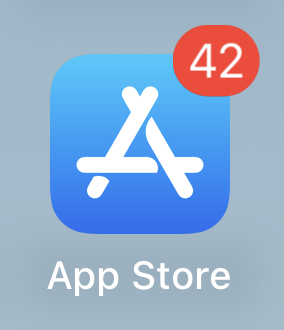
This is my way of saying the number of apps needing updates on my iPhone is now 42. I am seriously impressed it’s gotten this high.
Meanwhile, I am still mulling over what phone to get as my ailing iPhone 12 continues to sputter out. I’m still leaning heavily toward Android and away from pricey Pro/Max/Ultra models, because my phone use would not justify the added expense.
My list so far includes:
Google Pixel 9a or 10a (they are near identical–it might come down to price if I went this route)
Google Pixel 10
Samsung Galaxy 25 or Galaxy 25 FE
Moto G Stylus (midrange with a few flaws but no dealbreakers)
OnePlus 13 or 15
I haven’t 100% ruled out getting another iPhone, because while there are no good big tech companies, I don’t feel Apple is worse than Google. But I’ve seen iOS 26 and Liquid Glass in action and I have an irrational dislike of how they look and feel, and there is no escaping them with a new iPhone.
That said, if I could be convinced, the models I’d consider would be:
iPhone 17
iPhone 16
The 16e (or rumoured 17e) would have been a contender, but it has too many weird compromises for the price.
41 apps now need updating. For a while it was 40, then dropped to 39, then went back up to 40, and now it’s 41.
To me, this is the most interesting game I have on my iPhone. How many apps can get queued for updates before something forces itself? I suspect I will find out soon.
In Apple-adjacent news, Jonathan Horst, who got kicked out of Linus Media Group because his YouTube channel Mac Address was too clever and different, is back with a new channel called Think Different. I like his style and approach (though not his newly shorn head). His first video is a delightful rant against Liquid Glass and flat design. Good stuff.
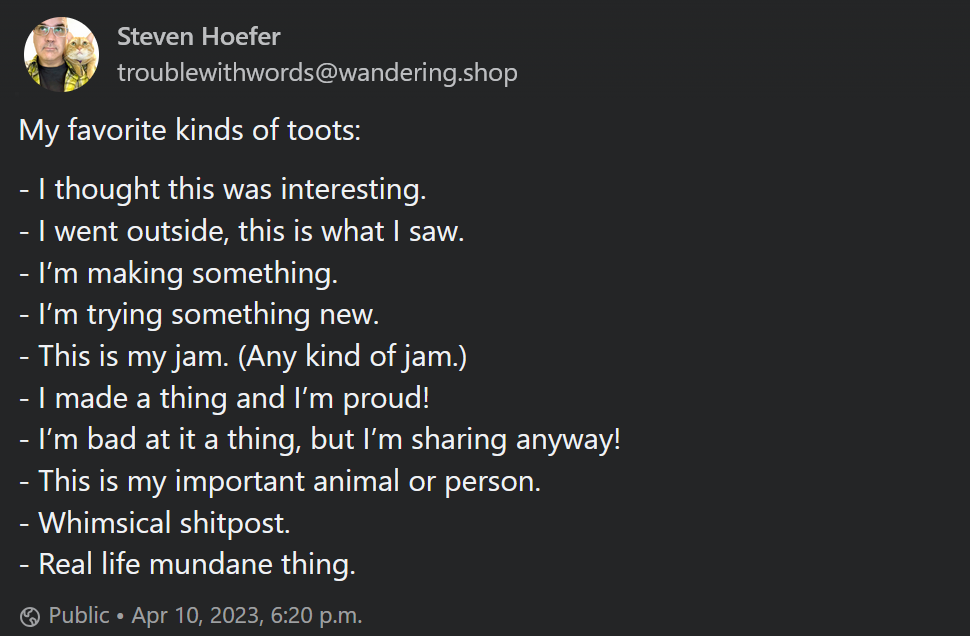
A toot is what some people call posts on Mastodon, the federated, decentralized social media service (and the only social media I check in on anymore). I saw this today, found it delightful and I am sharing it here, as the tenets of social media dictate:
Oh, and a link, too:
My favorite kinds of toots:
– I thought this was interesting. – I went outside, this is what I saw. – I’m making something. – I’m trying something new. – This is my jam. (Any kind of jam.) – I made a thing and I’m proud! – I’m bad at it a thing, but I’m sharing anyway! – This is my important animal or person. – Whimsical shitpost. – Real life mundane thing.— Steven Hoefer (@troublewithwords@wandering.shop)