Today’s edition (linked above) includes a shot of Mars taken from the Mars Express explorer, which launched in 2003 and is still working and sending back shots like this one.
I like it so much I’ve made it my desktop wallpaper and am finding excuses to close windows, so I can see it. I love the clarity and the two standout details–the cute little moon of Phobos and the gigantic Olympus Mons volcano, which is about twice as high as Mt. Everest and around 600 km wide.
As I said, space is neat.
Here’s a 2K version. The newsletter has links to versions that go all the way up to 6K.
Click to embiggen, because you will want to embiggen this.
When I got my first PC in 1994 (30 years ago!) I had to choose between Intel or AMD for the CPU. I chose AMD because their Am486 DX-40 CPU was both faster than the 33 MHz Intel equivalent, and cheaper. Win-win!
It served me well for several years.
Around the same time, a friend of mine, flush with money earned by working on the railroad (all the live long day) also got his own PC, but because he was Mr. Moneypants, he got a tricked out Intel 486 CPU running at 66 MHz.
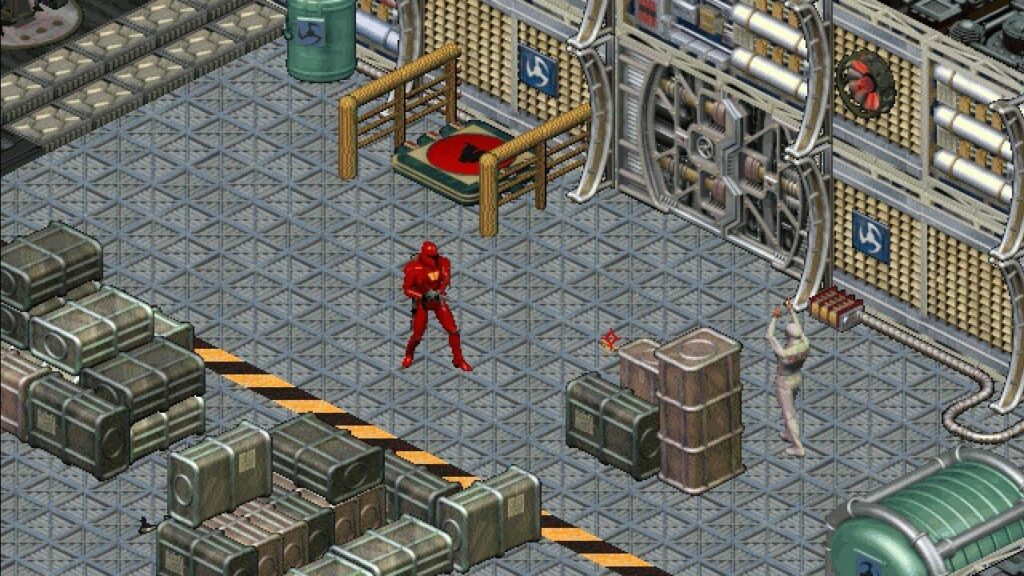
We both had the game Crusader: No Remorse, which came out in 1995 and remains one of my favourite PC games of all time, despite having a shall we say, somewhat inelegant control scheme.
You can’t see any in the screenshot below, but if you look at the flashing red light on the wall, it’s about the same size as fans you would see spinning away in the game, as fans do. And this is where I saw that 26 MHz could make a big difference–on my friend’s PC, the fans spun smoothly. On mine, they hitched, like the wiring in them was funky or something. It made me a bit sad, and a little jealous.
Crusader: No Remorse (1995). Not shown: The million exploding barrels littering most levels.
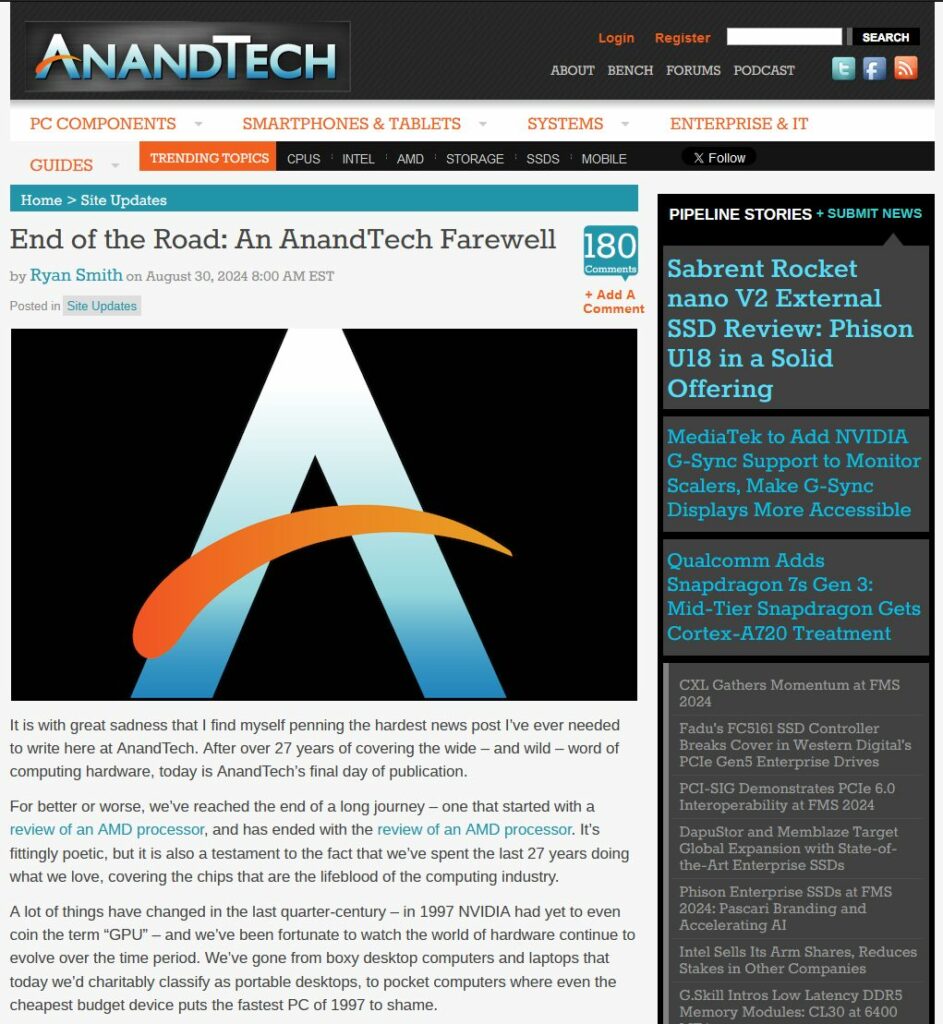
Today, 26 MHz is about as relevant to CPUs as the first horseless carriages are to today’s electric vehicles, but back in the 1990s every new processor (save budget models) brought significant, noticeable speed boosts. It was in that environment that tech sites like AnandTech flourished, and I can see why it and other similar sites are dying off now–today, most people buy laptops and just deal with whatever it has when it comes to gaming (unless they are hardcore enough to seek out gaming laptops), or you have the enthusiast/gamer market where people aren’t looking for all-around good systems, but ones that can excel at playing very demanding games, cost oodles of money and have enough lights on them to be seen from space.
But yeah, for a time, if you wanted smoothly spinning fans in your games, a couple of hundred dollars more could buy you that.
Specifically on why it may be me, and not social media, though to be fair, Facebook is still a raging dumpster fire.
Facebook:
Anyway, as I opined to Nic today while talking about it, I think it really comes down to social media now just being a form of entertainment (and more nominally, for news and information) and I prefer to get my entertainment through other means, so a little social media goes a long way.
Or maybe I just suck at finding good people and things to follow.
Either way, cutting back on it will give me more time to draw. I’m going to draw something right now, then post it, right here! In the next post.
As I’ve mentioned before, the only social media I really use anymore is Mastodon, but even there I’ve retreated mainly into the role of lurker, occasionally liking or boosting posts, and sometimes replying. I rarely create a post, and it’s mainly because I don’t really know anyone on Mastodon. On Facebook or Instagram, there are people I know–family or friends. I originally used FB like many people, to keep in touch with these people.
Toot be or not toot be
Facebook is a massive dumpster fire now, so while there are still lots of people there who I know IRL1I dislike the term “In Real Life” but can’t come up with anything better., I don’t care to keep in touch with them because I tend to keep my distance from dumpster fires.
Instagram was mainly where I posted bird photos, but I’ve pretty much stopped doing that and IG is a dumpster fire, too, it’s just a slightly smaller bin.
But as I pick and choose who or what to follow on Mastodon, I find myself asking more and more, what is it I’m looking for? Have I turned into a U2 song? Have I still not found it? Am I looking for something I will never find?
I think it’s possible, and the broader implication is that maybe social media is just not for me. Maybe it never was, and it only became obvious once I’d retreated from most, but not all, of it.
On Mastodon, I follow a few people ‘n things:
The hashtag #sketch
A few tech people (skewing to Apple, just because there’s so many of them)
The hashtag #linuxmint
A few political people or people who post about technology/politics
A few others I’ve discovered along the way, due to their photography, or just their writing on assorted topics
Generally, this gives me a decent mix of stuff that doesn’t get too bogged down in any one area. #sketch is lightly used, so there’s never too many posts to go through. Half of the ones for #linuxmint (and ther aren’t many) are in languages other than English, so I could probably drop that tag (I tried following #linux for a time, but it gets too much traffic, as one might expect on a nerd-centric platform like Mastodon). The others are a mixed bag.
Mastodon itself is fine. Some people are Very Serious or get easily offended. Some seem to easily offend others. It’s probably picked up some of the worst parts of Twitter, but has fewer tools for people to manage who can interact with them and their posts. Improvements are allegedly coming, but it’s been almost two years since the exodus from Twitter and now Bluesky, which is effectively a Twitter clone, but more “fun” is picking up users while Mastodon treads water. There seems to be a level of crankiness on Mastodon that I’m noticing more, probably related to the above-mentioned lack of tools, or related issues.
I don’t care about which site is more popular. Mastodon is big enough for me, but more often now, I find myself just scrolling through and feeling unsatisfied. There are jokes and cogent observations and talk about the Fediverse, and it’s all fine, but…unnecessary? I think the only thing I’d really miss are Chris Silverman’s bizarre and utterly fantastic Apple Notes sketches, and I can always check the notes.art site for those.
Then I think about the last time I lost myself in a sketch. It’s been a while. And I wonder if I’m just passing time scrolling and scrolling, and getting very little out of it. So maybe it’s not even Mastodon, it’s just me falling into a lazy habit and unwilling (so far) to escape out of it.
I used to visit AnandTech semi-regularly for some time, but in the past few years had checked in less often. The site was staying the same, but I was becoming less hardcore about PC stuff. I just wanted something that would work until I was ready for my next system (my current PC is a little over five years old, and the one it replaced ran for about seven years).
While editor Ryan Smith notes the publisher’s generosity in allowing the site to operate as it wanted, what he also says by implication, is that the generosity came to an end. AnanaTech apparently didn’t want to become another SEO-driven content mill, and so it gets shut down.
The good news? The site itself is being kept up (for now–I am skeptical Future PLC will stick to that) and its forums, which date back to 1999, will be kept running (see my skepticism above). But as of today, it’s now a legacy site. It becomes a part of history, part of the past, still worthy of keeping and remembering, but now an artifact, an exhibit of what once was.
The final edition of AnandTech, August 30, 2024.
But we still have Blue’s News! This was my home page for years when I was gaming all up in the hizzy in the last 90s/early 2000s. And it still looks exactly the same. Also, I no longer have a home page.
You’ve seen them, usually when people are on stage in some kind of televised conference setting, sitting in comfy-looking chairs and chatting with each other while wearing wee boom mics that have flesh-coloured pieces of foam on the tips instead of the usual black. Like this one below, which I grabbed from a current Ars Technica article:
To me, it just makes it look like the person has a large skin growth either on or hovering weirdly just above their face. It’s unsettling. To me.
UPDATE, August 26, 2024: The solution to the drive issue was to run a scan on the C: drive, which fixed errors and allowed Linux Mint (and presumably Ubuntu) to once again access the drives.
The complication: In both Linux Mint and Ubuntu, my two main Windows drives (both NTFS) are producing errors and can’t be mounted (accessed). Digging around, there are a number of possible reasons. The easiest to test was that Windows was hibernating and preventing the Linux systems from accessing them (I am simplifying here because I’m the guy buying Linux for Dummies in 1999). I shut down (rather than restart) the PC and rebooted into Mint.
This brought back the secondary Windows SSD, but the primary (C:) drive still produced the same error. My research revealed a few other things to try, which I will do the next time I boot into Windows (I’m typing in Ubuntu at the moment).
But this weird inconvenience (it hadn’t happened until just the other day and I have no idea what triggered it) made me realize the best way to run Linux is (in order from best to least, uh best):
On a completely separate machine
In a virtual machine (VM) — if you’re just noodling around
On separate drives
On a partitioned drive
I am using option #3, which, until this glitch, has worked reasonably well. I’ll still tinker with things as they are, but I am now convinced the best way is to just run Linux on a completely separate PC, which I currently don’t have. I have parts, and could cobble together something, but it would not be great. The better solution would be to convert the current PC 100% to Linux after getting a new PC for Windows 12 Ad Edition or whatever. There is no timeline for such a thing, however (my PC dates back to 2019 and still runs everything I need without issue).
But for now, I continue to tinker and hammer down the lumps that keep popping up in the Linux carpet.
UPDATE, August 26, 2024: Microsoft has changed the wording of the note that resulted in the Ars Technica article. The update is in the same article link below, but for the link-averse, here's the before/after:

BEFORE: "The Control Panel is in the process of being deprecated in favor of the Settings app, which offers a more modern and streamlined experience."

NOW: "Many of the settings in Control Panel are in the process of being migrated to the Settings app, which offers a more modern and streamlined experience."
It’s explained in the story that the time between announcing official deprecation of the Control Panel (now) and it actually being removed from Windows could span years. The current Settings app has a few things to recommend it:
Generally it looks nicer and more modern
It features breadcrumb navigation
The search (which you will probably need) works reasonably well in my experience
But it also falls short:
Many Control Panel settings are absent, especially ones for more advanced options
The categories are, I think, not as straightforward
System seems to be a dumping ground for “Where do we put this setting?”
It’s a single window, so you can’t have two of them open at the same time
The home page is filled with information pseudo-ads for Microsoft services, such as OneDrive, Microsoft 365 and more
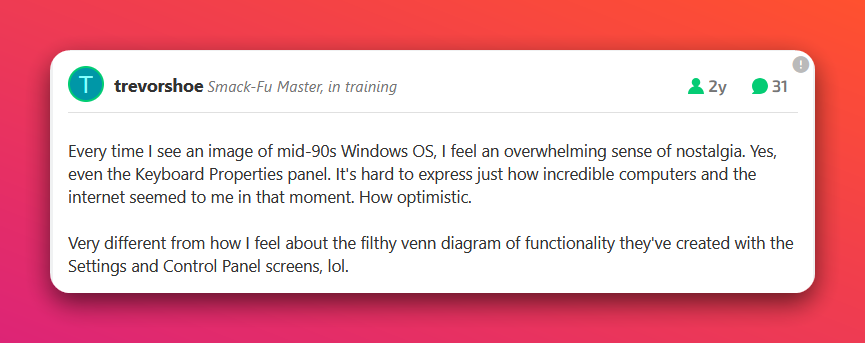
The comments on the article are a mix of nostalgia and the expected nerd rage against the generally considered-to-be inferior Settings app. This comment resonated with me:
The reason it resonates is that I feel that same nostalgia when I see that mid-90s Windows GUI. I feel that GUI, with higher-resolution elements and a few tweaks, would look fine today and in some ways, even better than what we have with Windows 11 (also see my post on Windows GUI: Good, Bad and Pretty Ugly (Ranked)). The post also hits on an issue that has been happening since the Settings app was introduced in 2012 with Windows 8: A constant visual clash between Settings and Control Panel. Also, it’s been 12 years! Why is Microsoft still not finished moving over everything in the Control Panel to Settings1This is the mild exasperation referenced in the title? ~nerd rage intensifies~
Anyway, I actually rarely use Control Panel these days, as Windows mostly just works (and I use PowerToys, which probably helps), but the article did prompt me to pin Control Panel to the Start menu, just in case. Then I went in and looked through some of the options, pretending it was suddenly 1999 again and computers were cool. They were still tools, but they were also just kind of neat. To nerds, at least.
When I think about moving from WordPress to something perhaps simpler and easier to manage, it also occurs to me that since October 2023 I’ve not exactly struggled to post, but my output of roughly 2 posts per day has dipped to something like 1.1 posts per day. Maybe I don’t have enough to say anymore to warrant switching to another (paid) service.
Or maybe I’m just in a creative funk.
Or maybe I’m lazier than I used to be.
So many possibilities.
I will continue to ponder.
Meanwhile, here is a smart-looking cat1Yes, I’ve used this one before. Like I said, I’m lazy. I mean, I’m recycling and saving e-trees or something.:
I find, especially using light mode, it can be difficult where across the vastness of my two 27 inch monitors my mouse pointer is. I do have the feature enabled where if you tap the CTRL key twice it gets a nice spotlight on its location, but I wanted something that didn’t require extra effort on my part, because I am lazy.
I went into the Accessibility options and made it look like this:
I like it! It’s sort of hideous, yet delightful. And much easier to see.
As Brad Colbow opined not long ago, there are no more tech good guys. It seems every large tech company goes bad at some point. Maybe they all start bad and it just gets worse as the companies scale up. Whatever the case, the people who now defend the likes of Google and Microsoft seem kind of weird, or they’re lawyers.
Here’s my somewhat arbitrary ranking of how evil each of the Big Tech™ companies are:
MOST EVIL: Meta. First, the name change didn’t fool anyone. This is still Facebook and all it entails. Also, Zuckerberg was pretty off on the metaverse being the Next Big Thing (NBT). He’s probably looked into changing the company name again to AI. They get top spot because they’ve valued engagement over actual people’s lives. They are literally willing to let people die if it benefits the company. Anyone posting or using Facebook, Instagram, WhatsApp or Threads would do well to remember this.
FROM A TO EVIL: Amazon. Like Google and MS, Amazon has used its monopoly to crush competition and then made its own experience that much worse, because why be good when you don’t need to be? They rank so high here because of their huge reach and influence. Bonus evil points for implementing a Vader-ish “Pray I don’t alter the deal further” by adding ads to Prime video, then demanding you pay extra to remove them. Good companies that respect their customers don’t do things like this.
DON’T BE EVIL: Google. Remember when web browsers started including pop-up blockers because web ads had become so pernicious and obnoxious? That was before Chrome even existed. In the early days of Google search, company stewards warned of mixing search with ads, fearing the latter would corrupt the former. Today, Google is a company that sacrifices everything to squeeze as much money as it can out of its ad/browser monopoly. They paid Apple over $20 billion in one year alone to be the default search engine in Safari. The company has no real purpose or vision except to sell ads and make profits fatter. It’s soulless, crushes competition through its monopoly muscle, and has directly contributed to making the internet a worse place.
EVIL, TOO: Microsoft. Speaking of monopoly abusers, there’s Microsoft. They got their wrists slapped in the late 90s, early 2000s by the US Department of Justice for their shenanigans with Windows and Internet Explorer. That wrist slap did create an opening for Chrome, though, so oops! Today, Microsoft leans heavily on its cloud services to make money. It also actively seeks to make Windows worse by shoving ads, tracking and other cruft into it. It may have directly contributed to Linux getting 1% more popular. That’s a lot for Linux! It got me to try Linux, for Pete’s sake. MS also seems soulless in the same way as Google, with no real vision except to chase trends (currently AI) and make as much money as possible.
THINK EVIL: Apple. Apple may be #4 on this list, but it’s rising fast. The first company to be valued at over $3 trillion US, Apple seems to exist now for two reasons: To make pretty good hardware that it sells at premium prices and to extract as much profit out of absolutely everything they do, and to keep extracting maximum profit, no matter what the cost to their reputation or long-term health. Apple, more than any other company here, is simply riven by greed, fostered by its long-standing culture of controlling all the things. Once services started making more money than anything but iPhone sales, Apple changed from a hardware company to “must always squeeze every dollar out of every avenue possible” company and has bitterly fought EU regulators, among others, to keep their gross profits untouched. I feel the tide is turning and Apple is determined to defy reality. We’ll see how that works for them. In the meantime, their once-beloved reputation is in tatters as they reveal themselves to be out-of-touch (see: the “Crush” ad), entitled and greedy.
BONUS EVIL : The company formerly known as Twitter. X gets included because it still carries outsize influence. Journalists, or people who call themselves journalists, have demonstrated repeatedly that they are quite happy to hang out at a Nazi bar. This particular Nazi bar is so ineptly run that it’s losing a ton of money, while allowing hate, racism and everything terrible about people, to flourish. But because it’s run (so to speak) by one of the richest (on paper) people in the world, there’s no danger it will go away any time soon.
This list may be updated if I realize I’ve forgotten one evil tech company or another (the original post missed Amazon, which is kind of funny, since I put them at #2).
The iPhone 12 doesn’t have any kind of optical zoom, it digitally “zooms”, which just gives you a mess of pixels vaguely in the shape of what you’re pointing the camera at.
Today, I saw a beaver resting near the Cariboo Dam. It was not especially far away, but not especially close, either. The 250mm telephoto lens on my Canon EOS M50 would have gotten a nice shot.
My iPhone 12 produced this brown ovoid blob with maximum zoom: