The other night I thought to myself that I’ve been taking photos with my new camera, but hardly ever post any of them. So I went through and tagged a bunch I took on Saturday and found I had 51 apparently worth considering. That’s way too many, but it was a starting point. I did the tagging in Linux Mint, but photo editing is still a bit iffy there, so I switched back to Windows 11 and my main photo editing software, Affinity Photo.
I edited one raw image of a barn swallow, then loaded a second image, of a house sparrow. After doing this, Windows 11 turned into this weird, laggy mess. The mouse cursor would slowly drift across the screen on its own, as if it weighed several tons, never fully stopping, never responding to any clicks, though I could get it to slowly move in other directions. The keyboard was also non-responsive, so I could not invoke task manager by using CTRL-ALT-DEL to see what program had gone rogue., or if it was Windows itself.
In the end, I rebooted the PC. It was such an unpleasant experience I even briefly thought of switching over to the Mac, then remembered the security hell of trying to install mouse drivers on it that led me to abandoning it for what has now been multiple weeks, because I am done with modern computers constantly throwing obstacles in the way of a pleasant, or even just nondescript, user experience.
Windows 11 has been behaving so far since the reboot, but I’ve only edited a single photo. I’ll have the full batch of selected photos from last Saturday posted sometime in 2028, probably.
In the meantime, here is that one photo, of a barn swallow.
First, the good news, which started with Very Bad News.
I got Jeff a Lenovo YOGA 2-in-1 laptop a few months back to replace the aging and decrepit 2017 iPad Pro I gave him when I got a new one in 2020. It has worked OK since, but there have been a few little glitches and weirdness. I was unsure how much was to blame on the hardware, Windows or moon phases.
I got my answer a few days ago when the laptop booted up to an obscure Bitlocker error. I did not realize Bitlocker was even on–it’s activated by default on the Windows 11 install. Researching the error, I was not able to find a reliable solution. Jeff gave the thumbs up to the “nuke from orbit” option. I selected the Windows reset option that blows everything away. It produced an error message with no description other than “an error occurred.” I then offered to install Linux Mint. He said go ahead.
I prepped a Mint USB stick.
I inserted the stick and booted from it.
I chose the Install Linux Mint option on the desktop.
Linux Mint installed and was ready in significantly less time than it took to get to the Windows 11 desktop after unboxing the laptop–and Windows 11 is pre-installed.
Mint automatically recognized the Brother printer once it connected to the Wi-Fi. The touchpad was recognized, as was the included pen when using the built-in drawing app, cleverly named Drawing.
Everything is working just fine. The laptop, to me, feels snappier and more responsive. It may actually be a better laptop now with Mint than the bloated mess that is Windows 11. This is good news.
Now, the bad news. On my PC, I dual boot between Windows 11 and Mint. Mint has generally given me no issues, but at some point recently and issue did arise. It may have been an update or something else, I’m not sure. It’s not Bitlocker, at least.
The issue seems to be related to Firefox, the built-in browser (and my browser of choice) and YouTube. At some point, while watching a YouTube video, the whole system will freeze and continue to freeze intermittently. The only way to fix it once it starts showing this behaviour is to shut down Firefox.
The issue might be Firefox. It might be YouTube. It might be something else. I have done no troubleshooting. What I have done is started testing to see if the issue replicates in Vivaldi, my backup browser of choice. So far, it has not happened with Vivaldi. This makes me sad, because I want to keep using Firefox in Mint, but I also really don’t want to spend time troubleshooting this when a) I may spend a lot of time on it when I could be doing something productive or at least entertaining and b) I may find no actual solution. So this is bad news.
But I may do a little troubleshooting, at some point. Maybe.
Today is the first day of WWDC 25, Apple’s Worldwide Developers Conference. It always starts with a keynote, which highlights the new features and changes across Apple’s array of operating systems.
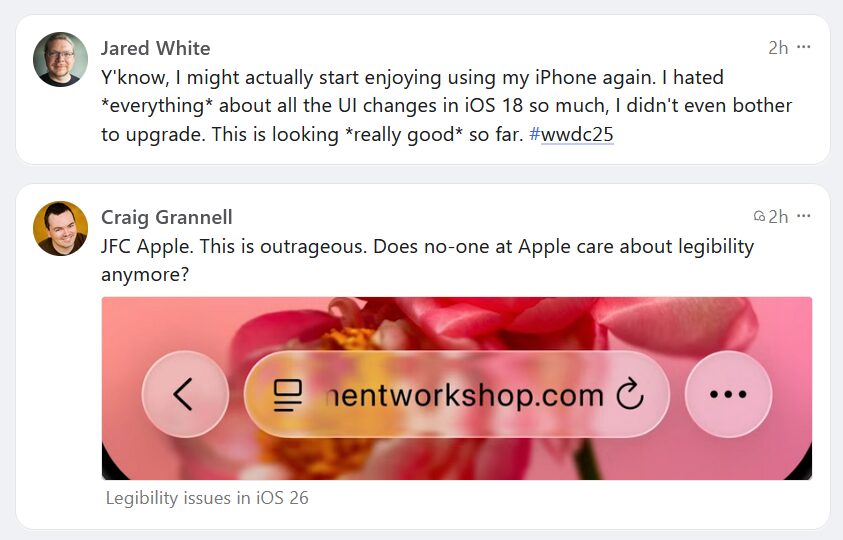
This year the rumour (correct, as it turned out) was that Apple would introduce a new look to its OSes called “Liquid Glass” (because “Aero” had already been used in 2006 for Windows Vista, which this is VERY reminiscent of. And no, the irony of Apple copying Microsoft–old Microsoft–is not lost on many).
Any change is always going to get a varied set of reactions. People generally oppose change, even when the change is mostly good. People are weird.
These two posts showed up in order in my Mastodon feed and perfectly sum up the zeitgeist on UI redesigns.
Relevant quote, but read the whole thing, I think it captures a lot of what is happening now in 2025 and predates the whole AI craze, though that same craze is making it worse:
Earlier this week, it was discovered that the Chicago Sun-Times and the Philadelphia Inquirerhad both published an externally-produced “special supplement” that contained facts, experts, and book titles entirely made up by an AI chatbot.
…
It’s so emblematic of the moment we’re in, the Who Cares Era, where completely disposable things are shoddily produced for people to mostly ignore.
I know people who play YouTube videos at 2x speed. The idea of watching a video in real time is unthinkable to them. Or they play the same videos while reading a web article or doing something else, constantly looking for ways to keep themselves overstimulated, where the idea of just being quiet and alone with your thoughts is alien and unacceptable. It’s weird. I feel the pull, too, but I force myself to focus. It is impossible to do creative work if I am distracted. Sometimes even background music is too much.
And AI slop, now flooding the web, is making these distractions not just worse, but far more pervasive. It’s part of why I’m checking out small blogs again. Not just to escape corporate control and influence, but to actually read real content, however imperfect it may be.
Of late I have been seeking out more personal blogs, yearning to return to the groovy days of a more personal internet, circa 1999-2005 (the latter being the year this very blog started). It’s great to see sites that are very obviously non-corporate and are not the result of some mildly-tweaked cookie cutter template. Even Pika recently announced the addition of background images to their blogging platform. Is this taking retro too far? Perhaps. But it’s fine, and I’ll explain why.
Sometimes a site doesn’t quite do it for me, visually. Taste is personal, and I admit I may not have the most refined sense of aesthetics out there. I’m no Steve Jobs. Then again, I also wouldn’t have thought a round mouse was a good idea, either.
The blogs that tend to miss for me usually do something like the following:
Text is too big. As I get older, I have become more tolerant of larger text, for obvious reasons, but that doesn’t mean I think body text on a website should be 30px (see below for example). There is something unpleasant about reading a paragraph that is set to the size of a headline.
Text is too small. Are you 21 and have the vision of a bald eagle? Good for you! But I am not you, and your teeny text makes me squint and sigh.
Text is too thin or light. This just makes the words harder to read.
Poor contrast ratio of background colour to text. This one is relatively rare, and even platforms like WordPress will warn you when you are combining colours that will make your words more challenging to read.
This is 30px text. Do not use this size for writing paragraphs about how fluffy and great cats are.
This is 11px text. Don’t do this, either.
And obviously don’t do this. (WordPress did indeed warn about this colour combo.)
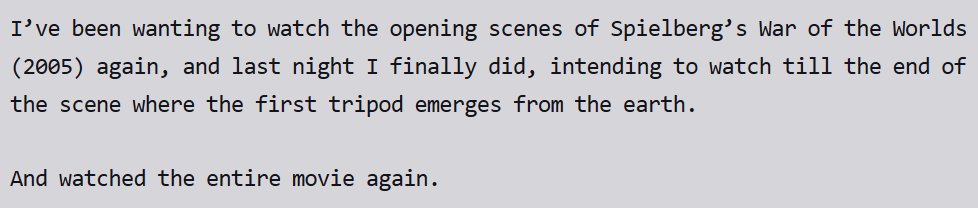
For the most part, though, I am content to let people let their freak flags fly, and it’s because of Reader View. This is Firefox’s version of a feature most browsers have, letting you take the text of a page and giving you control over its appearance. I generally have it set to a monospace font (Consolas) against a light gray background. It gives the text a very neutral appearance, making it easy to read and focus on. It looks like this (snipped from one of the posts on this blog):
I’m not sure what makes Consolas work so well for me, but it does.
The test, then, is how quickly will I flip to Reader View on a blog? Will I start reading, then flip? Will I do it instantly? Will I actually not flip at all? My experience so far has been to flip about 70% of the time right away, maybe about 5% of the time I will flip part-way through, and the rest I will read the blog in its original styling. People like weird styling, it seems. Or maybe I’m just old. Either way, it’s ok, because of Reader View.
Linux Mint is getting closer to being a replacement OS for me over Windows 11 and macOS whatever (the yearly updates are kind of meaningless now, it’s just a yearly dribble of new features no different from what MS does with Windows 11, just with a cute name like Sequoia attached).
But it’s still not there quite yet, which I’ll elaborate on below.
First, I’ll say this: Linux Mint (the distro I have been running for some months now as a third OS) is pleasant to use. It stays out of the way, it doesn’t constantly ask me to grant permission to everything (Macs are trending toward becoming the UAC nightmare that was the initial release of Windows Vista, sinking the user experience in favour of “security”). There are frequent updates, but they are handled with a few clicks whenever you decide to apply them. Most don’t require a system restart.
It has built in software bits like applets, extensions and desklets hat are easy to add (or remove) that help customize the experience in small, but nice ways. The look and feel of the entire OS is highly customizable. It loads fast, everything feels snappy.
At this point, the only things holding it back for me are the same as before:
Photo editing
Gaming
Journaling
Photo editing has improved and I’m experimenting with a few new programs there, such as Prima.
Gaming is also getting better, though having an Nvidia card complicates things a bit. Native gaming, when available, works great, and emulated gaming is also pretty good now. It’s not quite there, but it’s close.
Diarium (the unfortunately named journal app I use) I am running in a Windows 10 VM. The VM is a tiny bit laggy, but since I only use the app briefly in the morning and evening, it’s not a big deal. A native solution would be preferable, but seems unlikely, unless I switch to a different piece of software.
Still, I feel Linux Mint is closer than it’s ever been in terms of replacing the other OSes. If and when I get a new PC, I will likely turn this one into a dedicated Linux box and see how it goes on a rig that is 100% penguin-based.
Apple may be starting to see the consequences of its own actions. Every new platform it has launched in the last decade — the iPad, Apple Watch, Apple TV, and now Vision Pro — has struggled to gain meaningful developer support. Why? Because developers are tired of being in an abusive relationship.
If I were starting fresh today, I wouldn’t build my business on Apple’s ecosystem.
Instead, I’d consider web development, where you can control your own distribution, pay no platform commissions and not deal with a mercurial gatekeeper. Or perhaps focus more on cross-platform development, so you’re not locked into a single company’s walled garden.
Finally even becoming a content creator, on a platform like YouTube, seems like a more stable way to make a living these days.
The reality is that Apple’s development ecosystem has become a high-risk, high-maintenance environment. New developers looking for a sustainable career path would do well to consider alternatives that offer more control and fewer headaches.
I think the iPad has done better overall with support than stated here, as there are some notable iPad exclusives (such as Procreate1Yes, there is Procreate Pocket for the iPhone. No, I don’t count it., which is quite literally the only reason I keep my iPad), but if you go by the last five years or so, it hits closer to the mark. As Apple continuously fiddles with the iPad’s UI and how much (or little) the iPad is meant to do, devs have started to shy away from making exclusive apps for it.
I happen to also agree that the yearly update cycle is bonkers and serves no one but Apple. So Apple will continue to go with them, introducing new bugs that never get fixed, releasing new software that never gets fleshed out or is forgotten, all while keeping the eye on the main prize: services, which Apple makes a ton of money on, while offering poor value and uneven reliability (iCloud, iCloud Drive) to its customers.
Basically, Apple is too big to need to worry about developers–or customers. If iPhone sales dropped by 50%, they’d still be selling hundreds of millions of them. Captive market. Their focus now is on an insatiable drive to make even more money, because that’s what giant publicly traded tech companies do. And with a corrupt regime in power in the U.S. Apple will be happy to play them to get what they want, regulations, environment or customer needs be damned.
If Apple had leadership with a moral compass aligned to what they claim to believe, things would be fine. But instead we have its CEO donate $1 million to Trump’s inauguration, as close to a straight-up bribe as you can get. And it will make no difference unless they keep offering fealty to the king. Maybe they will. Probably they will, and they’ll become ever-more corrupt and uninterested in doing what is right or best, and simply in doing what will extract the most money from the most people.
What I’m saying here is this: Don’t buy Apple products. Don’t support them, don’t believe them. Yes, every tech company is pretty much evil these days, so you have to sometimes choose the lesser evil. Apple is no longer one of the lesser evils.
This concludes my 2025 Apple Rant. Unlike Apple, I do not intend to roll out a new rant every year. But hey, you never know.
On Mastodon, someone linked to a full set of icons used in BeOS, an OS that tried to make a splash late in the 20th and early 21st century, failed, but still lives on as Haiku.
I really like them. Warm, slightly cartoony, psuedo-3D. It’s the latter that one of my interweb gaming pals described as “the Zaxxon angle”, which is a great way of describing it. Today’s icons in Windows, macOS, and most Linux distros are generally flat, with maybe some slight bevelling or something to hint at 3D, but nothing is close to what BeOS did. And that’s kind of a shame to me. It’s not just nostalgia, either. The icons are distinctive and have style, they feel of a piece, not just random whatever.
Looking at the specs for one of Samsung’s Odyssey S9 ultrawide monitors, I noticed this particular feature:
This seems to imply that if you have Eye Saver Mode OFF, your eyes will not be saved. They will be lost. Why would you not want to save your eyes? Apparently, real gamers do not need to concern themselves with such things. Their eyes are like eagles or something. Until they hit 40, after which they retire and switch to Eye Saver Mode ON1Eye Saver Mode reduces blue light and brightness, so I guess if you’re playing a very blue-lit game, you best be prepared to sacrifice yourself for maximum deets, or whatever the kids are saying now that we’re a quarter of the way through the 21st century..
Also, the G9 is a 49″ ultrawide monitor, which seems absurd until I realize it would take up less total desk space than my two 27″ monitors. The curved screen still weirds me out, though.
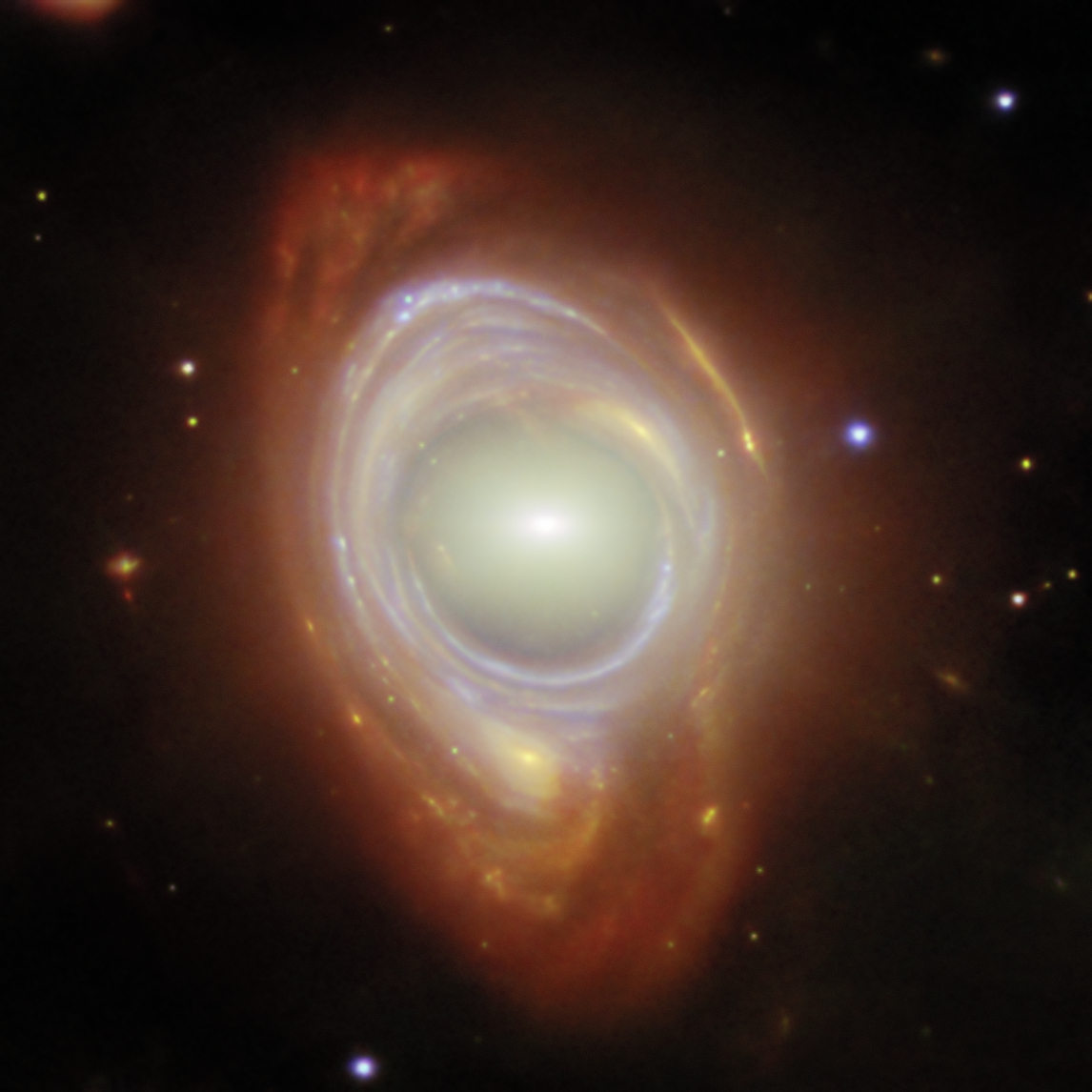
This is in Phil Plait’s newsletter today, and it’s too beautiful and weird not to share. You can view it on the original site with full text here: Spying a spiral through a cosmic lens
This new NASA/ESA/CSA James Webb Space Telescope Picture of the Month features a rare cosmic phenomenon called an Einstein ring. What at first appears to be a single, strangely shaped galaxy is actually two galaxies that are separated by a large distance. The closer foreground galaxy sits at the center of the image, while the more distant background galaxy appears to be wrapped around the closer galaxy, forming a ring.
Check out Phil Plait’s newsletter here: Bad Astronomy
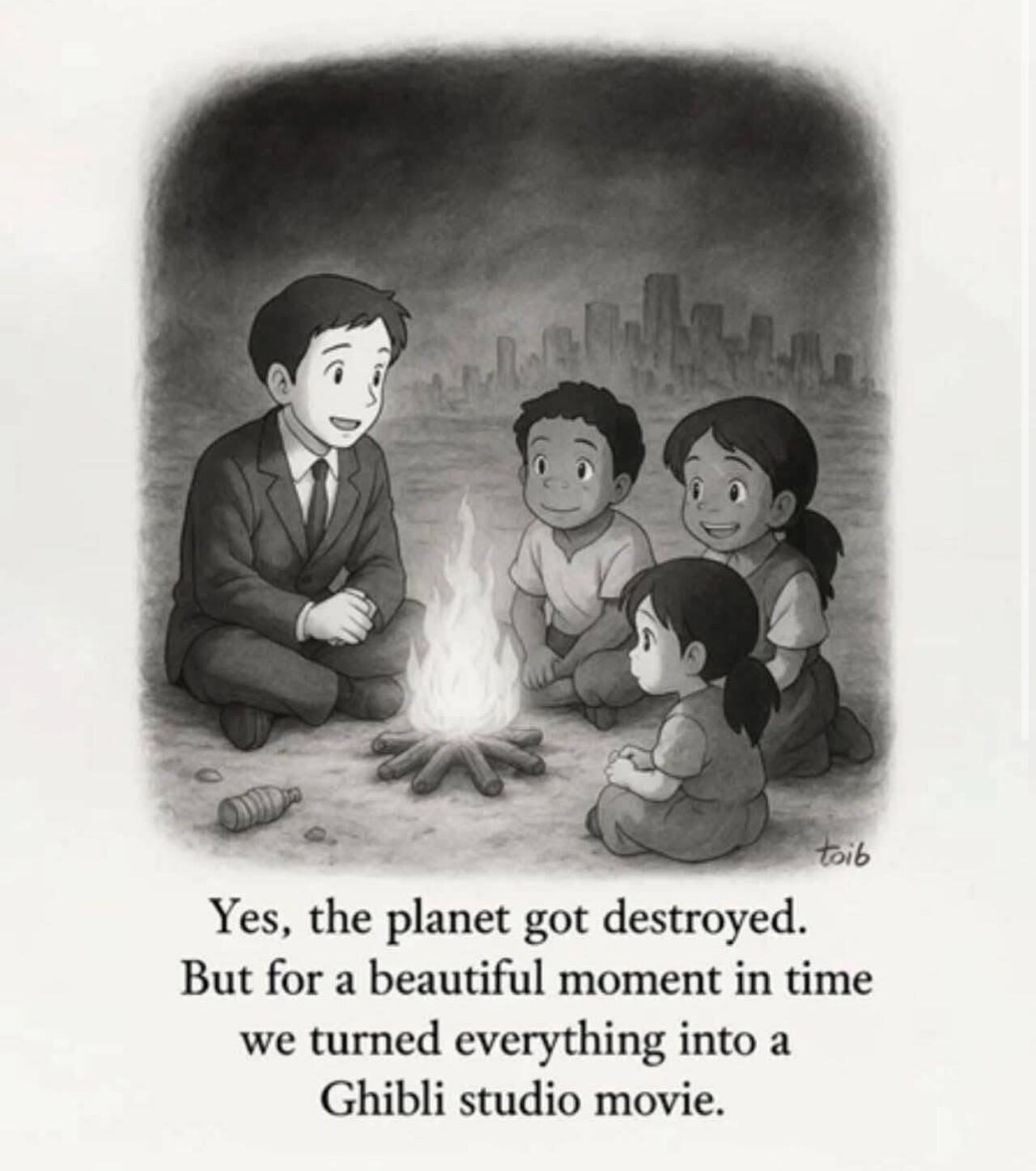
I saw this on Mastodon and it is perfect. Context provided below.
Context: A few weeks ago, OpenAI released an update that allowed people to generate images, including in specific styles, if they so chose. One of those styles is Studio Ghibli, after the well-regarded Japanese animation studio. This, predictably, led to a bunch of people turning personal photos into pseudo Ghibli images, but others used the style for less tasteful purposes, to showcase terrorism and other violent acts.
Sam Altman, the CEO of OpenAI, changed his avatar on X to a “Ghiblified” version of himself. A lot of people–rightly, I think–took this as being Altman’s way of saying AI companies can appropriate (steal) art and art styles as they see fit and no one can stop them. It’s at the heart of much of the criticism of AI: that the output it produces is largely built off of stolen works, that the companies behind AI simply don’t care (or even feel entitled to the stolen works) and comes at great cost to the environment, too1Some of these costs are coming down, but it ain’t exactly efficient yet..
But yeah, for a beautiful moment in time, we turned everything into a Ghibli studio movie.
The original New Yorker cartoon, which also remains perfect: