I still really dislike a subscription model for a writing app, but for $36.99 per year, I’m willing to try it again…for at least the next 12 months. And I have missed it, as the app itself I still consider pretty faboo. I lament that the closest equivalent on Windows is a shameless rip-off. Nothing else matches its UI and interface, though some come close.
This, of course, means I’m committing to writing on my MacBook Pro again, though I am still no fan of the keyboard. I think I may be part-masochist.
And for home, I’m thinking of a better solution than the dongle mess I’m currently using, either a Mac mini or a Hackintosh. Time to ponder.
In one of those “down the rabbit hole” journeys that happens when I get caught up searching for something on the web and get inexorably drawn into finding and poring over a bunch of unrelated things, I came across the D2D YouTube channel.
Dave Lee seemed personable enough, and I liked his low-key style, so I kept watching for videos that would interest me and lo, he had one featuring one of my weirdly favorite computer topics: keyboards.
I used to collect computer mice like no one’s business and I still change up semi-regularly (my current mouse is a Logitech G703 wireless, which I’ll review separately. Super-short review right now: Great mouse except for battery life.) but the pace of collecting mice has dropped off over the last few years, perhaps because mice are generally improved enough that I don’t see the need to keep searching for something better.
Which brings me to keyboards.
For some years after I got my first PC (way back in 1994) I just used whatever cheap keyboard I could find, ones that would go for $10-15 today. They were all pretty much the same. The biggest change was when they started including a dedicated Windows key. It seemed weird at the time.
But after I’d upgraded my rig a few times I became more particular and started looking for keyboards that had backlighting or extra keys. I eventually decided the extra keys/macros were something I never used, but backlighting was nice to have, as my computer space was not brightly lit.
Fast-forward to around five years ago when mechanical keyboards became a big thing. I didn’t pay much attention at first because they seemed absurdly expensive. Well, they were absurdly expensive, really. I was intrigued, but not enough to buy.
As I spent more time working on laptops, I found myself starting to prefer the low-travel keys they featured and settle on a desktop keyboard that emulated the style. Although it was not backlit, my computer space was now brightly lit, so it was no longer a priority. The keyboard was wireless (nice, but inessential) and runs off solar power. This is nicer than expected because it meant that I literally never have to worry about batteries.
The worst aspect of the Logitech K750 is probably the glossy sheen the keys and surrounding surface have. Under bright light it can produce surprisingly annoying glare. Glossy is never good on keyboard.
Although happy enough with the keyboard, curiosity got the better of me and I got a Cooler Master Trigger mechanical keyboard. It has red backlighting, extra macro keys, and a weird setup that disables the Windows key by default. I never warmed to it at all and quickly set it aside, regretting the decision to buy.
But buyer’s regret never stopped me, so I next picked up a more business-oriented Das keyboard. It had blue switches and I learned to love the CLACK. However, like the K750, it had a glossy design I came to dislike and it was big and bulky. A tenkeyless design (without the numeric keypad) would be better ergonomically and take up less space. From here I experimented with some tenkeyless designs using red, brown and blue switches. They were all fine, but none really clicked (so to speak), though the blue switches remained my favorite.
Then Dave Lee posted a video for what he declared the best keyboard ever, the CTRL keyboard, featured on Massdrop. I was intrigued and liked the clean look. The drop ended before I could buy, but eventually came back and I placed an order.
It took a few weeks to show up and I had to pay an additional fee to actually collect it, so it came out to be very expensive in the end–over $200 Canadian. Although it has a few flaws, it has become my favorite mechanical keyboard and the reason has nothing to do with anything Dave mentions in his video, but rather in the choice of switches.
I was intrigued by the description of Halo Clear switches as having the clickiness of cherry switches, but with a smoother, more “velvety” feel, so I took a chance and ordered the keyboard with them, trusting they would live up to the description.
And they did. And they are the key (ho ho) reason why I really like the keyboard and have finally ended my great keyboard quest.
For now.
The good points:
Halo Clear switches are clicky, but smoother than blues and a bit quieter, too
Backlighting offers a good set of options
USB Type-C connections on opposite ends of keyboard allow for easy cable management
Switches are actually hot swappable if you’re into that
Aluminum chassis is very solid
Works great with both Windows and Mac
The not-so-good points:
With the backlight off, the lettering on the keys is very difficult to see. Not a big deal if you’re a touch typist, but something to be aware of.
The removable feet will almost always pop off if you try moving the keyboard by sliding it around the desk. Folding legs would have worked better.
The default backlight mode is a strobing rainbow effect, which you will see every time you connect the keyboard. It is pretty, but entirely impractical, so you have to go through a series of FN-key shortcuts to get back to something “normal.”
I found all but the white backlight color to be too garish, even after adjusting the brightness down.
Sometimes the backlight controls will stop responding, forcing you to unplug the keyboard and start from the strobing rainbow again.
The keyboard configurator is clumsy
Really, I think any reasonably well-made keyboard with Halo switches would win me over, but even apart from them, the CTRL is a sold offering. Overall, I’m happy with the purchase and typing is once again a satisfyingly clicky experience, though now with a pleasingly softer touch.
Today is the day I make the decision on what software to use for my writing and the hardware platform for said software. Below is a partial list of the options.
Software:
Ulysses (Mac, iOS)
Scrivener (Mac, iOS, Windows)
WriteMonkey (Windows, Mac [beta only])
FocusWriter (Mac, Windows)
Hardware/OS:
macOS on a genuine Mac, either a Mac mini, iMac or MacBook
macOS running on a Hackintosh (PC built to run macOS on the sly)
Windows 10 on current PC or shiny new PC
Windows 10 on a new NUC PC (separated out from the above because it would not be used for any gaming)
Amiga 500 bought from eBay running WordPerfect 4.2
And the winner is…
mumble mumble mumble
No, really. The winner is:
Nothing. Nada. I am plagued with doubts at every turn and am still undecided. However, I said I would make a decision today and I’m sticking to that, so here is my decision of sorts:
I will resume Road Closed in Ulysses (Olde Version) on the MacBook Pro and when I work on it at home I will use the power of The Dongle to connect the MBP to the 24″ monitor and a keyboard that clacks in a pleasant way.
So this is decision deferred. I’m not sure I’m ready for a Hackintosh experiment, I still want to get an actual new PC, and none of the current Mac offerings are very appealing. If the $1399 Mac mini option was the $999 entry-level offering, I’d probably go for that, but it’s not, so YOU LOSE TIM COOK LOL. Seriously, I hope the blatant moves to extract as much money from buyers as possible (while getting increasingly shoddy with quality) bites Apple in its metaphorical ass. I don’t expect or event want Apple products to become cheap, just reasonable. They are not reasonable now.
And so, quasi-decision made, the writing journey continues. I will report on my success on that front next Friday, February 1st. Excelsior!
Today is the 35th anniversary of the original Macintosh. Since I am old enough to have lived through personal computer prehistory, I remember the original Mac well.
In 1985–only a scant year after its introduction–I worked on a Macintosh Plus as part of a job entry program in a small publishing/advertising firm in Duncan. The Macintosh Plus came with what was then a staggering one megabyte of ram and this particular model had two floppy disk drives, one internal, one external, so you didn’t need to switch out floppies. Convenient!
I mostly worked on simple ad blurbs and also did entry for a database (I forget the actual software, but it would be pretty easy to find, I imagine). I spent most of my time writing a parody of Friday the 13th using MacWrite. I printed out hard copy on the LaserWriter Plus (this company either had lots of money or lots of debt) and still have that same hard copy kicking around somewhere. I may even have the floppy disks stuffed away in a box.
Since the Macintosh was ludicrously expensive back then (even more than today’s models in relative terms), my own computer was a Commodore 64, which was inferior to the Macintosh in most ways, except it had color graphics and about ten million more games.
The closest I came to owning a Mac back then is when the Macintosh was offered for student discount while I was attending university in 1990. It was around $1,000 as I recall. By then I had an Amiga, which in many ways was a better machine and cost a lot less, so I never went Mac.
That changed in 2013 when I finally got my first laptop, a MacBook Air, then regarded by many as the best all-around laptop. I was too used to Windows, though, and the display was actually not that great, so I ultimately sold it for a Surface Pro 3 the following year.
I returned to the fold (while keeping the SP3) in late 2016 when I picked up the updated MacBook Pro without the goofy Touch Bar (the Touch Bar-free version was the most reasonably-priced–and it still cost $1799). macOS had matured and was a lot more refined, the haptic trackpad was awesome and it had a bright, sharp display. The battery life was only average, but it met my needs. Unfortunately, the ultra-shallow keyboard was something I learned to merely tolerate, not really like, and when you use a laptop for writing, that’s not a great thing. And this was before all the issues with the butterfly keyboard mechanism became known.
I still have the MacBook Pro, with two years left of free service if the keyboard goes south. I’ve actually been using it more recently, as I toy with the idea of going back to Macs for writing (I make the decision tomorrow, per my self-imposed deadline).
When I look at the current Mac line, it makes me a little sad. It could be so much more, but Apple has gotten so big and so reliant on the iPhone that the Mac is playing not just second fiddle, but third, after the iPhone and iPad.
Apple’s attempts at innovation on recent Macs have all been failures:
The 2013 Mac Pro was fatally flawed by its design, which led to heat issues and throttling. Apple also seemed to assume “pros” wanted a small computer that they would plug every sort of upgrade into, creating an ungainly mess of cables and peripherals. Nope.
The 2016 update to the MacBook Pro introduced the Touch Bar and raised the prices significantly. A couple of years later and the Touch Bar has really been a bit of a dud. It’s never been expanded beyond the Pro laptops and feels like an afterthought now.
The MacBook in 2015 introduced the butterfly keyboard, which was divisive due to its extremely shallow keys. Some people love it, as it requires a very light touch, but many dislike it for the same reason. It was also kind of loud for a laptop keyboard. Worse, it was prone to a number of flaws, like keys getting stuck, or registering multiple times, or just not working at all. Apple has revised the keyboard twice and the same issues are still being reported. They really need to chuck the design altogether, especially since it is now used across all of their laptops. I give this a 50/50 chance of happening in 2020.
Even the revised Mac mini, after being neglected for four years, emerged with flaws–cheap thermal paste that results in the machine throttling easily, expensive and with piddly specs on the base model. At least they finally killed the 5400 rpm hard drive it came with in favor of SSDs (that are glued and cannot be upgraded or replaced by the user).
So while I consider a return of sorts to the Mac, it’s only as an adjunct to my PC and likely through either a dock with my MBP or through a hackintosh I’d build from an Intel NUC.
Still, happy anniversary to the first personal computer to popularize the graphical user interface. Despite my gripes, the Macintosh had a huge, undeniable impact on personal computing.
I don’t mean old as in tired and passe–though others might make that argument, with some justification–but rather, it’s actually been around a good long while now.
I recall articles in computer magazines (almost as quaint now as the pre-internet days) in 1994 were touting two major developments in the tech world: the forthcoming release of Windows 95 (originally known only as “Windows 4”) and the rise of this new form of online communication known as the Internet.
I was already a regular participant on some BBSes (my roommate in the late 80s had a BBS running off four Commodore 64s) and participated in early forums that were part of FidoNet. Looking back it seems hilariously primitive. You connected to the host, downloaded all of the new messages on the forum, made your replies, then uploaded them and…waited. The conversations were not only not real-time, they weren’t even same-day. It would typically take two to three days for the turnaround. It didn’t prevent people from hurling insults and contributing little, of course, but it helped.
By comparison, my first cable modem and the actual internet–first introduced to me as a separate “premium” service by my ISP–was like stepping into the future. Your connection was always on (!) and you could visit multiple sites at the same time. There were multiple sites!
A big part of the early days for me revolved around gaming and one of the first games I got into online was Tribes, released in December 1998 (I bought it a month later). It got me into a gaming group and I still regularly converse with members of that group twenty years later. Back then I had the reflexes of a thirty-something, so I was already behind the curve, but I held my own. I read a bunch of gaming sites, many of which are either gone now after living on in a zombie state for awhile, like Voodoo Extreme, or have been abandoned after the parent company vanished, like PlanetQuake, which is still up, but hasn’t been updated since 2012 (its parent company, GameSpy, was shuttered the next year).
And then you have something like Blue’s News. Not only is the site still being updated regularly (by the same person, no less), but visually it is unchanged. Yes, the site looks pretty much exactly like it did 20 years ago. It was my home page for a long time, but I haven’t regularly visited any dedicated gaming site since consoles entrenched themselves as the primary way to game. There’s something both admirable and awful about not changing your website design for 20 years (for the record, I find the look today to be pretty ugly. Dense, small text on a dark background is not my idea of readability. On the plus side, the layout is about as straightforward as you can get).
The internet is an inescapable part of our lives now, and much of it is a terrible place. Facebook and Twitter serve as staging platforms for hate, enabling the spread of misery, violence and death. The wealth of information is vast and impossible for any single person to even begin to sift through. You choose your interests, put your faith in Google (or Bing, or DuckDuckGo if you really want to go full rebel) and hope for the best. Sure, you can find stuff through the recommendations of friends, but most of those will come via Facebook, anyway. And there’s always the echo chamber effect, too.
In the olden days the array of content was exponentially smaller. Sites themselves were smaller and updated less frequently. Messages downloaded as pure text at a rate slow enough to read as it downloaded. It wasn’t better, per se, but it was simpler. And in a way, that made it better. Or it created the illusion.
Fun Fact: this site turns 14 years old (!) on February 4th. In my first post I ranted about sites using white backgrounds. How things change. 😛
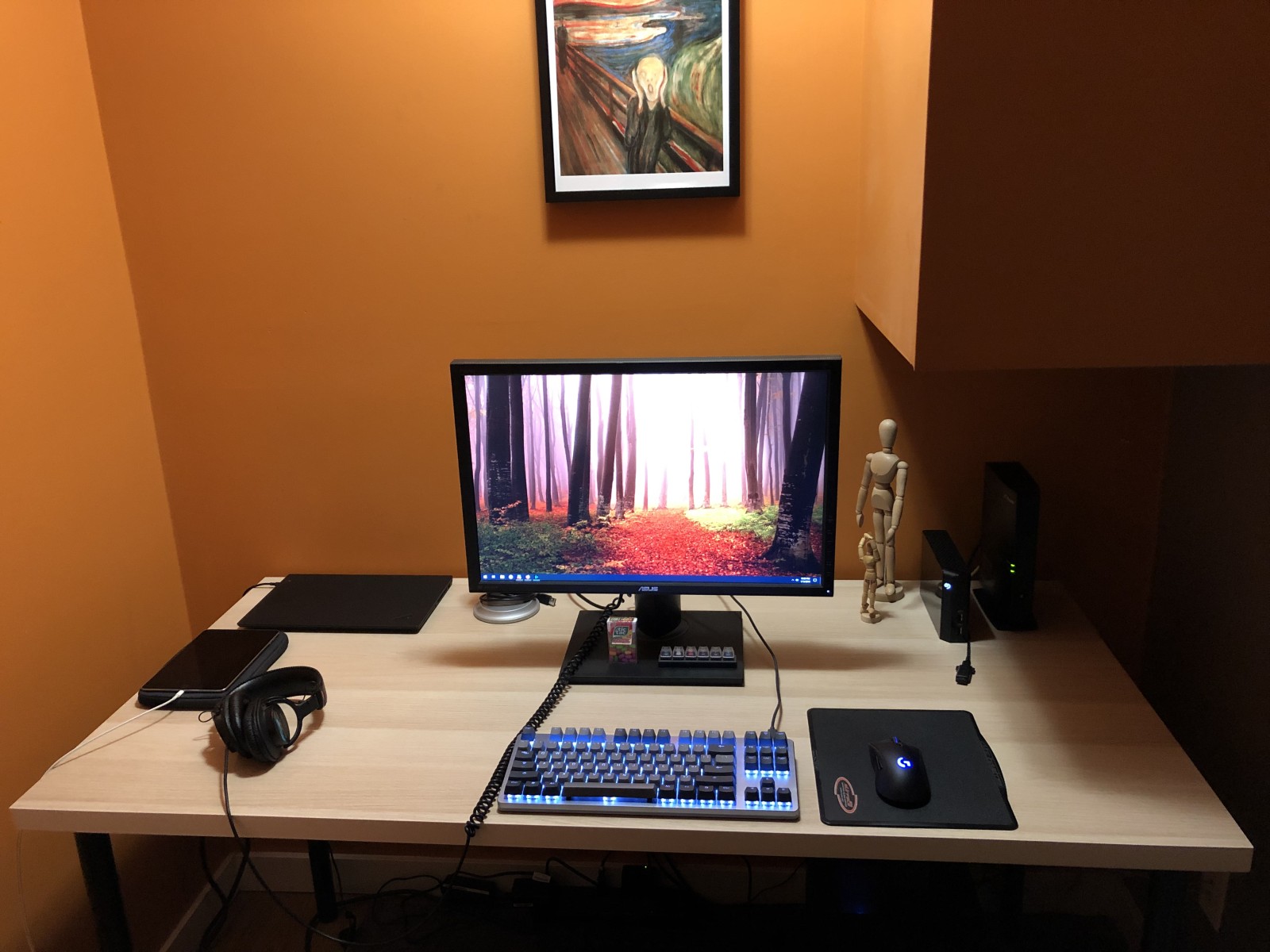
I got a new computer desk from IKEA. It is fairly simple–just a big plank of wood with four legs. It replaces an L-shaped desk that fit the nook I have the computer in, but it was kind of awkward, otherwise. It was too shallow, too narrow and too faux executive office-looking, with a fake dark wood surface.
The new desk comes with a fake light wood surface, which is brighter, happier and will inspire me to previously unforeseen levels of stuff and junk.
What you can’t see in the mediocre shot below is the printer has moved from the left side of the desk to a pseudo-printer stand to the left. I say pseudo because it’s really the old end table from the living room temporarily repurposed to hold the printer. It has two shelves which handily hold all the junk I had scattered across the old desk but did not need quick access to.
Also helping to inspire me is Edvard Munch’s The Scream, as seen on the all behind the desk.
The gear, from top-left, clockwise: Lenovo ThinkPad X1 Carbon, Blue Yeti microphone (hidden partly by the monitor), Asus P248 24″ monitor (on the monitor stand are Tic Tacs and a WASD 6-key Cherry switch tester), two escapees from a Robax commercial, a Seagate 4TB backup drive, my gateway/router, Logitech G703 wireless gaming mouse, CTRL mechanical keyboard (Halo Clear switches), Sony MDR-7506 headphones with absurdly long cable, and iPad mini 4, which has a battery life similar to whatever bug dies after about four days.
I not infrequently fall down the rabbit hole when I sit at the computer. What happens is I’ll read something (The original iPod Shuffle came out 14 years ago), then see something specific to latch onto (a mention of a SanDisk MP3 player, of which I bought one some years back when I first started running), which further prompts me to investigate further (looking at current SanDisk offerings, then what Sony and other companies are offering for MP3 players) and in the course of this, moving onto other things that pop into my head and checking them out.
Hours pass and I look back and I don’t regret the time spent, per se, but it does seem a bit of a waste in that I’ve not accomplished anything other than scratching a faint nostalgic urge (I never had a Shuffle, though I still have two iPod nanos) and confirming things I already knew (the current MP3 player market is pretty bad, filled with brands you’ve never heard of selling products that look suspiciously like Apple’s discontinued designs).
Somehow tonight I ended up on the Wacom site, looking at their Intuos tablets (I have one). And I was thinking, I should draw more. I could draw here at the computer using the Intuos, but I’d have to dig it out of a drawer, plug it in and neither requires any great or special effort, but I just can’t be bothered. So I see on their site that there is a model that uses Bluetooth, so you don’t need to plug it in. That takes away a step, making it 50% easier to use! Is it enough for me to go for it? I think and honestly, it would probably make no difference. I don’t need more convenience, I need more discipline.
Which gets me back to the rabbit hole. I am distracted and allow myself to get pulled into these little online expeditions too easily. I don’t think I have ADHD, though my brain does perhaps spin a little faster than I’d like (this is where learning meditation might be handy), but maybe I have some low-grade variety of it, where I don’t flit from one thing to another, I just flit from something and in the end have little to show for the time spent having flitted.
Anyway, that’s enough pop pysch self-analysis for tonight. But hey, I wrote again.
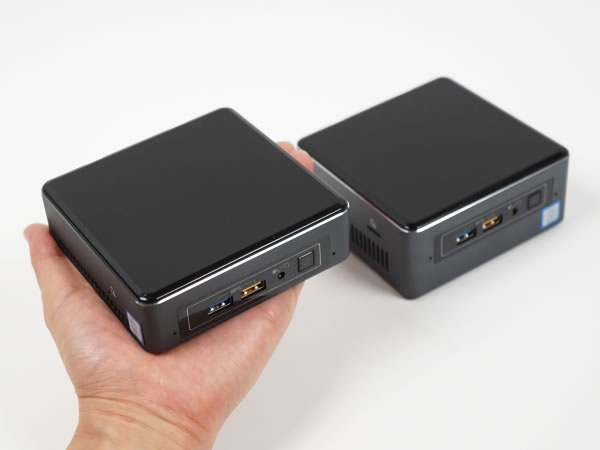
If I thought I wouldn’t game at all, I’m pretty sure my next PC would be a NUC, simply because they are so small and adorable. And you can get a full PC without any real compromises–you can have fast storage, lots of memory, a good port selection. And it can sit silently and adorably on the desk, where those ports are easy to get to.
I will likely build a new, bigger PC with a full-size video card in the near-future to replace my current, aging machine. But I might go ahead and then build a NUC as a secondary/experimental PC. I might even try a zany Hackintosh build, so I can have that Mac experience, but with a good keyboard.
It started a few days ago when I went online to check how my monthly internet/TV bill was divided between the internet and TV parts, as I am looking into the possibility of cutting the proverbial cord. As it turns out, the TV part is about $60 per month. I then drifted over to looking at the various internet plans to compare to what I have now, and discovered my current plan no longer existed, but a new plan that was both faster and cheaper, was available.
My ISP had not notified me of this. IMAGINE THAT.
I called and a tech came out today for her last appointment before heading off to spend Christmas with the family or whatnot.
Here are the results of the initial internet connection in 2011 and the results of the speed test today, post-upgrade.
2011:
2018:
Sadly, Telus’s star rating has not similarly improved over the last seven years. But now I can reap the benefits of getting exposed to horrible social media even faster than before. Onward to the future, what little we have. Hooray!
One day I’ll write up a proper review of the CTRL keyboard I got through Massdrop. I actually quite like it. But it also prompted me to make my first YouTube video. Or at least the first one I can remember.
When Windows reboots, the keyboard shuts off, then when it comes back on, it goes into its default backlight mode. It looks like this. The effect is so pronounced you don’t even need to actually watch the video, just look at the still image from it. But go ahead and watch it, it’s only two seconds long and it’s magical.
Now, you might be thinking, “Who would consider a strobing rainbow pattern to be a good choice for a default backlighting scheme on a keyboard?” and then answer quite sensibly, “Absolutely no one.” And yet we know at least one person would, given the video evidence above.
It takes a few keystrokes to set the backlighting to what I prefer (white, no strobing), but this is a textbook example of just because you can do something doesn’t mean you should (technology edition).
(Also, the video was made from the two-second live video clip from my iPhone. It’s like video-making for lazy people with no attention spans. Perfect for me!)
Apple has been raising prices across all of its product lines, most famously with the iPhone X last year, the first smartphone to sell for $999 ($1349 Canadian). This year’s “budget” phone, the iPhone Xr sells for $749 ($999 Canadian).
Other products that have seen significant price increases since 2016:
MacBook Pro
MacBook Air
Mac mini
Apple Watch
Apple TV
iPad Pro
The only product to see a substantial price drop is the base model iPad, which went from $499 to $329 after Apple reverted a lot of the improvements found in the iPad Air 2 to better differentiate the iPad from the iPad Pro. Technically the Mac Pro (see below) has also seen a price drop, but it is dead hardware.
If you look at the above list, you may be wondering what is missing? Here’s the short list:
MacBook
Mac Pro
iMac Pro
The MacBook has not seen any upgrades other than minor processor updates since it debuted in 2015. It has not been updated in over a year.
The Mac Pro was released in 2013 and in 2017 Apple admitted its design was “thermally constrained” (it overheated) and promised a new model…in 2019.
The iMac Pro was introduced a year ago and has seen no updates since then.
Older iPhone models also get discounted, but these are, well, old phones. Apple can’t sell them at the same price as current models, so their hand is forced here.
The argument can be made that Apple is justified in that many of these products have seen more than just incremental updates. The iPad Pro, for example, has smaller bezels and Face ID. The MacBook Air now has a high resolution display. And so on.
But other companies regularly improve products without significantly increasing prices. And a lot of these upgrades are simply Apple catching up to the current market.
The Mac mini, left untouched (including its price) for more than four years was upgrade this year, with the base model sporting an unimpressive Core i3 CPU, a measly 128 GB SDD and at least, mercifully, 8 GB of ram. But these specs rank it is as merely average for a desktop PC, even slightly below (most desktop PCs start with Core i5 CPUs, unless they are specifically budget models, which the Mac mini is absolutely not). Where the base price of the mini was once $499 it has skyrocketed to $799 ($999 Canadian). It’s not a bad system, but it’s a terrible value. Unless you are absolutely wedded to macOS, it makes little sense to buy it.
The Apple watch this year got a 30% larger display…and a 20% increase in price. What was once $519 Canadian is now $649 Canadian.
The so-called Apple Tax has been around nearly as long as the company itself, the idea that you pay a premium price for premium products. Given Apple’s record revenue and profits, it would seem people are happy to pay these premiums. But Apple is now pushing pricing to ever-higher levels, often with little to no justification. The new MacBook Air finally has a high definition display, catching it up to…the entire rest of the laptop market. And for this Apple now charges $200 more ($350 more Canadian). Some people will keep paying, no matter the price increase, because they value Apple’s devices so highly.
But the last year has seen sales of Apple devices either go flat (iPhone), decline (iPad) or decline sharply (Mac). When this happens to a company that wants to keep its revenue steady, they generally do one of two things:
cut prices, hoping to boost sales sufficiently to make up for lower revenue-per-unit
raise prices, hoping to boost revenue-per-unit enough to offset the lower sales
The first is basically hoping to turn around flat or declining sales, the latter is accepting the declines and trying to make more money from your remaining customers. Apple is taking the second approach, and this is one of the few times I think people saying “Steve Jobs would never have done this!” are actually right. He would not have raised prices to simply maintain revenue. He would have pursued new products and product lines. Apple is doing this, to an extent–rumors persist that an Apple car is still in development, for example, but the company seems to be moving away from things to services and counting on them to help keep revenue up. The services range from iCloud storage to Apple Music and the iTunes store. And this part of Apple is growing.
So maybe Apple is content to squeeze as much as they can from their hardware sales, knowing that the established base of devices (100 million Macs, over a billion iOS devices) is sufficient to keep services growing for a very long time.
These apples cost too much
For me, though, everything is just too damn expensive now. I was originally thinking about upgrading my Series 2 Watch to the Series 4, or getting one of the flagship phones. But the prices are just too high. I’ll keep and continue to use the devices I have, but when it’s time to replace what I have, I think it will be easier than expected to extract myself from the hallowed Apple ecosystem.
Here’s a current-gen list of replacements. The ones in bold I already have:
Apple device
Non-Apple replacement
iPhone 8
Google Pixel 3
Apple Watch Series 2
Garmin Forerunner 645
MacBook Pro without touch bar
Lenovo Thinkpad X1 Carbon
Apple TV 4K
Xbox One
iPad Pro 10.5″
No replacement
Apple Music
Spotify
iCloud storage/Photos
OneDrive
In most cases the replacement either costs less (eg. Pixel 3) or does more (eg. Xbox One). Without even trying, I am already partly ready to make the jump.
Why do I have no replacement for the iPad Pro? Android tablets have never really established themselves (a lot of this can be blamed on Google not pushing the form factor more or doing more to get developers to make tablet-specific apps) and the market has largely been ceded to the iPad. When my iPad Pro is ready for replacement, I’d consider buying a refurb, used or waiting for a sale (not from Apple itself, of course). But everything else is ready for the switch and in a way I’d look forward to it, not just because Apple’s stuff is so expensive now, but because I’m growing increasingly weary of the limitations Apple imposes as it insists it knows better than its users. iOS is particularly bad for this, letting you do things like use different browsers, then having all web links open in Safari, anyway. I’m tired of getting a second-rate experience because Apple wants so much control over my experience. All they do now is largely get in the way.
And the iPad Pro is wonderfully adept hardware, shackled to what is still essentially a phone OS. They added a USB-C port to the newest models, but plug in an external drive to copy files and nothing happens. Apple doesn’t support that, unlike any other tablet out there. It’s silly. And for this they want you to pay ultrabook laptop prices.
Is the future pear-shaped?
It will be interesting to see where Apple is in a year. During its last quarterly report the company announced it would no longer report unit sales. The tech market, already going bear, did not react well, and Apple’s stock has shed much of its value and has yet to recover.
Some dismiss the decision to not report unit numbers, as Apple is again expecting record revenue in the next quarter, but really, there is only one reason to start hiding the numbers–it’s because they expect them to go down. And they will. I am curious to see where the declining sales and higher prices intersect, and how Apple will react if and when they get to that point. It’s hard to imagine them cutting prices, but it’s happened before. It’s entirely possible Apple will ride out their flat or declining sales with ni major impact to the company’s bottom line. I don’t think that will be the case, though.