Escaping the Googles

Back in its early days Google had a simple motto:

Don’t be evil.

This motto still exists in their official Code of Conduct, right near the end of the very long document:

And remember… don’t be evil, and if you see something that you think isn’t right – speak up!

Since changing their official motto to Do the right thing, Google has seen itself increasingly mired in controversy, most of it borne from the fact that the company makes its money through selling the data of its users to companies that then use the data to target users with ads, ads which often follow them around the internet. Google is essentially a series of services—most of which are free to the user—designed to harvest data and sell it for ads.

Put more simply, Google is an advertising company. Nearly everything it does is in service to advertising. This is the code of the company and is likely to remain so into the foreseeable future.

Is this bad? Is it evil? On a relative scale, not so much. To paraphrase Stockard Channing, there are worse things it could do. But what it does is enough to have finally given me pause after years of using their free services:

  • The Chrome browser is near Internet Explorer 6.0 levels of dominating the browser market, with sites increasingly being tailored for and only tested with Chrome. This is not good for the web, web standards and basically everything a free, open web stands for.
  • Gmail, Google search and other free services are tracking users across the web, feeding their surfing habits, random clicks and more to companies that use that information to target the users with ads and services. Most of this is done surreptitiously, without the user being aware.
  • Chrome is easing restrictions on some kinds of ad-blocking, for obvious reasons

Basically, I’m not comfortable supporting this model anymore. I think it makes for an unhealthy web. So I’m making changes. Some are days, some are more difficult.

Let’s start with the easy ones:

  • I haven’t used Chrome as my primary browser for quite awhile, having switched to Firefox long ago. If I need alternative browsers for whatever reason, I can use Edge (!), Vivaldi or Brave.
  • I’ve switched from Google search to DuckDuckGo. Plus DuckDuckGo is way more fun to say. Are the searches less comprehensive? Maybe. I can’t say I’ve never not found what I was looking for yet. In fact, the searches are more accurate because I no longer have Google trying to shape (or contort) the search results to better “fit” what I am allegedly looking for.
  • I no longer use Google Drive for cloud storage (I use OneDrive and iCloud Drive)
  • I have long abandoned Google’s office apps, like Docs and Sheets

And now the harder stuff:

  • Google Maps is still by far the best map site/software, though Google is doing its best to clog it up with services, suggestions and generally getting in the way of what should be simple directions on how to get from A to B. The alternatives are still not quite there. Apple Maps is improved, but it’s limited to Apple platforms (which, honestly, is kind of dumb—Apple should have a browser version, and I don’t mean one that requires Safari). Apple is also way behind on its equivalent to Street View. Then there’s Bing Maps. It’s okay, but it lacks in so many little and some major ways. I will keep using these and hope they improve, but it will be a meaning process. I don’t use maps much, anyway.
  • Gmail. This is the big one. I have had a Gmail account for a long time. I have thousands of messages and many subscriptions and services tied to my gmail address. I can direct new subs to an alternate email address—I have a more “serious” email address at outlook.com, for example, or I can use one from my own domain, @creolened.com, though that looks a little weird, really. This is a long term project, one I’ll probably tackle piecemeal. There is always the fear that whatever other service I switch to could disappear, while Gmail is one of the handful of Google services that seems relatively safe.

All said, I’m making these moves to help simplify my interactions on the web, to get less ads and less shaping, to find what I am looking for, without handing over information that really sin’t anyone else’s business. Excelsior, as they say.
Treadmill run: This thing goes up to 30 (minutes)

Today I slept in a wee bit, then had breakfast and thought about going for a run. Instead I noodled around for a bit, then walked to the mall, which, given my walking pace, burned 341 calories.

When I got home I thought about going for a run, but time was running out to get to the lake before darkness set in.

So I had a bubble bath, because I bought bubble bath at the mall.

After the bubble bath, I did not think about going for a run, because I was all fuzzy and warm and relaxed. Instead I had dinner.

After dinner I did a 20 minute walk on the treadmill with a speed of 6 and incline of 10. I sweated profusely. After the sweat dried, I got back on and did an open run, planning to stop when the watch declared I had been running for 30 minutes.

Thirty minutes later I stopped. I started the run at a speed of 10 again, but after awhile I wanted to get my heart rate down a bit, so dropped the speed to 9.4, then 9.2. I bumped it back to 10 for the last minute or so.

Overall, it went fine. The first few minutes all the muscles that get worked out in running, rather than walking, yodeled in protest. Things settled down after that and I was left to ponder thoughts like, “Why is my phone randomly pulling up so many Coldplay songs?” By the last few minutes I was getting into that “will be glad it’s over” state of mind because I am still soft and flabby. Then it was over.

A few takeaways now that I’ve done multiple runs on the treadmill:

  • I definitely need a fan, because I sweat buckets on this thing. The fan on the treadmill is equivalent to having a baby wave its hand in front of your face.
  • Maybe a towel to go with the fan.
  • Running without a shirt is kind of nice. I may do this outdoors once I lose most of the tire.
  • The downside of going without a shirt is a well-designed shirt pulls the sweat away from your body. With no shirt, the sweat is all, “All right, I’m staying right here.”
  • I’m tempted to cover up the display while running. I don’t really like seeing my stats in front of me for the entire run. Maybe I’ll start playing racing videos on the iPad or something.

And the stats:

Distance: 4.47 km
Time: 30:06 
Average pace: 6:44/km
Speed: 9.2-10 km/h
BPM: 153
Calories: 333
Total treadmill distance: 54.11 km
Device used: Apple Watch Series 5

The “testing the app” treadmill mini-run

Tonight I got back on the treadmill to try the Sole app, which can sync to the treadmill through the magic of Bluetooth, which is neither blue nor has teeth.

The app has a measly 1.5 star rating in the App Store, but I didn’t check on why. It could be a single disgruntled ex-employee or maybe the app actively kills other apps while they innocently idle in the background. In any case, I use the Apple Watch to track my runs for real, so this app is just be a bonus or alternative to the monochrome LCD on the treadmill itself.

And that’s what it was. There are three views, one that closely mimics the treadmill’s display, but in color, and two others that show the same stats, but in different layouts. It’s nicer than the built-in display simply because it’s in color and higher resolution. It also makes it easy to start a timed run, something I haven’t quite uncovered on the treadmill’s actual controls.

Reaching out to interact with the iPad while running is a good test of balance, of which I have very little. Fortunately, you can still control the run from the treadmill’s panel and buttons, too.

For this mini-run I set a 10 minute goal and in that time I ran 1.51 km and my BPM was a low 148. This was with a speed of 10 km/h, so close to my normal running pace (I’m going to start recording the speed in my treadmill stats, but it will generally be set to 10 km/h). I burned 103 calories or two Timbits. Mmm, Timbits.

I next did a test walk to see how using a mix of incline and speed would turn out. This time I didn’t set a timer, I decided to walk until I had burned another 100 calories. Interestingly, my BPM was 145, nearly the same as for the run. It took me 9:56 minutes to burn 106 calories using the following settings:

Speed: 6 km/h
Incline: 10%

This put my walking pace at 10:17/km, which is pretty decent for a 10% incline. I sweated copiously. I may tinker with the settings a bit more, but this may be as close to the sweet spot as I’ll get, as the incline can only be set to a maximum of 12% and at 6 km/h I was able to keep pace, but nudging the speed up from there made it a fair bit more difficult to keep from moving toward the end of the treadmill and a spot on America’s Funniest Home Videos or whatever the YouTube equivalent is now.

Here are the stats for the run part:

Distance: 1.51 km
Time: 10:04 
Average pace: 6:38/km
Speed: 10 km/h
BPM: 148
Calories: 103
Total treadmill distance: 49.64 km
Device used: Apple Watch Series 5

I think I may try doing at least a mini-run of 10-15 minutes every day, along with the longer 5K runs and, of course, the outdoor runs on the weekend, except when there are blizzards and such.

The second “using my own treadmill” run

The second time was more like a “real” treadmill run. I put on the AirPods and listened to music, which made me realize that I was apparently concentrating so hard during the first run that I didn’t notice the sound of the treadmill’s motor at all. It’s not loud, per se, but it’s kind of hard to miss. I could still hear it underneath the music with the AirPods in, but not to the point it was annoying.

I tried the built-in fan. It moves a tiny bit of air and adds to the noise. I stopped trying it.

This time I ramped up to the usual jogging speed of 6 (mph), which translates to about 9.7 km/h. This is the best combo of comfort and speed to approximate running outdoors, though it’s slower. Adding a 1% incline brings it closer and I might try that in the future.

I ran 15 minutes on my first bit of treadmillin’ and went for 20 minutes tonight. I’ll try the full 30 minutes or 5K the next time out. Tonight I definitely felt better on the treadmill and best of all, my left foot feels fine, even wearing the cross trainers without the orthotic. Yay. I also ended the run at 20 minutes on the Workout app, but let it go a few minutes longer on the treadmill itself, ramping the speed down to give me a recovery period, something I neglected the first time. It’s a much nicer way to finish.

Plans for the future may include mounting a better fan, setting up the iPad app that works with the treadmill to see how it compares to the built-in display (the treadmill has a place to hold a tablet) and other stuff I haven’t thought of yet. Jeff brought his magic fingers to play after by helping to execute the right key combo to enter maintenance mode and change the units from miles back to km. That should make it easier on my brain to track progress on future runs.

The stats:

Distance: 3.09 km
Time: 20:04 
Average pace: 6:30/km
BPM: 160
Calories: 241
Total treadmill distance: 48.13 km
Device used: Apple Watch Series 5

The “I ran on my own treadmill” run

After thinking about for a good long while and doing research for awhile longer, I finally went out and bought a treadmill so I can run when it is dark/wet/scary outside. It’s a Sole F80, which is what might be considered a basic or entry-level commercial grade treadmill. I was willing to spend on something commercial grade because I’ll be using the treadmill regularly and I wanted something that could hold up to daily use.

Unlike a lot of treadmill purchasers, I’m not in the planning stages of running, since I’ve already logged 4,800+ km over the last ten years, so I don’t expect this to become a glorified coat rack in a couple of months.

Setup was east, because I paid the fitness store to do it. The manual shows an exploded view of the treadmill, so named because looking at it will make your head explode. It took three experienced builders an hour to put the treadmill together. It would have taken me a week and I’d have had parts left over, wondering if they were important or not.

I programmed in settings for User 1 (me) and User 2 (Jeff) and did a trial run (ho ho) of 15 minutes. I didn’t listen to music, just my own clomping, as I wanted to listen for any odd sounds the first time. I heard no odd sounds, just the relatively quiet whir of the motor and, as mentioned, my clomping. Shortly into the run my left shoelace came untied, which was weird, but I figure I must have tied it a bit lopsided and got an end caught under my shoe. Because I had been un-manlike and read the manual, I knew how to pause the run, tied my shoelace back up and completed the run.

Because I haven’t been running much lately and also I’m fattish now, even 15 minutes felt like more than 15 minutes. But I’m going to run again in a couple days and keep it up as much as I can comfortably manage.

I do like the ease of just changing and hopping on. It really can’t get more convenient, so my excuses for not running will need to be extra-lame now:

  • “I might break the treadmill!”
  • “What if I pull a muscle again? I’m good at pulling muscles.”
  • “What if I fly off and go through a wall?”
  • “What if I run so much my legs become like tree trunks and suddenly I can’t get through the door?”
  • And so forth

The stats for my first at-home mini-run:

Distance: 2.32 km
Time: 15:06 
Average pace: 6:30/km
BPM: 157
Calories: 175
Total treadmill distance: 45.04 km
Device used: Apple Watch Series 5

Another awesome book review

On kobo.com the book Fire and Fury, about the first year of Trump’s tenure as president, features this 1-star user review. Keep in mind that user reviews are held in a moderation queue before being posted.

Is the user’s name Ana Nomous or did they just stumble that badly when trying to spell “anonymous”? Whatever the case, it is both curious and interesting that someone took the time to post a 1-star review in which they forthrightly state they have never read the book and would never read the book because ewww.

This is a close cousin to the “I must answer every reader question about a product on Amazon even if I have no actual information to provide” posts featured on, well, Amazon.

People are weird.

Baffling design: The Staples search engine

I did a search for “network cable” (note the singular) on the following sites and here’s what came up:

  • Best Buy Canada: network cables
  • London Drugs: network cables
  • Memory Express: network cables
  • Canada Computes: network cables
  • Amazon Canada: network cables
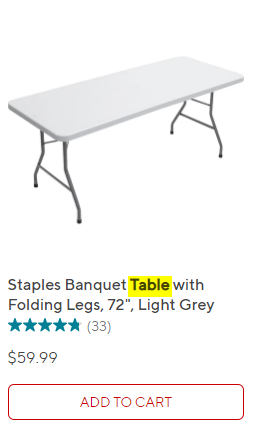
  • Staples Canada: tables

One of these things is not like the other. I tried doing the search in a second browser that had never been to the staples.ca site before to see what would happen and the same thing comes up–tables. Table is highlighted as the search term in each result:

Here is the URL showing the search terms:

Now, if I do a search for “network cables” (plural) the site will pull up…network cables. But when you look at the results you’ll see the items listed are in the singular:

This is inconsistent and illogical.

Is it too much to expect a search of “network cable” to not show a bunch of tables? We are 30 days away from the year 2020. I do not think this is an unreasonable thing to expect. I’m just glad I wasn’t searching for a hard disk.