In WordPress, if you publish a post and later make changes to it, the Publish button changes to Update, to let you know that you’re, well, updating the post.
But in version 6.6, just released, that Update button now says Save, which is more old school, but actually makes less sense in terms of publishing something (as opposed to saving a file like a word processing document). I don’t hate the change, but it seems a bit weird and doesn’t really improve anything.
However, they haven’t made anything else objectively worse with this update (that I’ve found), so kudos for that!
Also, yes, I’ve kind of stopped looking for other alternatives to WordPress since finally committing to my site redesign. I still might resume that search, but it’s on the back burner again for now. Apologies to anyone waiting for me to render a verdict!
I didn’t make this (one of my interweb friends did) and yes, it’s poopy AI art, but it still amuses me. I’m also mildly impressed it translated the prompt literally and correctly.
I cancelled Amazon Prime a little while back, so I am unable to partake in all the “Prime Day” deals that are on offer today and tomorrow. Which is fine, because Amazon is a horrible, abusive company, and I have been able to find alternatives without too much trouble. There are still a few things that can be tricky to source elsewhere, such is the power of Amazon’s crushing monopoly. This is bad for consumers and businesses alike.
Kudos to Ars Technica. As I write this at 8:24 a.m. Pacific time, they don’t have any stories about “Prime Day” deals on their main page. This may change over the course of the day, but it’s still nice to see. UPDATE, July 17, 2024: It did change. Day 2 has a featured story on the main page with links to deals provided by Wired magazine, another Conde Nast property. Still, it’s just one story and easy to ignore if desired.
The Verge has five stories, and Engadget has six before you even get below the “fold” (start scrolling). I stopped counting after that. There may be other tech sites that have even more, but I have some standards.
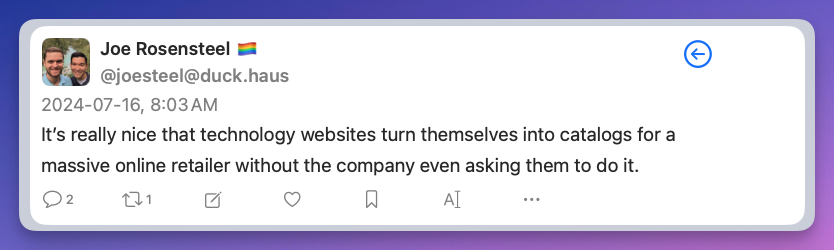
Also, Joe Rosensteel, a VFX artist, posting on Mastodon:
…is the title of a Rick Beato video on YouTube. You can watch it below.
Rick attributes the current state of pop music (bad) to two things:
Music is really easy to make now, thanks to various software and hardware tools
Music is really easy to listen to now, thanks to streaming services
I think he’s right. In the video he lays out how much work went into recording a typical rock band, with drums alone requiring multiple mics (and a good drummer), where today it’s…a drum machine. Vocalists needed to sing on pitch, and the opportunity to fix mistakes originally meant having to re-record. Then came autotune, pitch correction software and the equivalent for instruments. Now anyone could sing, and the voice could be processed any way you like. When something hit, it was easy to reproduce…and was, by everyone looking to score a hit. The sheer volume of music increased as it became easier to make. And this is before you even consider the horror of AI-generated music.
As he notes, over 100,000 songs were added to streaming services over the last year, a rate of about one per second. This isn’t a stream, it’s a torrent1See what I did there?.
Then he explains how music in the olden times (my time) was something to be sought, acquired and savoured. Sure, it feels a bit “I had to walk both ways uphill in the snow” but again, he’s right. I remember saving for an album, having to go to the record store to buy it, take it home, then listen to it. If I liked it, I might loan it to a friend. Buying an album was a thing. Today, for $10.99 a month (about what one of those albums used to cost), you get a virtually endless supply of music on demand. You don’t have to seek it out, it’s just there, in an app. Combined with the sheer volume (heh heh) of the music output, it cultivates a feeling, especially in those who are growing up with streaming services, that music is nothing special–it’s just background noise. Don’t like a song? Just skip to the next random track. Let the software build a playlist for you. You don’t need to do anything, just listen. There is no investment, no value. It’s product.
And everything kind of sounds the same.
As I’m typing this, I’m listening to Boney M’s Nightflight to Venus, a 1978 album that gleefully celebrates its disco roots. It’s silly, bonkers, but also super catchy, with terrific harmonized vocals. It even covers a nice variety of styles, not just disco. I mean, it has a cover of “King of the Road.”
Today, an equivalent album would likely be composed on a computer, probably feature hyper-processed autotuned vocals, a drum machine and probably no actual guitars. It would be musical sludge, a pile of muck in a larger pile of indistinguishable muck. But hey, there’s a million other songs on tap, so just skip to something else if you don’t like it. The pool is big.
Anyway, the video is worth a watch, and helps explain why I spend more time listening to my ripped CD collection in Windows Media Player than I do listening to the nigh-endless selection of songs on Apple Music2Consider that I started buying my own music around 1977, which is 38 years before Apple Music existed.
I logged into Facebook today. One of the first things in my feed is the insufferable “Reels” feature. If you click the three dots, you get the option below.
“See fewer posts like this” is a big fat lie. Even if I do nothing, FB will periodically refresh the feed and when it does, it makes sure Reels are the second thing, every time. I click Hide every time. It keeps promising I will see fewer posts like these. They keep coming back. I wouldn’t be surprised if the code for Reels actually has a line in it like:
haha /nelson muntz
Anyway, it’s yet another reason why Facebook is terrible trash and everyone should stop using it.
I have surprised myself by sticking with light mode on the PC for more than an entire day.
Thoughts:
Text does look a little crisper overall
Things aren’t too bright, but I could probably turn my monitor’s brightness down a little
Discord’s implementation is bad. The background for text is pure white (#FFFFFF), which is silly. You can fix it by changing the colour–by subscribing to Nitro™ for $10 a month. $120 per year to have a nice off-white is a bit much. File Explorer also uses pure white. I may see if I can change that specifically.
In fact, more apps than I realized seem to use pure white, so I’m guessing this is the “accepted” default for Windows 11’s Light Mode. Some other application colours:
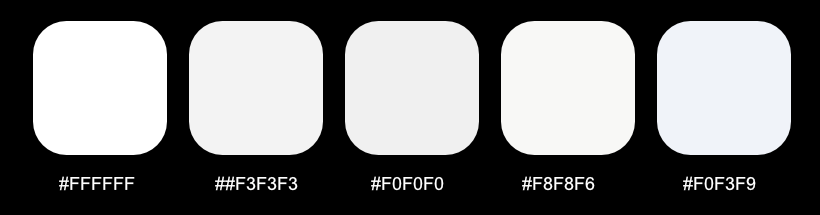
TickTick: #FFFFFF
Diarium: #F0F3F9 for the sidebar, #F3F3F3 for the main calendar view, #F0F0F0 for the individual entries
Thunderbird: #FFFFFF
Proton Mail: #F8F8F6
For funsies, here are the above-mentioned shades of white:
Today, after reading about someone launching a new text editor (one gets released approximately every ten minutes) and having it default to tiny text and dark mode, both of which were undesired by this person, I decided at long last to switch away from dark mode in windows and go fully light mode–no exceptions!
Well, except one: the browser. And really, my main browser Firefox just uses dark mode to make tabs and the address bar darker, but it helps set them apart from the actual page content below, which is a good use of contrast, in my view.
Actually, I lied: two exceptions! Any image editing program will also still use dark mode, because again, it better separates the UI from the content you’re working on.
So far, light is very bright. We’ll see how it goes. Apparently some studies say a light UI causes less eye strain, which seems a bit crazy to me, but I’m no eye-ologist. I will report back in a week or so, or when I give up and re-embrace the lovingly velvety darkness.
(I will also switch macOS to light mode, using the same exceptions there.)
Microsoft caught a lot of flack over its upcoming Recall “feature”, and the inevitable “Switch to Linux!” chorus started up again. Even though Microsoft is changing Recall in response to the immense backlash, a lot of people have decided they simply can’t trust Microsoft anymore.
I am somewhat on the fence, but it’s prompted me to update my Linux Mint install and maybe even get really nutty and try other distros. For the moment, I’m going to spend some more time in Mint and see how successfully I can work out some of the remaining kinks that have thwarted my previous efforts to embrace the penguin.
At the keynote for today’s WWDC24 launch, Apple revealed its version of LLM/machine language/AI stuff and is calling it Apple Intelligence, which will just confuse people, and when it doesn’t confuse people and goes sideways, Apple’s got its name stuck right there at the beginning to remind you who is behind the thing that isn’t working for you. It’s very Apple.
The keynote was pretty dull. Apple hits the same notes every time they do these and is leaning so hard into the Xtreme Craig Federighi stuff that it has gone from parody to self-parody to whatever it is now. After the prerecorded segment in which a bunch of people skydive into Apple Park, the camera drone zooms into Tim Cook on the roof of the building and saying, “Wow, that was so cool” with all the excitement of someone reading names from a telephone book (kids, ask your parents what a telephone book is).
There were a few things I liked:
Customizing icon arrangement on iPhone/iPad (and not forcing iPad owners to wait a year to get the feature), though it remains to be seen how much you can really customize it. Probably not as much as people will want.
The workout app on the Apple Watch finally acknowledges that there are days you might not complete your rings because you’re sick/hurt/on vacation.
Uh, I’m sure there was something else.
What I found most interesting is the limited pool of hardware that can take advantage of AI™. It will only work with an M1 or better SoC and last year’s iPhone 15 Pro/Pro Max models. I mean, I doubt I’d use it much, anyway. My phone is basically a camera and text messenger device.
Overall, some nice new things, unless you’re an iPad owner hoping for a dramatically overhauled and improved UI, in which case you are probably quietly sobbing right now.