Escaping the Googles

Back in its early days Google had a simple motto:

Don’t be evil.

This motto still exists in their official Code of Conduct, right near the end of the very long document:

And remember… don’t be evil, and if you see something that you think isn’t right – speak up!

Since changing their official motto to Do the right thing, Google has seen itself increasingly mired in controversy, most of it borne from the fact that the company makes its money through selling the data of its users to companies that then use the data to target users with ads, ads which often follow them around the internet. Google is essentially a series of services—most of which are free to the user—designed to harvest data and sell it for ads.

Put more simply, Google is an advertising company. Nearly everything it does is in service to advertising. This is the code of the company and is likely to remain so into the foreseeable future.

Is this bad? Is it evil? On a relative scale, not so much. To paraphrase Stockard Channing, there are worse things it could do. But what it does is enough to have finally given me pause after years of using their free services:

  • The Chrome browser is near Internet Explorer 6.0 levels of dominating the browser market, with sites increasingly being tailored for and only tested with Chrome. This is not good for the web, web standards and basically everything a free, open web stands for.
  • Gmail, Google search and other free services are tracking users across the web, feeding their surfing habits, random clicks and more to companies that use that information to target the users with ads and services. Most of this is done surreptitiously, without the user being aware.
  • Chrome is easing restrictions on some kinds of ad-blocking, for obvious reasons

Basically, I’m not comfortable supporting this model anymore. I think it makes for an unhealthy web. So I’m making changes. Some are days, some are more difficult.

Let’s start with the easy ones:

  • I haven’t used Chrome as my primary browser for quite awhile, having switched to Firefox long ago. If I need alternative browsers for whatever reason, I can use Edge (!), Vivaldi or Brave.
  • I’ve switched from Google search to DuckDuckGo. Plus DuckDuckGo is way more fun to say. Are the searches less comprehensive? Maybe. I can’t say I’ve never not found what I was looking for yet. In fact, the searches are more accurate because I no longer have Google trying to shape (or contort) the search results to better “fit” what I am allegedly looking for.
  • I no longer use Google Drive for cloud storage (I use OneDrive and iCloud Drive)
  • I have long abandoned Google’s office apps, like Docs and Sheets

And now the harder stuff:

  • Google Maps is still by far the best map site/software, though Google is doing its best to clog it up with services, suggestions and generally getting in the way of what should be simple directions on how to get from A to B. The alternatives are still not quite there. Apple Maps is improved, but it’s limited to Apple platforms (which, honestly, is kind of dumb—Apple should have a browser version, and I don’t mean one that requires Safari). Apple is also way behind on its equivalent to Street View. Then there’s Bing Maps. It’s okay, but it lacks in so many little and some major ways. I will keep using these and hope they improve, but it will be a meaning process. I don’t use maps much, anyway.
  • Gmail. This is the big one. I have had a Gmail account for a long time. I have thousands of messages and many subscriptions and services tied to my gmail address. I can direct new subs to an alternate email address—I have a more “serious” email address at outlook.com, for example, or I can use one from my own domain, @creolened.com, though that looks a little weird, really. This is a long term project, one I’ll probably tackle piecemeal. There is always the fear that whatever other service I switch to could disappear, while Gmail is one of the handful of Google services that seems relatively safe.

All said, I’m making these moves to help simplify my interactions on the web, to get less ads and less shaping, to find what I am looking for, without handing over information that really sin’t anyone else’s business. Excelsior, as they say.

Mac mouse mayhem: More and then no more (for the moment)

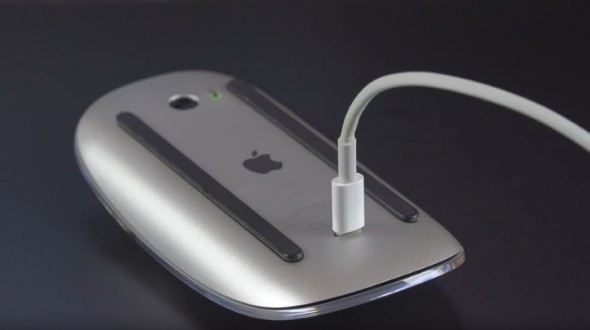
I don’t actually have a Magic Mouse 2, I just love pictures of them being charged. Image is courtesy of geek.com.

A small but persistent annoyance in writing on my Mac mini is the way the mouse cursor behaves. Or in this case, misbehaves.

I noticed it when I connected my Logitech Marathon 705 via USB wireless receiver. Mouse movement would seem okay, but on closer inspection there is always some glitches in the form of the cursor jumping ahead or stuttering. I installed the Logitech drivers and found no change.

I then switched to a Logitech M720, which connects via the same receiver. The erratic mouse movement was even worse. I tried using both mice directly on my desktop, no mousepad. No improvement. I tried various things like software updates, restarting in safe mode and so on and again, no change. Jiggly mouse syndrome persisted. I did not want jiggly mice.

Searching for troubleshooting tips largely produced results that were obvious and unhelpful (“check to see if there is gunk in your mouse”) or obscure enough to make me wonder if Macs are just really bad with third party mice.

Since both tested mice are wireless and using the same receiver, I decided to try a different approach. I unplugged the receiver and plugged in my old wired Steelseries Rival 300 mouse. When I used this mouse with Windows, I quite liked it and only replaced it when I went wireless (with the Logitech G700, which I adore, save for somewhat short battery life). After plugging in the Rival 300 I waited a few moments, then moved the mouse. It moved exactly as intended. No jumps, no jiggles, no erratic behavior. It was super slow, as is always the case with the default mouse settings on a Mac (why this is so is a question left for the ages). I bumped up the tracking speed and voila, it is working just fine.

So now I wonder, is it the wireless receiver? Is it a Logitech thing? Would this happen with a Bluetooth mouse? I am okay with using the Rival 300 as a stopgap but given the Mac mini and PC share the same desk, I really prefer wireless for both. I’ll probably try digging out my old Microsoft Bluetooth mouse and see how it fares, as soon as I remember where it is. In the meantime, I accept a tail on a mouse to end the mouse mayhem on my Mac.

Also, to paraphrase Phil Schiller, as others have done a billion times or so already, “It just works, my butt.”

Apple September 2019 event: My middling warm take

Here’s my middling warm take on the Apple keynote today, in handy list form:

  • Little in the way of surprises, though there were a few small ones (see below)–this is pretty standard now for Apple events, where all major details leak months in advance
  • iPhone Pro is a dumb name. Apple is good at coming up with dumb names. Is iPhone 11 Pro Max better than iPhone XS Max? Kind of a draw.
  • People will at least stop calling the LCD model the “ex-ar” now that it’s just iPhone 11
  • I’m going to be talking about price for 6 of the next 8 bullet points
  • The price went down for the iPhone 11 from $749 to $699–a good sign that Apple is counting on this phone to shore up flagging sales and is willing to cut the price (and margin) to entice more to buy it
  • Pricing on the “Pro” phones remains ludicrous, even excluding Canadian pricing ($1379 and $1519 if you were curious)
  • The “affordable” iPhone 11 starts at $699 U.S. or $979 (!) Canadian. I did an exchange rate comparison and $699 U.S. works out to about $920 Canadian. Hmm, I say. Hmm.
  • Unless you want the improved cameras and are sticking to iPhones, I can’t think of a compelling reason to buy any of the new phones, unless you have something old, in which case the iPhone 11 makes sense (or get the still-being sold Xr for even less)
  • Prices stayed the same for the U.S. but some products went up in other countries (like Canada). I guess we’re paying for the tariffs (lol)? Example:
    • Series 4 Apple Watch 44mm with GPS + Cellular: $649
    • Series 5 Apple Watch 44mm with GPS + Cellular: $699
  • I want a Series 5 Watch, but I don’t want it for $699. Or even $569 (GPS only). So I’ll stick with my Series 2 (Apple will give me $60 for trade-in if I change my mind).
  • Always On Display for the Series 5 Watch was an actual surprise. It’s nice, but I suspect it won’t push many people into buying who didn’t already have other reasons.
  • Arcade and Apple TV+ pricing are decent and about what I expected
  • Apple giving away a year of Apple TV+ with new Apple devices seems to be both a good idea (it creates a huge, instant audience) and also a sign that they may not have faith in the service to survive on its own
  • iPad: Nice, but kind of meh. Looks like Apple is trying to squeeze maximum value out of the original generation Pencil and smart keyboard cover that debuted with the 10.5″ Pro in 2017. Recycling is good for the environment, why not for peripherals, too?
  • Watching game demos is never not painful for me
  • If you removed all of the adjectives from the presenters, the keynote would have been 30 minutes shorter

Kind of boring overall, which makes the “By innovation only” tagline look even more silly.

App of the Day: No app

I can’t remember the last time I got an app for my phone that actually excited me. As phone technology has improved, I’ve found the way I use the phone has, in some ways, regressed.

I’ve commented on this before, but my phone habits have probably shrunken even more since then.

My typical usage now is:

  • text messages, either with my partner using the default Messages app, with friends using Facebook Messenger (ugh) or at work using Slack.
  • taking photos of things, sometimes work-related (these are typically deleted after, as they are only useful in the moment, but mostly just flowers and scenery I find interesting
  • occasionally checking email
  • occasionally checking something in a browser (usually Firefox)
  • occasionally adding something in the Reminders app
  • using the PayRange app to buy something from a vending machine (I do this at work to avoid long lines in the cafeteria when all I want is a beverage).
  • occasionally taking or (even less occasionally) making a phone call

Everything else, like playing games, checking news, other apps, the weather, maps–are all edge cases I only do once in awhile.

AR (Augmented Reality) is something Apple is pushing but it excites me about as much as putting on socks in the morning. VR is even worse, and doesn’t work for me, anyway.

I am more likely to delete an app than install it. In fact, iOS 13 (coming next month) will offer a new feature that will make this easier, by presenting an uninstall option when an app offers an update. This is kind of clever, really. “Hey, here’s an update for an app I installed a year ago and never use. But look, there’s a handy uninstall option right here, too!” This might make some companies like Facebook rethink their strategy of constantly pushing updates to keep the app in the user’s mind.

Anyway, it could be that I’ve just become a boring old sod and the app world is actually exciting and innovative, but when I look at the upcoming iPhone launch, I wonder why on earth I would spend so much money to do so little, especially when the phone I have now seems to be good enough.

Using my smartphone for good, not evil

Actually it would be more fair to say I’ve been using my smartphone (currently an iPhone 8) for harmless nonsense, which is still better than using it for evil.

I’ve made a few recent posts to the blog during my morning commute, using the Ulysses app to slowly tap out a post and then upload it directly to my blog. I marvel at the technology, even as I lament how few will see my carefully-considered nonsense. I even just recently had a two-day stretch of zero visits on June 21 and 22. This is bad even by my own sad standards. I clearly need to work on the SEO and other acronyms to boost hits. More clickbait! More gossip! More whatever it is people want. Maybe just a redirect to Facebook.

It feels like the writing muscles are finally starting to halt their atrophy, as I am using more little blocks of time to write errant thoughts down, moving ever-so-slightly closer to perhaps engaging in some fiction writing again.

Mainly, though, I am not using my phone for social media, except for using Slack at work, which is not really in any way fun, so doesn’t count. There’s hardly any clickbait.

What do I use my phone for? Here’s a list. I like lists.

What I use my smartphone for, in order of most to least

  1. Listening to music
  2. Sending and receiving text messages with my partner. A lot of this includes Bitmoji nonsense, which I love and adore.
  3. Logging food/water in the MyFitnessPal app
  4. Adding or removing stuff in the Reminders app
  5. Checking stats in the Activity app
  6. Occasionally checking email, either personal (Gmail) or work (Outlook)
  7. Checking calendar appointments (almost exclusively work-related)
  8. Adding errant thoughts using the Drafts 4 app
  9. Adding errant and less-errant thoughts using the OneNote app
  10. Sometimes checking the weather or news
  11. Using the flashlight function
  12. Making or receiving an actual phone call
  13. Playing a game
  14. Writing a blog post (this one may move up the list over time)

What I never use my smartphone for

  1. Making the world a worse place (to my knowledge)
  2. To smash open walnuts
  3. As a level
  4. To play music without earbuds or earphones. Seriously, why do people do this? Do you do this? Don’t do this.
  5. To plug in a nice set of headphones (zing!)

I sat beside Mitchell on the SkyTrain today

I don’t know Mitchell, but I do know he was sitting next to me on the SkyTrain this morning. I know this without having spoken to him and without interacting with him in any way at all.

How did I know his name? Was he wearing a name tag? Did someone nearby shout out to him, “Yo Mitchell dawg, what’s up?”

The answer to these questions is no.

I found out his name because I was writing a blog post on my phone. Yes, it was the magic (and menace) of technology.

The Ulysses app allows me to compose WordPress posts and send them magically to my blog to be published. On the iPhone this is done through the export function. But the first time you use it, the default is to open the share sheet. One of the options that appears here is AirDrop, Apple’s way of allowing iPhone users to easily share files.

And lo, there was Mitchell’s iPhone. He was indeed using his iPhone. I thought about sharing my blog post just to see how he’d react, but opted not to. But it also made me think how people could use AirDrop to creep on others.

Scenario: Unrelated man and woman sit beside each other on train, both have AirDrop enabled. Man opens up Photos app and goes to the share sheet after selecting a particularly appalling example of his manhood. He then opts to AirDrop it to the woman sitting next to him. She puts his phone in a place one might have considered physically impossible.

She could just choose not to accept, but you still get a preview of the image, so Unwitting Commuter is still going to see something grossbuckets before declining. I should test this sometime to see just how it works with someone you theoretically don’t know. With a picture of a kitten, you pervs.

Anyway, now I’m kind of wondering how Mitchell’s day is going.

Possibly made internet famous on an app I never use

The other day Jeff and I were returning from Save On Foods, carrying bags of groceries and walking along the mind of awful Brunette Avenue, where people drive at highway speeds (it is not a highway). I happened to notice one of the vehicles that blew past (actually, it was probably doing the speed limit) was an Apple Maps car. I’ve never seen one out in the wild before.

Now, I never use the Apple Maps app on my iPhone. It had a disastrous launch and I’ve never had a reason to go back and check the improved version, since Google Maps still works fine. But now I am officially part of an Apple Map. My face will be blurred out, but every time I check out a map of my neighborhood, there I will be. I’ll be internet famous!

The shiny new version of Apple Maps isn’t out yet, though. It’s coming in the next release of iOS, macOS, iPadOS and WhateverElseOS Apple comes out with. This should happen in September. I’l check back then, as that is when their version of Google’s Street View, called “Look around” (Apple is very bad at names) debuts. I’ll report back then and will sign autographs shortly after.

The return of the quiet keyboard

Today I bought my second Logitech K750 solar-powered keyboard. I kind of broke the original version at work when trying to get it working with the USB receiver. But I got a lot of use out of it before my gentle destruction of it, so I’m not perturbed.

But you may be thinking (well, probably not), why would I buy one when I have the CTRL mechanical keyboard with the best keys ever? A good question! These are the features I wanted:

  • Wireless. I could easily swap it in and use it as needed.
  • Numeric keypad. This is one of those things I occasionally need.
  • Quiet. The keys are very quiet, making it the perfect alternative when even I get a little tired of the CLACK of a mechanical keyboard. It happens!

And that’s about it, really. The solar part is a bonus, because it means I never need to buy batteries. It was on sale for $20 off, so I decided to go for it. The only issue right now is the keyboard has a slight curve to it, making it a bit bow-shaped. This means that if I press hard enough on the keys or the board itself, it noticeably flexes, as most of the bottom surface is actually not flush against the desk. This is an issue I did not have with the previous model. It’s not terrible because the keys work with a fairly light touch, but I may still take it back. I’ll mull for now.

And so my vast keyboard collection expands by one more. In a way it’s good that my new PC’s motherboard doesn’t support Bluetooth (a baffling omission, really), as it prevents me from trying out any of the vast number of Bluetooth keyboards out there. Mind you, a $15 USB Bluetooth adapter would fix that…

The low tech fix

Today I began what I was convinced would be the maddening task of further troubleshooting my PC. I pulled out the ram and video card, but nothing changed.

Then I noticed a bunch of the tiny little headers on the motherboard weren’t fully plugged in. How they came unplugged, I don’t know. Even more mysteriously, the honking big header for the front USB ports was completely disconnected and sitting well away from where it would normally be plugged in. All of this was strange, but easily fixed by just making sure everything was nice and secure.

I pressed the power button…and the PC powered up without issue. Windows didn’t even report a bad shutdown or anything. Everything is working again without any parts having to be replaced, and with minimal downtime.

To this I say: Yay!

Bringing work home with you through bad karma

Or maybe not bad karma, but something. And bad.

I recently celebrated the arrival of my new PC, which was a tad more difficult to assemble than expected, but in the end booted up without issue and has hummed along nicely since.

Until last night, at around 3:30 a.m. At that time it disconnected from IRC while I slept, unaware of what was to come.

In the morning I immediately spied something wrong. I normally set the keyboard to its bizarre, useless backlight configuration of “strobing rainbow” because it makes for a groovy night light. Instead of seeing this, the keyboard backlight was off. The power light on the monitor was also amber. Amber is never good.

But the sinister red LED on the HSF was still on, so the unit apparently had power. My first bit of troubleshooting was to hit the reset button to reboot the PC. This had the unexpected effect of cranking the fans up to super turbo mode. Alarmed, I held down the power button to shut the machine off. This had no effect.

I used the switch on the PSU itself and this worked better, turning the whole thing off. I flicked this switch back on and this time nothing at all happened. The sinister red LED on the HSF remained dark, as did the keyboard and display. I was sad. I was also out of time, as I had to head off to work.

Upon getting home I opened up the case and inspected everything, looking for things that might be loose or unplugged. Everything checked out fine, except for one of the cables plugged into the modular PSU. It seemed to be ever-so-slightly loose, so I reseated it. I put the case back together, plugged everything back in and hit the power button.

Nothing happened. My troubleshooting is now over.

I’m thinking it may be the motherboard for the following reasons:

  • there is evidence power is still getting through, as things like the network light still work
  • bad ram or CPU would produce an error message
  • a bad video card would not affect the keyboard (to my knowledge)
  • the video and keyboard not working both point to the motherboard as the source of the problem

It’s possible the PSU may be at fault, and it would be easier to swap it out to test first, but I still lean toward the motherboard based on all other evidence. I’ve asked for other opinions and am willing to be persuaded otherwise, but I suspect part of tomorrow will be spent buying and then installing a different motherboard and seeing what happens when I press the power switch. I am hoping my reaction will not be this: