Since 2009 I have participated in most NaNoWriMo outings, with a success rate of something less than 50 percent. It has been enjoyable at times, maddening at others, and has proven to me that one cannot wait for inspiration to arrive (not that I ever really believed that).
My last effort produced very little of note (and while I did enjoy my re-read of what I wrote on The Journal, I moved almost all of my creative energy back to drawing, rather than writing, so it remains unfinished, neglected but not unloved).
So here’s a list of pros and cons on participating this year:
Pros
Could be zany fun
If I finish, I have an entire novel I can brag about to people, maybe even real people
It would get the creative juices flowing like a mighty river after a huge storm
My typing might improve slightly
Cons
Would occupy a big chunk of time that could be used for other things that might yield more results, like:
Brushing my teeth
Reading other, already completed novels
Walking around
Maddening lack of progress would be maddening and also make me a little sad
Writing a novel in 30 days would probably produce a lousy novel
Seriously, I have no idea what I’d write. The pressure would cause an ulcer, or anxiety, or maybe some kind of rash
The outlook doesn’t look good, but you never know. We’ll find out for sure in just 31 days!
DISCLAIMER: Technically, I am talking about personal knowledge management (PKM) tools, which act like your own little personal Wikipedias, and not just plain note-taking apps. My main purpose for using a PKM is note-taking, though, and I make the rules here! Am I using a hammer instead of a screwdriver? Probably. Read on, anyway!
I love fiddling around with new stuff. It’s why I have three mice sitting on my desk (computer mice, not the living kind) and a bunch more stored away. It’s why I have more keyboards than I could ever need in five lifetimes, stuffed into drawers and scattered about my place.
And it’s why I’m a sucker for a shiny piece of new software, which leads to this post’s topic: note-taking apps.
Even if you have absolutely no interesting in note-taking apps, you probably still have one, anyway, whether it’s Notepad on Windows, the Notes app on Macs, or some built-in app on your iPhone (Notes again) or Android device. They are ubiquitous. And now, with the whole second brain1Go ahead, try looking up what a “second brain” is. Your actual brain will explode. thing being the new hotness, note-taking apps have started popping up like bunnies. Note-taking bunnies.
I noticed that after expressing some interest in technology on Medium (via my preferences), it started offering me stories on note-taking apps. I believe there are roughly a trillion of these articles on Medium, which nearly matches the number of note-taking apps themselves.
I thought to myself, “Self, you need to be more organized, somehow. For some reason. You need a note-taking app that will let you consolidate all your notes in one place, so you never need to figure out where your notes are. This future of unparalleled organization will be awesome.”
It’s a good theory. My notes were previously scattered all over. I used:
Paper. Actual paper, like cave people used to do
Drafts. An app on my iPhone that can send to other apps.
OneNote. I kind of stopped using it a few years ago and I’m not sure why.
Microsoft Word. Because I had it, so why not?
Apple’s Notes app on various Apple platforms. Because it’s there.
iA Writer. Not really built for notes, but…
Ulysses. See above, plus a subscription. Ew.
There’s more I’m forgetting, and this was all before the current explosion of note-taking apps. Since then I’ve tried:
Craft
Notion
Obsidian
And contemplated a million others, while absolutely only positively ruling out a few, like Evernote, usually due to what I deem excessive pricing.
For a time I thought I had settled on Obsidian. It supports markdown, is free, can work between Mac, PC and (somewhat) with iOS (it really wants you to use iCloud for your “vault”). On (virtual) paper, it provides everything I’d need in a note-taking app and also has all the second brain stuff, like backlinks and things.
I feel like I’m grossly under-utilizing it by not making proper use of links (back, forward or any other direction), tags and other means of keeping things organized. I mean, look at this guy wax poetic about how useful Obsidian is. It makes me want to install it again right now!
While I’m clearly not tapping into Obsidian’s potential, I am big on bullet lists, because I love lists. So now, as I think about whether to stick with Obsidian or not, I wonder: Why do I take notes? The answer is in a list. Right below!
Track ideas. These can be ideas for:
stories
blog posts
game design
comics
drawings
General reminders (I have moved these to actual to-do apps)
WIP stuff on my newsletter (five issues so far, published very intermittently)
Book and movie reviews (that get posted to my blog, Goodreads or elsewhere)
Random tips and tricks, usually associated with tech
Everything that doesn’t fit into the above
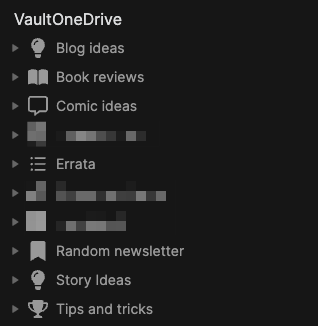
And Obsidian has worked reasonably well here. I’ve added plugins to expand on what it can do. Look how organized everything appears to be (I have redacted a few items, but it’s nothing scandalous, like panda porn or something, just stuff regarding the condo or other personal yet banal items):
And yet I feel like:
I am underutilizing Obsidian to the point where I probably could just use Notepad, for all the difference it would make
Maybe I don’t have the kind of personality to connect the dots, or in this case, the notes?
Maybe I actually don’t have a compelling reason to use backlinks and I’m overthinking things, as is my way
But it all seems so useful. There are so many articles! I want to do more! Yet I am not feeling there is a yawning chasm in my life because I have only clicked a backlink maybe once in Obsidian, and that was just to see if it worked (it did).
Anyway, have a look, there’s plenty to choose from!
A long time ago I had a dream to become a published author and I read somewhere that the biggest English-speaking book market is the good ol’ U.S. of A (this was before TikTok ruined everyone’s attention span and reading became quaint and/or gauche), so when it came to writing, the advice was to make your work as publication-ready as possible for the U.S. market, in anticipation of possible publication.
This led me to shunning my Canadian spelling heritage and switching the dictionary/language in various applications like Microsoft Word to U.S. English. I felt dirty, but also efficient and professional.
I had one story published in a (Canadian) Moose Lodge newsletter when I was 12. This was an actual newsletter, printed on actual paper. It was pretty thrilling when I was 12. This was the sum of all my publication efforts, and it was because the man who ran the newsletter was nice and wanted to encourage me.
But thanks to inertia and a weird need to be efficient, I have kept using the American spelling of words, even though I had long given up the idea of seeing my work formally published. Heck, I skipped National Novel Writing Month in 2020 and didn’t even feel guilty about it!
I am starting to lean back to switching to Canadian spelling. Sure, “labour” has one more letter than “labor” and with my typing speed, it makes a difference, but “labour” has character and flavor flavour. “Labor” has the blood ruthlessly drained from it.
Perhaps I am overthinking this.
I’ll ponder some more on this Labour Day, then make a decision, because I think that may have been one of my New Year resolutions–to be more decisive. Maybe?
Yes, it’s come to this. I mistype the word “humidity” so often, and I’m now talking about it so much, that I’m now using the Mac’s built-in text replacement tool to fix my persistent misspelling of the word:
I will always regret not taking that typing class in high school. With real typewriters and everything. I wonder if schools expect kids to start Grade 1 as advanced typists now. “Todd, you can’t take recess break until you hit at least 75 wpm!”
Current humidity is 55%
UPDATE: It’s not working! Apparently the text expander doesn’t work in Firefox or browsers or something. I am sad. And full of typos.
After referring to the possibly skeevy nature of the Microsoft Store app Inspire Writer, a fairly shameless Ulysses copycat, I noticed it had a 10-day trial, so I thought I’d download it and have a look. What could possibly go wrong?
The developer is Sunisoft, which describes itself thusly: “Established in 1999, Sunisoft is a developers tools software provider located in Zhu Hai, China. We are committed to providing more effective tools for software developers” (link). It apparently has fewer than 25 employees.
In terms of user interface, this is a straight-up copycat. You have the Library bar on the left, the list of sheets next to it, then the editor next to that. You can toggle these on/off the same way you can in Ulysses. You can export to multiple sources, including WordPress, which is how I’ve made this post (I’ll edit this if it turns out to not work, and I have to post the old-fashioned way in WordPress).
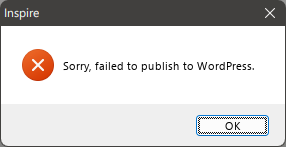
EDIT: While Inspire recognized all of my settings for my blog (categories, tags, etc.) it produced a simple error dialog every time I tried to export this post to WordPress:
There is an option to configure a proxy, but I have not successfully gotten that to work (yet), either. I'll update this post again if I do. Also, dumping in the straight markdown from Inspire into WordPress leaves a lot of clean-up to do. The rest of my look at Inspire continues below.
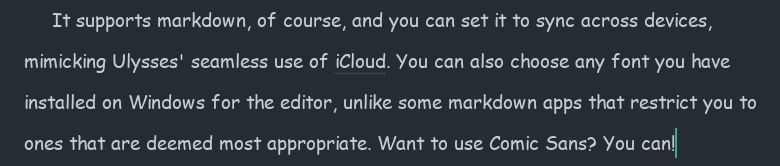
It supports markdown, of course, and you can set it to sync across devices, mimicking Ulysses’ seamless use of iCloud. You can also choose any font you have installed on Windows for the editor, unlike some markdown apps that restrict you to ones that are deemed most appropriate. Want to use Comic Sans? You can!
You know someone will do this.
But there are differences.
Missing features
While there is a Dark Mode you can toggle on, there is no support for themes or styles. You get Light and Dark modes, and that’s all. In this way, it feels closer to iA Writer.
Some shortcut keys are missing. For example, there is no shortcut for bringing up Preferences. Mac-first apps often use the Mac Preferences shortcut for their Windows versions, which would translate to CTRL-.
Clumsier or simpler features
Like Ulysses, Inspire Writer includes a word goal you can modify and invoke by hitting F5. Unlike Ulysses, there is no way to keep the goal open while writing, since its dialog takes control of the UI. You do get a ring icon in the top-right corner of the sheet in the Sheets view, which can be kept open. To its credit, the ring fills dynamically and changes from blue to green when you’ve hit your goal.
The documentation is obviously translated, but it’s never difficult to understand, so I don’t knock it too much for this.
Overall, it seems to do all the core things Ulysses does, just without the same degree of polish, and with some “extras” missing. It seems to work well otherwise, but it still feels like it hews a little too closely to Ulysses’ UI and would benefit from breaking free a bit and charting its own course. Ulysses is a fine program, but it’s not necessarily the definitive word on distraction-free writing apps.
I am unsure on what I will do when the trial ends. I really like the way it matches Ulysses’ use of indents, as it’s so helpful when writing fiction and most markdown editors simply don’t include this support or require you to at minimum add in an extra key for it (like hitting Tab), which eliminates the convenience of having indents in the first place.
Why do I care about indents so much, anyway, you may ask. Let me illustrate. Let’s say there is a scene where two characters are engaged in rapid-fire dialog, like this:
Bob tapped on the desk. “You see this desk here?” Jim nodded. “Yes. It’s very desk-like.” “It’s my desk.” “Says who?” “Says me.” “You and what army?” “The Swedish army!” “I’m pretty sure Sweden doesn’t have an army.” Bob sighed. “You need to see more of the world.” Jim folded his arms. “Yeah? How much more, smart guy?” “Twelve percent, minimum.”
Now, I was able to write that quickly (never mind the quality) because the indents happen automagically. In most text editors, I’d have to hit Enter twice after every line of dialog to get proper separation of paragraphs. I mean, I absolutely could do this, but having automatic indents is just easier. It’s the one concession to being Word-like that I approve of in a text editor.
All of this is to say, why is is that only a clone of Ulysses matches this feature among all the text editors I’ve tried. I was even hoping Obsidian would somehow have a community plugin that would mimic this, but I haven’t found one. It puzzles me, but maybe it’s a niche feature or considered “wrong” somehow.
Anyway, I will continue to tinker with Inspire Writer during the 10-day trial and render a verdict by the time it ends (curiously, it gives no indication of how much time is left, so I have no idea what will happen when the trial ends. Also, the app has only a single one-star rating on the Microsoft Store, and I’m really curious why).
A Windows version of Ulysses or its functional equivalent. It would need to be fully cross-platform and have no subscription.
There is actually a suspiciously Ulysses-like program on the Microsoft Store called Inspire Writer from a publisher I’ve never heard of. I mean, it basically has everything I like about Ulysses–again, suspiciously so. Whether they were just “inspired” by the app, reverse-engineered it or just plain decided to copy its features and UI, it makes me feel a little skeevy even considering it. And it makes me lament that there are no other writing apps for Windows that are like Ulysses. iA Writer is a pretty good markdown editor, but it doesn’t work well for long form (novel) writing, and most other markdown editors are the same–excellent for writing blog posts and short pieces, but not much else.
Odds of this happening: Pretty much zero. The company behind the app is one of those weirdly proud Mac-only (except now also iOS and iPadOS-only) developers. Also a Windows version would totally have a subscription, anyway.
Wish No. 2
Scrivener fully supporting cloud saves and syncing.
Scrivener was never designed to work with cloud services like Dropbox or OneDrive, due to the way it saves (by default every two seconds!) and the way it handles files (each project is not just a simple document, but rather a collection of files that effectively appear as one to the user). They cobbled in Dropbox support when the iOS version was released, but the official word from their support is to stick to using Scrivener locally and use cloud storage only to keep backups of your work.
It’s good advice, because it’s pretty easy to mangle your Scrivener files if you keep one document open (in error) on Computer A then go to open it on Computer B. Trust me, I know!
Odds of this happening: Very close to zero. I think we’d have to see a complete rewrite of the application, or a different “cloud-only” version of it, and neither seems remotely likely at this time.
HISTORICAL NOTE, April 8, 2022: This post was saved as a draft on August 18, 2015, but never published. I think I wanted the list to be longer. I no longer feel this need, so enjoy!
Words that don’t mean what some people may think they mean:
Bemused. It sounds like “amused” so maybe it’s a synonym. It means perplexed or bewildered.
Penultimate. Some may think this means “uber-ultimate”. It actually means next to last.
Arid. This one gets confused with arable (fit for cultivation) but means pretty much the opposite in that it refers to land that is very dry. Like a desert or all of California, for example.
Inflammable. This is perhaps the perfect example of crazy English. If you think it’s like invisible and thus means “not flammable” you’d be wrong because it actually means flammable. What does flammable mean, then? The same thing. Why? English! Actually, you can blame the Latin origins, which treat the words similarly.
This short book is about pitches. The story kind, not the baseball kind. I got it as part of a book bundle and I love short books, so I dove in.
And it’s fine. Hawker provides plenty of her own pitches as examples and while it may seem ego-driven at a glance, it’s nice in that there is an authenticity to the pitches. She’s not “writing to the crowd”, she’s providing examples of work she has relied on directly to help sell her novels.
The writing style is light and the book can be finished in an afternoon, all the better to apply the lessons therein. I don’t foresee myself making use of it much with my own writing, but for those who may need to work on and use pitches, this is a concise and worthy resource.
I still can’t post from a toaster yet, but I can post from yet another writing app, iA Writer. But only from the Mac version because they secretly hate Windows or something. Or maybe it’s Microsoft’s fault. I don’t know.
A few notes on this for future reference:
The title gets put in the title (yay), but also at the top of the post itself (???)
You can’t pick categories or tags
It posts using the “Classic” block, though you can choose to Convert to blocks afterward
Overall, not as robust as Ulysses and not something I would find myself using very often (or maybe ever again), but probably better than posting from a toaster. Probably.
RANDOM BONUS OBSERVATION: I left the “u” out of the word “fault” and the spelling checker did not know what word I meant to type (ie. it did not suggest “fault” as an option). We are still safe from SkyNET for a while yet.