Rick follows up the previously linked video, to address concerns that he is just an old man yelling at clouds. As he would say, check it out.
The stuff he says about music students is quietly horrifying.

Rick follows up the previously linked video, to address concerns that he is just an old man yelling at clouds. As he would say, check it out.
The stuff he says about music students is quietly horrifying.
…is the title of a Rick Beato video on YouTube. You can watch it below.
Rick attributes the current state of pop music (bad) to two things:
I think he’s right. In the video he lays out how much work went into recording a typical rock band, with drums alone requiring multiple mics (and a good drummer), where today it’s…a drum machine. Vocalists needed to sing on pitch, and the opportunity to fix mistakes originally meant having to re-record. Then came autotune, pitch correction software and the equivalent for instruments. Now anyone could sing, and the voice could be processed any way you like. When something hit, it was easy to reproduce…and was, by everyone looking to score a hit. The sheer volume of music increased as it became easier to make. And this is before you even consider the horror of AI-generated music.
As he notes, over 100,000 songs were added to streaming services over the last year, a rate of about one per second. This isn’t a stream, it’s a torrent1See what I did there?.
Then he explains how music in the olden times (my time) was something to be sought, acquired and savoured. Sure, it feels a bit “I had to walk both ways uphill in the snow” but again, he’s right. I remember saving for an album, having to go to the record store to buy it, take it home, then listen to it. If I liked it, I might loan it to a friend. Buying an album was a thing. Today, for $10.99 a month (about what one of those albums used to cost), you get a virtually endless supply of music on demand. You don’t have to seek it out, it’s just there, in an app. Combined with the sheer volume (heh heh) of the music output, it cultivates a feeling, especially in those who are growing up with streaming services, that music is nothing special–it’s just background noise. Don’t like a song? Just skip to the next random track. Let the software build a playlist for you. You don’t need to do anything, just listen. There is no investment, no value. It’s product.
And everything kind of sounds the same.
As I’m typing this, I’m listening to Boney M’s Nightflight to Venus, a 1978 album that gleefully celebrates its disco roots. It’s silly, bonkers, but also super catchy, with terrific harmonized vocals. It even covers a nice variety of styles, not just disco. I mean, it has a cover of “King of the Road.”
Today, an equivalent album would likely be composed on a computer, probably feature hyper-processed autotuned vocals, a drum machine and probably no actual guitars. It would be musical sludge, a pile of muck in a larger pile of indistinguishable muck. But hey, there’s a million other songs on tap, so just skip to something else if you don’t like it. The pool is big.
Anyway, the video is worth a watch, and helps explain why I spend more time listening to my ripped CD collection in Windows Media Player than I do listening to the nigh-endless selection of songs on Apple Music2Consider that I started buying my own music around 1977, which is 38 years before Apple Music existed.
I logged into Facebook today. One of the first things in my feed is the insufferable “Reels” feature. If you click the three dots, you get the option below.

“See fewer posts like this” is a big fat lie. Even if I do nothing, FB will periodically refresh the feed and when it does, it makes sure Reels are the second thing, every time. I click Hide every time. It keeps promising I will see fewer posts like these. They keep coming back. I wouldn’t be surprised if the code for Reels actually has a line in it like:
haha /nelson muntz
Anyway, it’s yet another reason why Facebook is terrible trash and everyone should stop using it.
I have surprised myself by sticking with light mode on the PC for more than an entire day.
Thoughts:
For funsies, here are the above-mentioned shades of white:
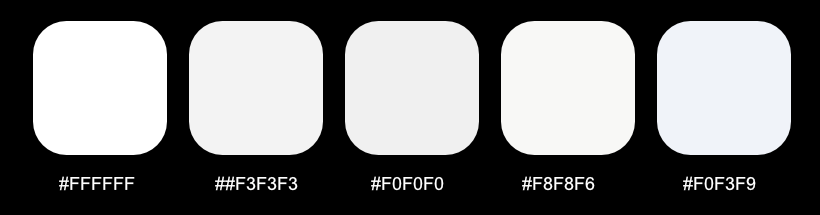
I’ll stick with it for a little while longer and see how it goes. I am investigating other not-as-white-whites, using this site as reference: 122 Shades of White: Color Names, Hex, RGB, CMYK codes
Today, after reading about someone launching a new text editor (one gets released approximately every ten minutes) and having it default to tiny text and dark mode, both of which were undesired by this person, I decided at long last to switch away from dark mode in windows and go fully light mode–no exceptions!
Well, except one: the browser. And really, my main browser Firefox just uses dark mode to make tabs and the address bar darker, but it helps set them apart from the actual page content below, which is a good use of contrast, in my view.
Actually, I lied: two exceptions! Any image editing program will also still use dark mode, because again, it better separates the UI from the content you’re working on.
So far, light is very bright. We’ll see how it goes. Apparently some studies say a light UI causes less eye strain, which seems a bit crazy to me, but I’m no eye-ologist. I will report back in a week or so, or when I give up and re-embrace the lovingly velvety darkness.
(I will also switch macOS to light mode, using the same exceptions there.)


I do not watch YouTube Shorts.
Microsoft caught a lot of flack over its upcoming Recall “feature”, and the inevitable “Switch to Linux!” chorus started up again. Even though Microsoft is changing Recall in response to the immense backlash, a lot of people have decided they simply can’t trust Microsoft anymore.
I am somewhat on the fence, but it’s prompted me to update my Linux Mint install and maybe even get really nutty and try other distros. For the moment, I’m going to spend some more time in Mint and see how successfully I can work out some of the remaining kinks that have thwarted my previous efforts to embrace the penguin.
As they say, stay tuned.
At the keynote for today’s WWDC24 launch, Apple revealed its version of LLM/machine language/AI stuff and is calling it Apple Intelligence, which will just confuse people, and when it doesn’t confuse people and goes sideways, Apple’s got its name stuck right there at the beginning to remind you who is behind the thing that isn’t working for you. It’s very Apple.
The keynote was pretty dull. Apple hits the same notes every time they do these and is leaning so hard into the Xtreme Craig Federighi stuff that it has gone from parody to self-parody to whatever it is now. After the prerecorded segment in which a bunch of people skydive into Apple Park, the camera drone zooms into Tim Cook on the roof of the building and saying, “Wow, that was so cool” with all the excitement of someone reading names from a telephone book (kids, ask your parents what a telephone book is).
There were a few things I liked:
What I found most interesting is the limited pool of hardware that can take advantage of AI™. It will only work with an M1 or better SoC and last year’s iPhone 15 Pro/Pro Max models. I mean, I doubt I’d use it much, anyway. My phone is basically a camera and text messenger device.

Overall, some nice new things, unless you’re an iPad owner hoping for a dramatically overhauled and improved UI, in which case you are probably quietly sobbing right now.
I say this as someone who has owned an iPad Pro since 2017.
When the iPad debuted in 2010, Steve Jobs pitched it as a “between” device that could do things a smartphone could, and things a desktop computer could–but it could do them in a more convenient form. The activities included:
All of these activities require minimal interaction, so they are suited to a touch-oriented device. The iPad’s larger display–yet still eminently portable design–makes it superior to a smartphone for viewing web pages or magazines, though with more responsive designs and larger phone screens, this use case is not quite as compelling as it once was. It’s still better for watching video in bed than a laptop or phone, I’d say.
Jobs only lived long enough to see one iteration of the iPad, called, cleverly1Given Apple’s often byzantine and arbitrary naming schemes, this is not sarcasm!, the iPad 2. It refined what was in the original, but otherwise changed nothing. It was just a better iPad.
That changed a bit in 2012 when Apple introduced the iPad Mini. It was, quite literally, a smaller version of the iPad. This didn’t change much, but it did mean that consumers now had two distinct choices when buying an iPad: regular size or smaller.
Apple then blew things up when they introduced the original iPad Pro in 2015. This had some refinements, but mostly it was bigger, going from a 9.7″ display to a 12.9″ one. Apple muddied the waters by later introducing a 9.7″ iPad Pro, which really wasn’t much better than the standard iPad Air available at the time (also a 9.7″ device). Apple “fixed” this by junking the Air (for a while) and bringing in a new base model iPad that stripped away things like the laminated display, but also dropped the price to a mere $299 (the original iPad sold for $499). The Pro models also supported a stylus, the Apple Pencil.
Does anything in the above paragraph look like a carefully-planned, long term strategy? Because it is not. It is Apple deciding one thing (“We need an upscale iPad so we can charge a premium price”) and then shuffling everything else around to make the line-up work. The early iPad Pros, apart from supporting Apple Pencil–an arbitrary limitation that was lifted a few years later, when Pencil support was added to all the myriad iPad models–didn’t really do anything that the base model couldn’t do. They looked a bit nicer, they sounded a bit better, they ran faster (not that you could really notice).
It was the Apple Pencil support that got me to buy that 10.5″ iPad Pro in 2017, then to move to the 12.9″ model when it was new in 2020 (I still use it today). It seemed like a way to get a Cintiq-like device, but (surprisingly, given Apple) for less than an actual Cintiq would cost. (This year’s iPad Pro models have reversed that, as Apple leaned much more into making the Pro model “premium”–even though it still can’t do anything more than a $300 iPad you can grab at your local Walmart.)
When I bought the 12.9″ iPad Pro in 2020, I got it from Apple directly and paid $1167. That’s pricey! The equivalent 2024 version is $1799. That’s silly.
But the price is not the main reason the iPad Pro is silly. You were probably wondering when I was going to get to this.
The silly part is: No one needs an iPad Pro. I don’t, you don’t, Apple doesn’t. Apple started the line to generate more revenue, and now they’ve jacked prices because Apple is in one of its greed-driven, “squeeze them for everything” phases (the last time was in the mid-90s). But in the drive for more money, Apple has boxed itself in, adding bits and pieces to iPadOS (which, let’s be serious, is just iOS with a different sticker on it), trying to make it work more like a laptop, with split screen, Stage Manager, a Files app (which started terrible and has stayed terrible since its introduction). But it is still marred by terrible memory management, arbitrary restrictions, a lack of utilities, and turning one or two click operations on a PC into a maze of steps, swipes and taps that sometimes just fail at the end, forcing you to start over.
It’s a mess and it’s a mess because Apple made a fundamental error in 2015 by introducing the iPad Pro. They got greedy, they made a mess, and in almost 10 years have failed to clean it up. WWDC 2024 is tomorrow, and Apple will probably make a few more token gestures to fixing iPadOS. But I don’t think they can.
The basic iPad experience is fine. Apple should refine what is there now to work better.
But here’s my advice for a company regularly valued at $2-3 trillion:
Now you have a truly professional-calibre touch device. Yes, I’m basically asking Apple to re-invent the Surface Pro, but with Apple’s level of polish and precision.
The iPad Pro is just not going to get better, software-wise, without major surgery on the operating system that Apple will never commit to. So they shouldn’t. They should just give up and put out touch-based Macs instead.
Because the iPad Pro is silly.
After tending to some caching devilry, I seem to have gotten my site back up and mostly functional. It is still in flux, but for now the changes are such:
With everything at least working, I will spend some time contemplating what I like and what I will change before diving in and probably wrecking everything again. Excelsior!
I did a silly thing last night. I decided to revamp the site, spontaneously, into something much more stripped down and streamlined. I didn’t intend to finish it the same night, but I’d get a lot of the planks in place, so to speak.
While I did this, my internet connection went down, because there are evil gnomes at Telus who know the worst time to make my connection fail.
Anyway, the main change was moving from content/sidebar to sidebar/content–simply switching the sidebar to the other side, and re-organizing the content in it. I also switched to a more muted colour scheme.
Everything looked pretty good. I hit Publish and…every widget in the new sidebar disappeared. I rebuilt it and in the preview it looked good. I hit Publish and again, all widgets gone.
The right sidebar seemed OK, but as soon as I touched it, the curse spread to it, but not as fully–for some reason the last widget was retained, and all others wiped.
My database is quite old–it dates back to 2005, when I started the blog, and I’ve already covered how it won’t properly display all emoji because of some old-timey character set issues. So I’m thinking that perhaps the outage may have corrupted a janky database into something even jankier. But I do not know for certain. I am a humble word-spewer and doodler, not a web developer.
I am pondering now. I’ve added a few things to the right sidebar again, and these few things seem to be sticking for the moment. We’ll see how it goes.
I am sad. 🙁
But I also have renewed my hatred of WordPress. >:( (actual emoji for being angry will not display)
An update on this interesting situation soon™.
Today I came across this wonderfully horrifying blog post about someone using AI (an LLM1Large Language Model, or as I’ve seen some people call them, a very fancy parrot to be precise) to write an email to a friend. Why a friend would do this to another friend is a very good question, because it seems terrible and awful.
The post is filled with great lines, though, one of which forms the title of this blog post, which was generated by LTF2Less than Ten Fingers typing, which is the way I’ll always roll, I think technology.