
To all the phones I’ve loved, er, owned before

UPDATE, November 21, 2025: Just noting that Apple revealed the iPhone 17 in September 2025. I am still using my iPhone 12.
UPDATE, September 9, 2024: Just noting that Apple revealed the iPhone 16, etc. today. I am still using my iPhone 12.
UPDATE, January 19, 2021: Added the iPhone 8 (RIP) and iPhone 12, corrected several egregious typos

Way back in the primitive days of 2008 I had something now known as a landline. This consisted of a telephone that was connected, via physical wires, to a dedicated telephone system that connected not just to my abode, but to pretty much all others, as well as businesses and even little structures known as phone booths. Any time of the day or night the landline meant I could pick up the receiver and hear the comforting drone of a dial tone, ready for me to punch in some numbers and get with the calling.

Today I have no such device. After getting my first cellphone in 2009 it grew increasingly obvious that I did not need two phones that did the same thing and especially two bills that did the same thing–expect me to hand over money willingly. And also especially considering my propensity to rarely call people or otherwise receive calls. Why pay two bills totalling $70? (This turned out to be a naive question now that we have companies like Telus trying to entice people into two year plans for a mere $95 per month.)

But never mind that, this is a list because I like lists and so here are the cellphones I’ve owned since 2009.

2009: The Year I Make Contact (with a cellphone)

Device: Samsung M320 (retail value: $40)
Fun Fact: Samsung has released 15 billion different cellphone models

My first cellphone was a Samsung M320, which sounds more like an airliner model than a cellphone, though to be fair, the phone could fly–briefly–if hurled with enough force.

I got this phone with my first mobile carrier, Virgin Mobile. When I eventually switched from Virgin to Telus, the customer support person at Virgin called me a “naughty boy” for switching. Things were different back then.

I actually still have this phone and on a lark connected it to USB and..it’s charging! Here it is in all its charging glory:
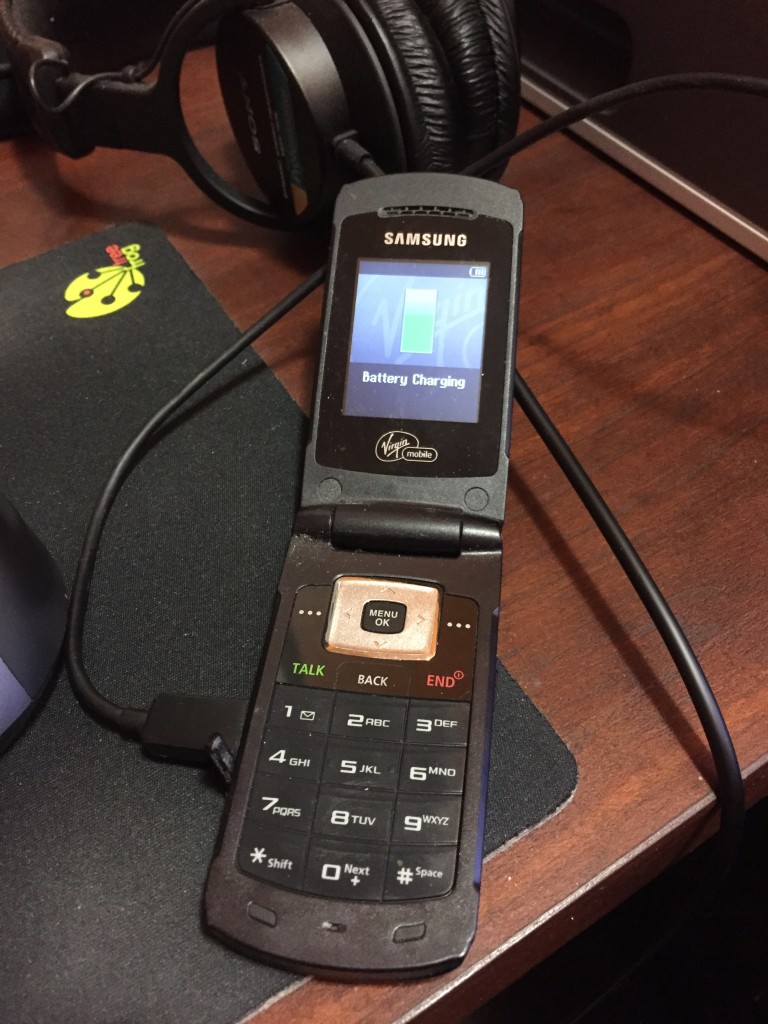
I still think having a red button labeled END is a bit ominous.

In terms of style, this is my favourite phone, though it’s a mere “feature phone,” meaning it doesn’t have a fancy touchscreen interface and all that jazz. While it’s not a smartphone, it’s not entirely dumb, either. It’s more of a dim phone. The best part is it flips open like a communicator on the original Star Trek. I confess to flipping it open multiple times and uttering, “Beam me up.” This was especially confusing to people when I did it while I was on a call with them. The phone had a low resolution colour display, a Tetris demo that worked about as well as you’d expect, and had TALK and BACK buttons next to each other, which I’m sure was just a coincidence. It was neat to me in that whole “wow, you can actually take your phone with you anywhere” way, but in 2009 it was already obsolete thanks to a little phone introduced two years earlier you may have heard of. I moved on quickly to…

2010: I phone, You phone, We All iPhone

Device: iPhone 4
Fun Fact: Steve Jobs made out on stage with the iPhone 4 at the 2010 Worldwide Developers Conference (WWDC)

Here is a stock photo of an iPhone 4 from Apple’s support page because mine has probably been recycled into a transistor radio by now:
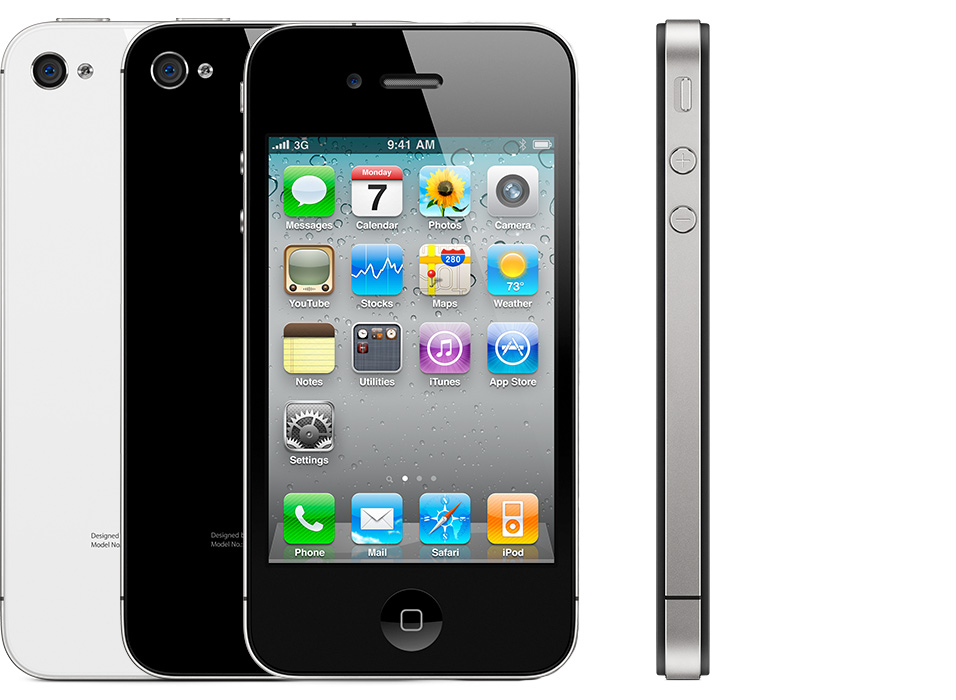
My iPhone 4 was black back when black was black and not space grey.

What convinced me to get my first iPhone was the Retina display. It really did look sharp. Steve was right! I downloaded bunches of apps that I promptly ignored, because apps were new and amazing. I kept a handful that were actually useful. Actually, I lie, I kept all of them because for the longest time I had no idea how to get rid of them. I was now ensconced in the iOS ecosystem, but it turned out that in 2010 that wasn’t enough. I wanted more. I wanted something…bigger.

2013: Bigger is Better (in theory)

Device: Samsung Galaxy S3
Fun fact: I spent more time moving icons around on screen than actually using this phone

Stock photo because my Galaxy S3 by all rights should have been shot into the sun (see below):
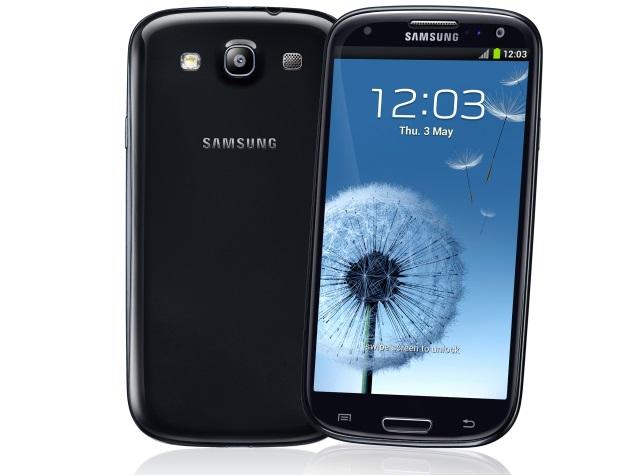
Now picture this phone going dead after a few hours of not doing anything at all. Grr.

Three years later (phone contracts were three years long in the olden days) I jumped ship to Android, or at least to Samsung’s version of it, dubbed TouchWiz, which reminds me too much of Cheese Whiz. What seduced me away from the iPhone was again the display–this time due to the Samsung Galaxy 3 offering an absurdly spacious (at the time) 4.7” display. I loved the larger screen. The phone was a little slippery to hold, though. Very slippery, really. It would squip out of my hand like a bar of soap. And to be honest, it felt pretty cheap and plasticky, pretty much the opposite of the classy iPhone 4. Also, it turned out the phone had a mysterious battery drain issue that could not be resolved. It would sit on the desk while I was at work, in sleep mode, and be drained before my shift ended. I spent oodles of time troubleshooting it, turning on power-save modes, disabling Wi-Fi, placing it in a pentagram on the floor and offering my first born. Nothing worked. It was the first time this fancy new technology let me down. Telus kindly allowed me to swap the S3 for any other phone they carried, up to the same value. This led to…

2013, Part 2: Back to the Fruit

Device: iPhone 5c
Fun Fact: This phone was an experiment of sorts for Apple. I loved it and so it was killed dead after one year.
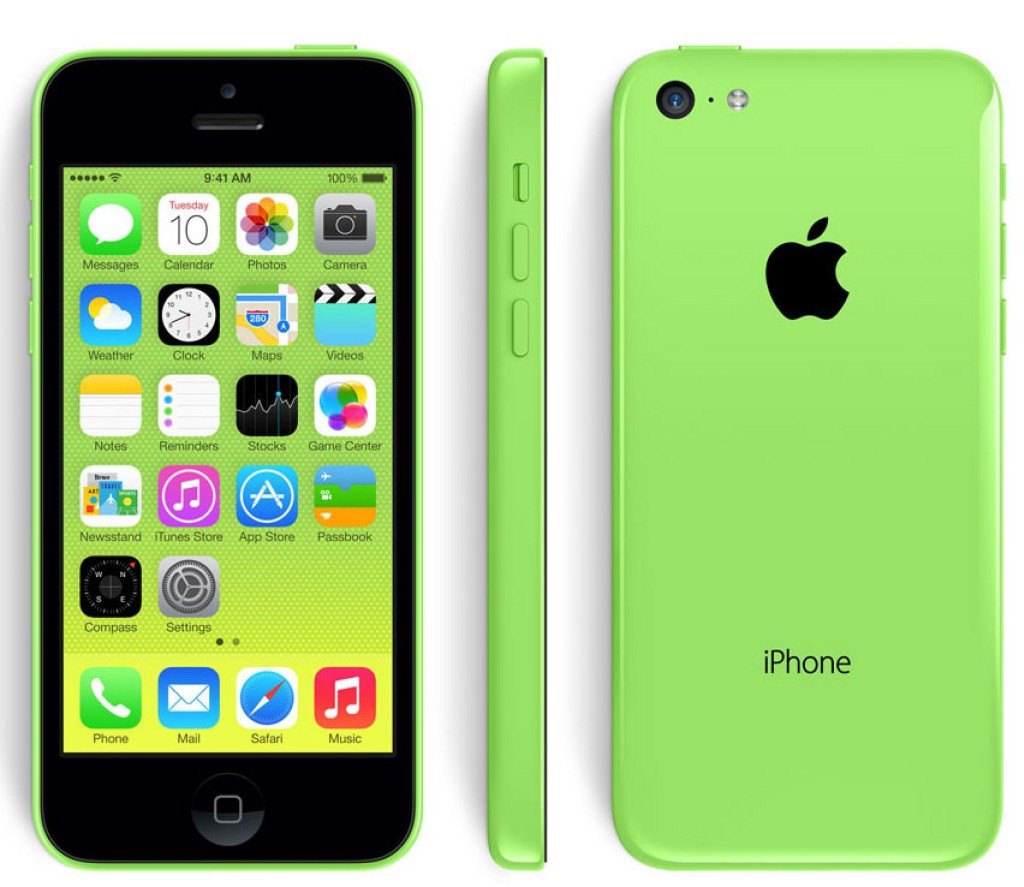
So green. So groovy. Image courtesy of MacRumors.

By the fall of 2013 I had returned to the Apple fold by getting a funky green iPhone 5C. Design-wise, this is still my favourite phone. It also fit nicely in hand without needing a case. It wasn’t slippery like the S3 and the plastic looked nice, not cheap. The display was larger than the iPhone 4 at 4 inches, but still smaller than the S3. I didn’t mind, though, it was enough for me. I downloaded more apps and for a time was content, but eventually chafed at the 16 GB of storage. My music collection alone would come to surpass this. So my next phone was based on something other than the display or battery/reliability.

2014: Big and Not Really Beautiful

Device: iPhone 6
Fun Fact: I’m pretty sure Steve Jobs rolled over in his grave at the design

Space Grey: The new not very black

In late 2014 (like, a few days before the year ended) I got an iPhone 6 after nearly three months of searching for a store that had the model I wanted in stock–a 64 GB Space Grey. The iPhone 6 was the first “big” iPhone and was popular as all get-out. This had the same 4.7” display as the S3, and like the S3 it was also very thin and slippery to hold. I got a green silicone case for it, to make it look a bit like my beloved 5c and to keep it from shooting out of my hand. That case turned out to be a little too grippy, making it somewhat difficult to get the phone out of my pocket. I opted for a black leather case instead, since green leather cases were not available and would probably have been hideous, anyway. Speaking of hideous, I am 100% certain that Jobs would have barfed at the way-ugly antenna cutouts on the back of the phone (the Space Gray colour made them a little harder to see, at least). I didn’t care about the looks, though, because with 64 GB of storage I was able to comfortably load all of my music on the phone, plus all the apps I’d never use.

Three years later and that same iPhone 6 is trucking along, albeit more sluggishly than before. I’m long past my two-year contract, so I’ve been eyeballing possible replacements and trying to decide what’s important to me now. Really, if the iPhone 6’s performance was still top-notch I wouldn’t even be looking at all. Since I have an Apple Watch I am more or less beholden to Apple (I rather like the watch) and where once Apple offered an iPhone and that was it, they now sell:

  • iPhone SE
  • iPhone 6s
  • iPhone 6s Plus
  • iPhone 7
  • iPhone 7 Plus
  • iPhone 8
  • iPhone 8 Plus
  • And next month (November), the iPhone X (that’s 10, not the 24th letter of the alphabet)

Yes, Apple has gone from the simplicity of offering one phone model to octupling the choices. The Canadian prices range from $469 to $1319, or from the sublime to the ridiculous, if you prefer.

I have made no decision as of yet and so my cell phone story has reached a pause, for now. I’m finding it hard to imagine I could justify $1300+ (before tax) on a phone that doesn’t actually do impossible things, like shoot money at me or do the laundry, so the iPhone X is probably a no-go. Plus it’s all-new first generation technology and Apple is pretty good at borking that sort of thing. Better to wait a couple of versions, then get the second generation at a discount.

Or just buy a cheaper phone, because as I mentioned near the start of this, I have a propensity to rarely call people or otherwise receive calls, which makes a $1300 phone seem a little silly, even if it can recognize my face.

UPDATE, January 19, 2021

I have acquired two more phones since this post was originally made. See below!

2017: Slightly improved

Device: iPhone 8
Fun Fact: Really just a refinement of the 6, though with a glass back, so Steve Jobs is probably no longer rolling over in his grave
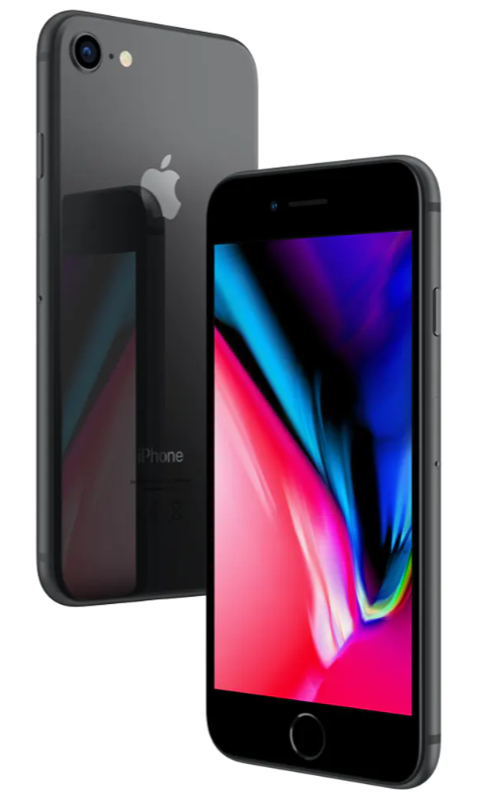
By 2017 the performance of the iPhone 6 was getting noticeably slower, thanks to Apple’s “We’re totally not trying to get you to buy a new iPhone” updates to iOS. I decided to upgrade and because I was off contract, opted to buy the phone outright (I did a comparison and buying the phone and paying monthly over two years would have saved me about $20), so I took my 6 to an Apple store, considered the $1,300+ price of the then new iPhone X, chuckled quietly, then got an iPhone 8 in space gray with 64 GB of storage. I was essentially getting a faster version of the 6, with a better camera, wireless charging and Force Touch1Or 3D Touch, or whatever name Apple gave the phone version. This was maybe part of the problem–even Apple seemed confused by the feature. (which Apple later went on to kill, anyway). I immediately got a case and the phone never left it. It is in that same case right now.

Phone-wise, the 8 is so close to the 6 that I can’t really say anything new about it. I did appreciate the camera improvements and it led me to ultimately getting an actual camera, so that was a plus (except to my bank account).

The iPhone 8 served me faithfully for over two years, but in its third year, things turned sour. See below.

2021: The future is notch-shaped

Device: iPhone 12
Fun Fact: My biggest phone yet that strangely doesn’t feel that big
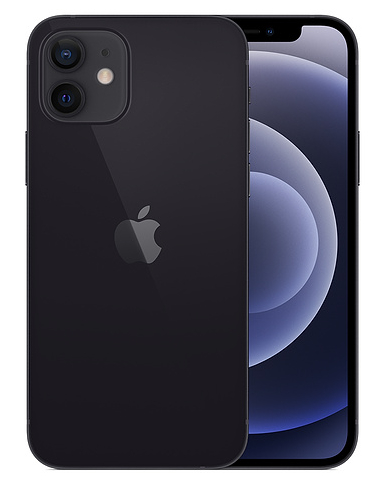
In 2020, the Worst Year Ever, my trusty iPhone 8 started developing battery issues. Specifically, the battery was not able to hold a decent charge. Then it got worse. The battery would drain so rapidly that it would go from 100% to 4% to “I’m shutting off now” in a matter of minutes. It got to the point that if I went out taking photos with Nic, I would need to bring along a portable power bank and run the iPhone tethered to it. At first I considered getting a new battery, but given the age of the phone, I ultimately decided to wait for Apple’s new models to come out and maybe get something on contract again, and using the “spread the pain over multiple years” to get a so-called Pro model with a telephoto lens.

In the end, I did everything differently, in a way:

  • I replaced the battery of my iPhone 8. With a new battery I can sell the phone used. Without a new battery, no one would want it unless they were mad. Or willing to deal with the hassle of replacing the battery themselves. But the battery replacement was more complicated than expected and the phone had to be shipped off to Apple.
  • The delay prompted me to finally move forward on getting a new phone, but in the meantime I had also decided to get an actual camera, so I went from considering the iPhone 12 Pro/Pro Max to settling on the regular iPhone 12.

The iPhone 12 model I have is Graphite, which is apparently Apple’s new version of Space Gray. I also bumped the storage up to 128 GB just to be on the safe side, even though I will now be taking more photos on my actual camera (a Canon EOS M50–more on that in another post).

This is my first iPhone with the new design language of “full screen” display, camera notch at the top and such. The larger display (6.1″ diagonally) is nice, and because the bezels are so much smaller, the phone is not actually much bigger than the 8. The flat sides also feel nice for holding it. It feels solid.

The camera is improved again and night mode works as advertised–handy for grabbing pics when lighting is bad and I am sans dedicated camera.

Other than that, it’s an iPhone and works like an iPhone. It’s fast and slick, but I use my phone much less than other tools these days. I made a rule only to install apps as I need them and I’m keeping the home screen free of any apps I don’t use regularly. It’s mostly empty.

Oh, it has 5G support. I have not noticed this making a difference anywhere at any time. So woo on that.

Run 543: Annoyed

UPDATE, August 21, 2022: The update is just to fix minor typos I noticed when reading through this post years later. I do have to LOL (as the kids say) when I refer to my pace being "plodding" at 5:20/km, when today that would be blazing fast. Good ol' aging!
Run 543
Average pace: 5:20/km
Location: Burnaby Lake (CCW)
Start: 12:01 pm
Distance: 5.02 km
Time: 26:48
Weather: Party sunny
Temp: 12-13ºC
Humidity: 63%
Wind: light
BPM: 173
Weight: 153.3 pounds
Total distance to date: 4222 km
Devices: Apple Watch, iPhone

Note to self: NEVER RUN ON A STATUTORY HOLIDAY

I didn’t feel like running today, but by late morning, a combination of guilt and rainy skies predicted for tomorrow prompted me to head out.

Today is Thanksgiving in Canada, a stat holiday. It is also a day I normally don’t run.

I started walking down the river trail, undecided on what to do, but leaning toward some kind of 5K. As I entered the river trail, I noted a couple with a lovely small dog. The dog was leashed. What smart and responsible dog owners, I thought! They stopped for a moment by the Canine Code of Conduct sign and the woman unclasped the dog leash, freeing her mutt. I was still 20 minutes from running and already annoyed. Later, I watched a pair of people look at one of the new STAY OUT signs posted at the entrance to one of the unofficial trails, then promptly take off down it. They probably had no idea where the trail led, but no sign was going to boss them around! I predict traffic on these trails will increase as a result of these signs (UPDATE, August 21, 2022: All the signs were vandalized and removed within about a month of going up and were never replaced).

I ended up doing a rather plodding 5K, sticking to the usual counter-clockwise route. The first three km were strangely sluggish, despite an equally strangely high BPM of 173. By the fourth and final km my pace improved significantly, but I opted to end it there rather than continue, netting an average pace of 5:20/km. If I had done a full 10K I probably would have finished with a decent pace rather than a mediocre one.

The left leg’s tendon felt a little tight toward the end, but was otherwise manageable. Conditions were also fine–dry and cool, temperatures hovering around 12-13ºC throughout my non hour run time.

As is always the case on a stat holiday, lots of people were out, especially people who like to clump awkwardly and block the trail. Multiple times I had to slow down, divert (in one case entirely off the trail) or even briefly stop. As I was coming out of the Conifer Loop trail, I saw three people ahead of me. Two moved forward to study the map at the intersection of the trails. The third–who clearly saw me–hesitated, then moved forward at precisely the right time to get in my way. How do people pull off these inept moves with such precision? I do not know.

Likewise, I continue to be baffled by my amazing ability to flip small rocks into my shoes now while running. I’m not sure if my gait has changed or if it’s the newish Brooks Cascadia shoes I’m wearing, but I have become expert in the whole “flip a small sharp piece of gravel into the air and have it land on the back of your shoe and then promptly slip down into it and lodge uncomfortably under your foot” thing. This time the gravel was sharp enough that I had to pause the run to fish it out of my shoe and toss it aside while muttering colorful metaphors.

By the end of the run I just wanted to leave, so I turned and headed back to the Burnaby Lake SkyTrain station instead of walking out. I don’t regret my choice.

Overall: bleah.

Run 542: Unplanned, fast and Friday

Run 542
Average pace: 5:22/km
Location: Burnaby Lake (CCW)
Start: 11:16 am
Distance: 10.03 km
Time: 53:54
Weather: Cloudy
Temp: 12ºC
Humidity: 70%
Wind: light
BPM: 170
Weight: 154.4 pounds
Total distance to date: 4217 km
Devices: Apple Watch, iPhone

I booked today off to get an extra-long Thanksgiving weekend, so I could make the most of resting and relaxing.

The relaxing started early as I opted to skip my usual Thursday evening run. I compensated today but heading out this morning for a run at the river or lake. I really didn’t know, I just headed out.

It was 12ºC the whole time but with little wind, so it felt cool but not cold. Still, this was one of the first days where the weather had a much more tangible feel to it. The sky threatened rain but the forecast said it likely wouldn’t happen until the afternoon, so I figured I’d probably be good.

Save for a few drops right at the end of the run, I was.

I opted for the lake and originally thought I’d stick to a 5K but instead did a full loop and turned in a pace of 5:22/km, shaving three seconds off my previous best. I was not expecting this.

The trail was pretty quiet, with only a few other runners and a couple of walkers present, one of who I passed twice as she rounded the lake clutching a giant paper cup of coffee and wearing a big jacket with a fur-lined hood pulled up over her head. She looked comfy.

No bears again. They should be heading off for hibernation soon, I think, if they even do that here.

A bunch of new signs have been posted at the entrance to unofficial trails that literally say STAY OUT. I predict they will have minimal effect. Since most of them lead to a pair of railway lines, I suspect Metro Vancouver is trying to cover itself for liability in case someone gets taken out by the Rocky Mountaineer or a 150 car coal train en route to whoever still uses coal for energy.

I started out the run telling myself to stay steady and indeed the first two km were the slowest. In fact, the whole run was strangely reversed, with the first km pace being 5:35/km and the last being 5:04/km (which is fairly blazing for the end of a 10K–maybe I was concerned about the rain starting and my nipples exploding). The fifth km was always weirdly faster than most at 5:12/km. I think for that one I was maybe thinking of only doing a 5K and wanted a strong finish then found myself going on, anyway (my average pace would have been about 5:26/km if I had).

Around the 6K mark the tendon in the left leg started getting stiff, but it leveled off again as it had on the last 10K, and after about five minutes or so it felt much better, as the back half of my run illustrated.

Overall, a perfectly cromulent run and it stayed dry on the walk home, too, which was a nice bonus. I opted not to use the AirPods today because of the potential rain. While I’ve never had a pair of EarPods damaged by rain, it only costs $30 to replace them should they get damaged. The AirPods cost about seven times that, so I’m a bit reluctant to expose them to precipitation. I’m willing to bet they’d be okay, but I need to spend more time using them before I can get past the idea of potentially wrecking them. Get my money’s worth first, you know. I listened to two Tom Petty albums for the run (Full Moon Fever and Into the Great Wide Open) and while I’m bummed that he’s gone, it still seems a little surreal at the same time. Tom Petty dead of a heart attack at 66 just seems off, somehow.

But it’s good music to run to. Thanks, Tom!

Run 541: Wireless and fancy-free

Run 541
Average pace: 5:00/km
Location: Brunette River trail
Start: 6:04 am
Distance: 5.05 km
Time: 25:15
Weather: Sunny
Temp: 16-14ºC
Humidity: n/a
Wind: light
BPM: 172
Weight: 155.3 pounds
Total distance to date: 4207 km
Devices: Apple Watch, iPhone

With the sun setting at 6:46 p.m. I headed out as quickly as I could for tonight’s run. With clear skies it was only slightly gloomy by the end but it’s pretty clear there’s probably only another week or so left before it’s going to be getting downright dim and then dark for after-dinner runs.

I will have to decide what to do soon.

But not right yet.

Tonight’s run was a bit different, technology-wise, as I picked up a pair of AirPods, Apple’s wireless ear buds. I also synced a bunch of music to my Apple Watch and so headed out without my phone for the first time in a good long time, relying on my Watch’s GPS to track the run and the AirPods to play entertaining music from the Watch. It all went surprisingly smoothly, with no hitches in the sound, the AirPods staying firmly in-ear and even the battery of the watch surviving without taking a big hit. It felt weird to not have the phone, which shows how dependent we’ve become on the infernal devices, yet nice at the same time to just pop on the AirPods and go, no belts or cords to mess with.

A side benefit is the AirPods carry the Workout app’s sounds. I almost never notice the haptic feedback from the watch when running and only occasionally hear the sound that plays at each km interval. It was nice to actually hear all of them clearly for a change, taking me back to the days of using the Nike+ app (maybe one day I’ll try that again, too).

The only real downside is without any cell/internet connectivity the run couldn’t record the weather conditions, but that’s a fair trade-off since I’m actually in the weather and everything while running.

And speaking of which, it was a pleasant clear evening so I felt rather spry. As a bonus, only minimal sweating and it didn’t start until after the 3K mark.

Now, I have no idea how accurate the Watch GPS is vs. the one on the iPhone, but tonight’s pace was a year’s best 5:00/km, with three km coming in under five minutes. This beats my previous best of 5:09/km. If I had known I was so close to breaking the five-minute mark I would have pushed just a tiny bit more but still, it’s a nice round number.

The left leg is still feeling a little stiff but it’s entirely tolerable and recovered quickly after. As long as I don’t go all crazy and start sprinting I think it will be fine.

Overall, a pleasing result, both in terms of the new set-up and the performance. Here’s to getting at least a few more runs in before The Long Dark Winter with guest star Long and Almost as Dark Fall, sets in.

A tech nerd’s writing dilemma

Or what you do when your preferred writing application goes subscription-only.

I love playing around with software, so looking for a new writing program is kind of exciting in a geeky sort of way. At the same time it can be a convenient excuse for not actually writing, so I am determined to make a choice as soon as I can.

Now that I have eschewed Ulysses (see here for more) I need to pick another piece of writing software to use for all my writing needs and desires. The first thing I need to establish are the must-have features this software will have:

  1. Must let you type words into a computer and save them to disk or “the cloud”
  2. Must work on both a MacBook Pro and Windows 10 PC or more broadly speaking, it must work in both macOS and Windows environments *or* support a file format that is natively supported in both OSes without requiring magic or witchery to work properly.
  3. Must please me in somewhat arbitrary and ill-defined ways
  4. Must not require a subscription. Paid or donate to unlock all features is okay.

Now, let’s review the criteria:

1. Must let you type words into a computer and save them to disk or “the cloud”

This one is easy as literally any program except whimsical comp-sci projects will pretty much let you do this. This does not narrow the criteria down in any way whatsoever, so my inclusion of it here was simply to start the process with a little levity. A tiny smidgen, if you will. Moving on…

2. Must work on both a MacBook Pro and Windows 10 PC or more broadly speaking, it must work in both macOS and Windows environments *or* support a file format that is natively supported in both OSes without requiring magic or witchery to work properly.

This is where it gets trickier. There are some programs that work across both platforms and these are my preference. However, if I opt for a common file format such as text (.txt) then I can write in different programs and the actual work will be the same in each. The biggest downside to this approach is probably the mental shift required when switching off between programs that could potentially work very differently even as they ultimately accomplish the same thing.

3. Must please me in somewhat arbitrary and ill-defined ways

This category covers “nice to have features” that aren’t strictly required but in a way actually are. For example, the ability to set a writing goal is pretty essential for National Novel Writing Month and some of the major programs like Microsoft Word do not feature this, because they focus more on making the writing look pretty, rather than the actual process of putting the words down.

Other nice-to-have features would include:

  • focus mode (highlight a line/sentence/paragraph)
  • distraction-free options (full screen support, etc.)
  • easy to access word counts
  • ability to easily move around scenes or chapters
  • built-in support for cloud services like Dropbox, OneDrive or others
  • and other things

4. Must not require a subscription. Paid or donate to unlock all features is okay.

This is pretty straightforward, unless the chosen program does what effectively amounts to a bait-and-switch by changing their pay model after you purchase the software (as happened with Ulysses, which went from a traditional paid program to subscription). There is an increasing move toward subscriptions (boo) but enough options exist outside the model to allow me to steer clear of it for now.

With the criteria set, let’s look at the pros and cons of some candidates.

Microsoft Word

Pros:

  • supports Windows, macOS, iOS
  • integrates nicely with OneDrive
  • offers web version in a pinch
  • familiar
  • supports indents
  • .docx format is widely supported
  • has a full screen mode

Cons:

  • no options for setting goals
  • no focus mode
  • no easy way to move scenes or chapters (it can be done, just not easily)
  • the WYSIWYG approach can lead to fighting the formatting
  • no built-in support for markdown, though it will auto-convert some markdown to formatting, such as using asterisks for italics.
  • about the complete opposite of a Zen writing program

WriteMonkey

Pros:

  • supports Windows and macOS (Mac version is currently beta-only and not feature-complete)
  • supports cloud services for saving
  • supports indents (Windows version 2.7 only)
  • can auto-generate backup files to a specific location
  • supports distraction-free/full screen modes
  • has focus mode
  • allows you to set both overall and immediate goals, with visual aids
  • word count is always visible
  • many options to customize the look and feel, along with theme support
  • supports markdown and in version 3 offers good visualization of markdown in the editor
  • saves in simple .txt format, making it easy to load its files in other programs (this changes a bit in version 3 but is still possible there)

Cons:

  • Mac version is in beta and lacks some essential features, such as indents, meaning cross-platform support is not really there yet. The workaround for now is to use version 2.7 on a Mac running wither in Bootcamp or through a VM solution like Parallels.
  • UI is a bit fiddly and can be difficult to work around (I’ve gotten past this particular hump, though, having used the program for several years now)

FocusWriter

Pros:

  • supports Windows, macOS and Linux
  • clean interface without billions of distracting options
  • can save to .txt format for maximum flexibility
  • supports setting goals
  • supports indents
  • shows word count
  • customizable themes, including different wallpapers and sound effects for distraction-free mode
  • can save to cloud services without issue
  • will start up with the last opened document to allow you to jump right in

Cons:

  • no real markdown support, though it offers one tag as a divider to separate scenes or chapters
  • maybe a bit too Spartan

Typora

Pros:

  • supports Windows and macOS
  • supports indents (awkwardly, as it has to be implemented by editing a theme file)

Cons:

  • doesn’t offer anything that isn’t also available in FocusWriter or WriteMonkey
  • focus is clearly on technical writing, not fiction

Scrivener

Pros:

  • supports Windows, macOS, iOS
  • supports indents
  • supports goals
  • offers focus mode
  • offers distraction-free/full screen mode
  • shows word count
  • highly customizable
  • allows for easy shuffling of scenes or chapters
  • excellent community support
  • can easily handle large projects

Cons:

  • UI feels dated and can overwhelm with options
  • offers poor cloud support due to the way it saves projects as collections of files. This can lead to corrupt projects.
  • Windows version perpetually lags behind Mac version in development (though files always remain compatible between the two)
  • weirdly forces you to name your project before you can start writing

No indent support

As mentioned above, supporting indents is crucial for fiction writing because a dialog exchange between characters woulds requiring hitting the Enter or Return key all the time and looks weird, as illustrated below:

“Hi John.”

“Hello Sally.”

“How are you?”

“I am swell, how are you?”

“I broke the Enter key on my computer.”

“Oh, that sucks. How did it happen?”

“My preferred writing program doesn’t support indents.”

Both John and Sally cried and bonded over this horrible tragedy.

It turns out that a lot of markdown editors lack support for indents, which was one of the things that made Ulysses so nice.

Here are programs that might have been considered but are ruled out because they lack support for indents or are platform-specific or both:

  • iA Writer
  • Bear
  • Editorial
  • Pages
  • MacDown
  • plus about a billion more

The Big Decision

In the end there are only a few reasonable choices.

Choice 1: WriteMonkey

My preference is to use WriteMonkey because I am familiar with it and it has worked well for me in the past, despite some rough edges on the UI. The main issue here is the beta version works well but lacks any way to use indents, so if I’m writing on my MacBook Pro I need to use a different program that saves to .txt format or I have to use Parallels/Bootcamp.

As it turns out, I’ve actually set up Parallels and while the Windows 2.7 version of WriteMonkey works well enough in it, something about the arrangement makes me nervous. Still, this remains a viable option.

One workaround is to use FocusWriter when on the Mac, as it has a native version of the program. I’ve tested and haven’t noticed any weirdness when switching between files created in WriteMonkey and then edited in FocusWriter and sent back to WM again. FocusWriter doesn’t support markdown but it also doesn’t do anything with markdown in the body of the document, either, so it’s still there in WriteMonkey.

Once WriteMonkey 3 is out of beta this should be a much stronger choice but it’s being developed by a single person, so work is not surprisingly proceeding at a slower pace (the first public beta came out in September after a private beta that ran most of the year).

Rating: 3.5 out of 5 indents

Choice 2: FocusWriter

FocusWriter’s strength lies in its simplicity and its native support for both Mac and Windows platforms. It doesn’t support markdown but perhaps because of this, it offers more fiction writer-friendly features.

Rating: 3.5 out of 5 indents

Choice 3: Scrivener

I spent enough time using Scrivener, including writing NaNo novels with it, to learn most of its quirks and workflow. Then I stopped using it for long enough that I’ve forgotten most of that.

If you are simply typing words into the editor it’s pretty easy to use. It gets complicated as soon as you do anything else. The UI is bad.

The good news is its getting a major revamp to version 3. The less good news is that it’s not out yet, though the Mac version is expected by the end of 2017, with the Windows version coming in early 2018.

My biggest issue with Scrivener, though, is the way it saves files. By default it saves after two seconds of inactivity, which is nuts. This can be changed, but still, it seems like a recipe for introducing file corruption by invoking near-perpetual writes.

Along with this, the cloud support is very bad. It can work decently with Dropbox but people are actively told to steer away from OneDrive, iCloud and Google Drive. OneDrive is my preferred place to save things in the ephemeral cloud, so being told it’s not a good idea is a bit of a put-off.

I also lost a large chunk of a NaNo novel a few years ago when I botched the local/cloud saves while using Dropbox. This is mainly on me, but I felt it likely wouldn’t have happened in a different program due to the way Scrivener bundles projects into a multitude of files.

Rating: 3 out of 5 indents

Choice 4: Microsoft Word

The ubiquity of Word is probably the best reason to pick it. Its supported everywhere. You can probably run Word on your toaster now. But it offers few features for a fiction writer that are very nice to have. It lets you write the words and make them look pretty. It doesn’t do much beyond that.

Rating: 3 out of 5 indents

Darkhorse possibilities

There are some web-based editors that can usually work in offline mode if you lose connection (your work is automatically synced when the connection is restored) but I’m very leery of going web-only for my writing.

I could also just use a typewriter. No one ever lost a save file on a typewriter. The trick would be to find one. Plus I hate using typewriters because I’m not Harlan Ellison.

Finally, there’s always a notepad and pen. The very thought is causing my hand to spontaneously cramp, so no.

In the end it looks like the best candidates are:

  • WriteMonkey
  • FocusWriter
  • Scrivener

My plan, then, is to do some testing as follows:

  1. Write a small project in WriteMonkey 2.7 (Windows version) and edit it on the MacBook Pro using both the same version in Parallels and through FocusWriter and see if anything screws up and also if the workflow actually works. I’ll use OneDrive for saving in a specially made folder for testing.
  2. Create a Scrivener project in Windows and make changes back and forth in Windows and Mac. I’ll save in a specially made Dropbox folder (in theory OneDrive should work if the folder/files are set to be available in offline mode but I can’t be bothered jumping through this many hoops. I’m not a good hoop-jumper).

After the week of testing I’ll commit to my decision and go on to great writing glory. Hooray!

One month until National Novel Writing 2017!

In 31 days National Novel Writing Month will begin once again, challenging writers to complete a 50,000 word novel in 30 days (that’s 1,667 words per day).

My success rate with NaNo has dipped below 50% since I started in 2009 and this is the first year where I’ve seriously considered not participating. However, my writing has largely stalled over the last two months, thanks to a combination of vacation time getting me out of the habit, an unfinished short story leaving me flummoxed and frustrated, and my preferred writing program suddenly and obnoxiously switching to a subscription model, leading me to dumping it.

They’re all excuses, really. I could have kept writing because the writing program (whichever one I may use) is just that, a tool. I have a plethora of options to choose from, so saying I can’t find a good replacement for the one I’ve stopped using would be like saying I couldn’t use a particular keyboard because it wasn’t the right color (I was originally going to say typewriter instead of keyboard, but a lot of people probably don’t even know what a typewriter is anymore, except as a prop sometimes seen in old timey movies).

The problem is the usual lack of discipline. I mean, look at me right this moment–I am once again desperately cheating my way through that one-post-per-day thing by attempting to write nine posts in one day so I’ll have 30 for the month (this post will bring me up to 25). The reason I’m doing this is because I lack the discipline to write one post per day (a simple and relatively easy task as I’m not exactly writing thesis papers here) and instead must cram in many posts on the final day (a not-so-easy task that may result in posts of less than great ambition and/or quality. See: the next post, which is going to be a haiku).

NaNo is a great way to reignite discipline, assuming the chosen novel keeps on rolling instead of smashing into a brick wall on the third day. I tend to write NaNo novels that feature roads dotted with random brick walls.

I can make this deal with myself: If I don’t get my writing back on track by the end of October, I do NaNo. If my writing is on track, I skip NaNo, because interrupting a project humming along to start another that may crash and burn in short order does not seem like the best plan.

This means I’ll have to start thinking of ideas, too. I hate this part.

I’ll report back in one month with my decision, possibly with a new keyboard in hand. But probably not.

I’m not paying for a Ulysses subscription (and why)

On August 10 the company behind the markdown writing application Ulysses announced that the program was switching to a subscription model and that people who had already purchased the Mac and iOS software would get a lifetime 50% discount on the subscription rate (offer available for an unspecified limited time). You can read a lengthy explanation for the switch in this Medium story (the first paragraph contains the line “Our users expect a continuously evolving high quality product,?” which suggests the company is somewhat clueless about what people want from a writing program.

The regular Canadian yearly rate is $50, so I would qualify for a $25 rate or roughly $2 per month.

$2 per month is not much money. It’s the same I pay for a medium steeped tea at Tim Hortons if I throw the dime I get as change into a donation tin (which I do, I’m not a big hoarder of dimes). My decision to sub or not to sub, then, is not based on ability to pay, but willingness to pay.

After thinking it over for some time I finally came to an answer: I’m not paying.

I’ve stopped using Ulysses and will only keep the apps on my iPad and MacBook Pro long enough to move over the projects I’d been working on. The main one, my 2014 NaNoWriMo novel Road Closed has already been exported back to WriteMonkey, the program I originally used to write it back in the olden days of three years ago.

I really liked Ulysses. The interface was clean, effective and it had just enough features that I was sure it would be a good fit for this year’s National Novel Writing Month. It supports markdown, it has a very clean interface, with various ways to eliminate distractions and provide focus. It allowed you to set goals. Like Scrivener, it let you move around scenes or chapters easily. It offered customizable themes and could export to a variety of formats. It had seamless behind-the-scenes integration with iCloud. I never thought about saving, it just happened in the background, and I never lost a word or experienced any corrupted files in the time I spent using it.

There were problems, too. Macs render I-bars (used for selecting text) as thin black lines and Ulysses offered no options to change this, meaning it was surprisingly easy to lose the cursor if you used a theme with a darker background. I also found moving files around was prone to glitches, with nesting sometimes being hit or miss. There’s also no Windows version and the company behind Ulysses made it clear it wasn’t in the works.

Mostly, though, Ulysses worked well. As a simple markdown editor and writing tool, it did what it needed to.

Why am I unwilling to cough up a measly $2 a month, then, to continue using it? A few reasons:

  1. I don’t want my writing locked to a subscription where some glitch or oversight suddenly means I only have read-only access to my projects. I have Microsoft Word as part of Office 365–a subscription service–but if I want to, I can buy a single license copy of Word and never have to worry about losing write access (ho ho) to my work.
  2. Poor value. Even at $2 a month this is a middling to poor value. I get access to all of the major MS Office applications for free through my Office 365 work account but prior to that coming into play I subbed to the Office 365 University edition. It costs $80 and gives you four years of access–$20 per year or about $1.66 per month–less than Ulysses for a full office suite and cloud storage. But even if I went with the full singe user version (Office 365 Personal) I’d be paying $69 per year or $5.75 per month. This is slightly higher than the non-discount rate for Ulysses but instead of access to a single writing program, you get access to a range of products and services. The value comparison (regardless of whether you think Office is the best or worst thing ever) is incredibly lopsided. Office 365 gives you all of this:
    • Word (word processor)
    • Excel (spreadsheet)
    • Publisher (desktop publishing)
    • Outlook (email)
    • Access (database)
    • OneNote (cloud-based note-taking)
    • 1 terabyte of storage on OneDrive (cloud storage)
    • 60 minutes of monthly calls on Skype (web video phone conferencing)
  3. Ignoring the competition. There are a lot of markdown and distraction-free/zen writing applications out there. Most of them are either free or have a one-time and relatively low purchase price. Even when it was a buy-once program Ulysses was expensive, separating itself from the competition in a negative way (but at least that high price was only extracted once). My favorite payment scheme is probably the one used by WriteMonkey. The software is free to use but if you want plugin support you need to donate. Plugins offer some very nice bonus features but the program itself otherwise works fine. The author is essentially engendering good will in the hope that you will donate and get some nice extras. And it worked, I donated.
  4. Ignoring all of the other subscription software and services. Microsoft and Adobe can get away with it because they are big companies that sell to corporate users and can provide updates and services across an array of products and services. At some point people will draw a line and say no more to the next app they like that demands a subscription for use. I pay for Office 365 but I’ve bailed on my Adobe sub because I don’t get enough value from it and cheaper alternatives exist. I pay for Netflix and a few other services, like my mobile phone plan and internet, and I’ll pay for stuff like ad-removal in phone apps I use regularly. But I’m pretty close to the limit when it comes to adding more subscriptions to my load. A single-use program that is already complete and functional just doesn’t rank.
  5. A writing app doesn’t need a subscription. Microsoft can add or change functionality across seven programs and its cloud service, as well as web-based versions of the same. The Ulysses team can…update Ulysses. But as a writing program it is already feature-complete. If I was pressed I could make up a list of “might be nice to have” features but none would be essential. I can’t begin to imagine adding enough stuff to make me say, “That’s worth $25 (or $50 for most people)” a year.”

Several other competitors to Ulysses, such as the teams behind Scrivener and iA Writer, have said they have no plans to go to subscription. I wish them continued success.

As for Ulysses, I would never wish the company ill, but I hope that it doesn’t pan out for them and they switch to a different kind of payment scheme, whether it’s “pay to remove ads” or “pay for infrequent major releases” (the Scrivener model) or something else. I really don’t want to see single-use software continue down the road of constantly dinging the user for marginal value.

This, of course, leaves me looking for a writing program to use now that I’ve stopped using Ulysses. I’ll cover some options in another post.

September 2017 weight loss report: Down 2.1 pounds

For the month of September:

September 1: 156.6 pounds
September 30: 154.5 pounds

Year to date: From 165.9 to 154.5 pounds (down 11.4 pounds)

I shed another 2.1 pounds in September, despite taking a week off running due to a minor muscle pull and generally running less in terms of distance. On the other hand, I resumed lunch hour walks, which is where I ironically pulled aforementioned muscle.

Like August, I ended the month with my lowest weight at 154.5 pounds, putting me only 4.5 pounds from my official target and less than 10 pounds away from my unofficial target of 145.

It feels like things are staying on track. I’ve even allowed myself one donut per week at our work meetings. This seems to be enough to tide me over, so I never actually buy any on my own.

I’m not sure how accurate my Fitbit scale is but I’m a decent bit leaner ‘n meaner compared to the start of the year when eggnog was still available and being consumed.

Body fat for the first nine months of the year:

January 1: 19.1% (31.7 pounds of fat)
September 30:
15.5% (24 pounds of fat)

Run 540: Into a running event, awkwardly

Run 540
Average pace: 5:25/km
Location: Burnaby Lake (CW)
Start: 10:22 am
Distance: 10.03 km
Time: 54:24
Weather: Partly sunny
Temp: 14ºC
Humidity: 82%
Wind: light
BPM: 169
Weight: 154.5 pounds
Total distance to date: 4202 km
Devices: Apple Watch, iPhone

Because I last ran counter-clockwise at the lake, today I ran clockwise. However, I started my run a little after 10 a.m., which turned out to be around the time a running event was beginning at the lake. The runners, as tradition dictates, were heading in a counter-clockwise direction.

And so it was that between the 3-4 km mark I noticed someone dashing by wearing what looked like an event jersey. The design was too elaborate for me to read as he whizzed by, but then I noticed a few more and thought there must be a small running group out and aboot.

It was when I approached the bridge at Deer Lake Brook that I could see dozens of people in a slowly-spreading out formation, all moving toward me. I managed to barely stay on the edge of the trail and for a moment wondered if I should just switch direction and go with the flow. After another moment I figured they’d pass soon and all was well after that until I rounded the sports fields and about five young women sped past me like a bullet train toward what looked like a finish line. At this point I had no idea how many events were going on or where or how or why, I just quietly hoped I’d be off the trail before hitting the next batch of eager participants.

And I was.

With the forecast promising rain, I headed out with the temperature hovering around 14-15ºC, nearly perfect for running. I didn’t even notice any sweat until I was nearly three km in! The sky was a mix of cloud and sun but this was one of those days where the sun felt like a fall sun, unlike two days ago when it got weirdly warm (27ºC in Vancouver) and very much felt like a summer sun. I prepared for possible rain by protecting my nipples (I wish I could come up with a cute nickname for them. “The boys” seems wrong.) but the rain obligingly held off until two hours after I had finished the run.

I kept up a nice pace and the cooler weather made it easier to maintain the pace. Somewhere between the 5-6 km the left leg began to feel stiff but I waited it out for a bit and it leveled off quickly, so I was able to finish the full run and even felt a little spry in the last stretch (I wasn’t really any faster, but I did keep up a very consistent pace throughout). The walk home was fine and as I write this the leg seems to have recovered nicely. My overall pace was my second-fastest for a 10K this year at 5:25/km. I am provisionally prepared to say I am safe for running 10Ks on the weekend.

Which I will probably do in a counter-clockwise direction from now on.

Book review: Five Stories High

Five Stories High: One House, Five Hauntings, Five Chilling StoriesFive Stories High: One House, Five Hauntings, Five Chilling Stories by Jonathan Oliver
My rating: 3 of 5 stars

The five novellas in this collection all tell stories either centered around or at least featuring (sometimes very tangentially) the Gothic residence known as Irongrove Lodge, with narrative bridges connecting the stories together in a manner of sorts.

Irongrove Lodge is a nasty old place, full of tortured ghosts and malevolence that drives its occupants to madness and worse. Its many victims prove that a good design treatment on a hell house just leaves you with a nicer-looking hell house.

I enjoyed four of the five stories quite a bit, while one of them left me a bit unmoved. The linking narrative also didn’t really click for me and probably could have been excised altogether. The passages are brief enough that you can get through them quickly, though.

“Maggots” features a protagonist who may be afflicted by imposter syndrome–or his aunt could actually be taken over by some alien entity. It’s appropriately weird and yet thoroughly grounded at the same time. At one point Will, the young man who feels he may be standing precariously on the edge between worlds, writes down possible explanations for what he perceives as his aunt’s strange behavior, ending with “I have lost my mind.” The whole thing is enjoyable in how the characters behave and react in the most ordinary of ways to to each other and events both mundane and…less so.

“Priest’s Hole” is about a man who discovers he can shape-shift thanks to a rather special room in Irongrove Lodge. He ends up with an agent he never sees who finds him jobs and it gets complicated and messy from there. The shape shifter narrates the story and frequently apologizes for being melodramatic and stupid. It’s a neat take on shape-shifting.

“Gnaw” is a straight-up ghost story, in which a young family moves into Irongrove Lodge, the husband determined to remodel it and make it a home for his wife and two children. Various ghosts and ghost-like entities have other plans, most of them violent and disturbing. The remodeling does not go well. This is one of those tales in which you will find yourself constantly muttering to yourself, “Why won’t they leave?!” but still manages to keep on the side of the characters behaving believably.

“The Best Story I Could Manage Under the Circumstances” is a surreal trip through magically-appearing doors in bedroom walls and ceilings, in which a young boy is ensnared by a demented storyteller. The whole thing is presented in a very droll manner, as a kind of modern fairy tale, and while it is a triumph of style, I found I didn’t care about the characters and nearly stopped caring about how things would turn out. If this style works for you, however, it may make your socks roll up and down in delight. My socks didn’t really move much.

The final story, “Skin Deep” is told as a series of vignettes from the perspectives of those involved, a format author Sarah Lotz used to good effect in her novel The Three and again uses skillfully here. This is another remodeling-gone-amok tale, in which a May-December couple moves into one of the flats at Irongrove Lodge, where Robin, the younger of the two, becomes obsessed with redecorating the place to the detriment of his wife’s bank account, their marriage and his sanity. The remodeling again does not go well, though the cleaners manage to get most of the nastiest stuff cleaned up.

Given the subject matter of most stories, the tone in the majority of them is surprisingly light, yet with the exception of “The Best Story…” the presentation never feels glib. “The Best Story” is all about being glib and weird and gross (you may not want to pass along this story to someone expecting a baby–trust me on this).

While I would overall recommend Five Stories High,/> the marketing of it is deceptive, as only two of the stories are really ghost stories at all. They also happen to be the only two that really make Irongrove Lodge a significant part of the narrative, rather than something shoehorned in to technically fit the theme of the collection.

View all my reviews

Run 539: The peppiest 5K of the year (so far)

Run 539
Average pace: 5:09/km
Location: Brunette Brunette River trail
Start: 6:07 pm
Distance: 5.02 km
Time: 25:58
Weather: Clear
Temp: 19ºC
Humidity: 64%
Wind: light
BPM: 159
Weight: 155.9 pounds
Total distance to date: 4192 km
Devices: Apple Watch, iPhone

Well, that was weird.

I had three things benefiting me on tonight’s run: the weather was very pleasant, with the sun behind the trees, the temperature 19ºC and little wind, it made for near-ideal conditions, with minimal sweating and such. Secondly, the river trail is much more forgiving than the trail at Burnaby Lake, with minimal changes in elevation and wide, gentle curves. Thirdly, I started the run at the start of the trail, so my warm-up walk was only 1.5 km instead of 4 km as it would be if I’d been running at the lake.

And cyclists are allowed at the river, which oddly means they are much better-behaved.

All said, I was aware of not overdoing things again and indeed, the second km found my pace dropping off by a fair bit as I tried to rein things in. Then the weird part happened. I found a good, solid pace and maintained it for the rest of the run–and ended up with my best 5K run of the year so far, with an average pace of 5:09/km. It’s the first time I’ve also come in under 26 minutes. I was not expecting this.

About two km in I felt a very slight bit of tweaking in my left shin but it eventually went away and the left leg was otherwise pretty much fine, with little of the stiffness I felt on Sunday. My BPM was lower, too, due in part to the utterly nice conditions.

Overall, a very welcome run, especially coming after what could have been a potentially nasty muscle injury. I think as long as I don’t try pushing harder I’ll be okay–for both running and walking.