In some ways, the reset of Windows was a success. It got rid of a lot of junk I’d collected over the years on my current PC, and now I’m just installing stuff as I need or use it, resulting in a leaner, tidier system. This pleases the OCD side of me.
But in other ways, it has not really helped, which makes me believe my issues are either hardware-related, a result of some weird software interaction, or a manifestation of minor and probably bored demons.
The wallpaper issue, which I was relatively sure the reset would resolve, continues unabated. Sometimes the wallpaper changes to one I used last winter (always the same one, which seems like it should be a clue) and the past two mornings it’s just changed to a solid colour (also the same colour).
Diablo 2 crashed upon exit. So much for stability! At least it didn’t take down the entire system.
I suppose I should be happy this is all I’ve encountered so far in terms of bugs or glitches. But I am in a position now that would have been unthinkable in the olden days: If I could do everything in Linux–yes, Linux!–I would ditch Windows. But alas, I cannot.
I’d also switch full-time to a Mac, which comes tantalizingly close to doing everything, but still sucks for gaming. It’s getting a little better, though. Good enough for me? Probably not. Plus, Apple locks things down way more than I like.
Anyhoo, I have installed more stuff:
PowerToys (I started to miss some of its features)
Vivaldi (which will be my Chromium-based alternate browser for now)
Stella (an Atari 2600 emulator I’d been mucking around with just prior to the re-install)
Diablo 3 (I know, I know)
Diablo 2 (technically it was still installed, the battle.net launcher just couldn’t “see” it)
EarTrumpet, which allows me to better manage multiple audio sources
Also at the suggestion of a gaming pal, I bumped up my mouse DPI from 1600 to 3200. It definitely takes less movement to do stuff, which is good. I am still overshooting a bit, but will hopefully adjust. I’m still trying new things, look at me! Maybe I’ll get into metal next.
A few glitches and things following last night’s reset of Windows 11:
Despite uninstalling all the non-included software, my Start menu settings were preserved, which means it’s littered with uninstalled apps. This is suboptimal, but not a dealbreaker or anything. I can manually prune the Start menu by going here: C:\ProgramData\Microsoft\Windows\Start Menu\Programs, and I’ve kept some of the stubs as reminders of stuff I may want or need to install later.
The wallpaper–which had been randomly changing on its own despite me turning off or tweaking every conceivable option to make sure it wouldn’t do that–had randomly changed when I logged back in this morning. I went through to see if one of the possible triggers had gotten reset in the reset. It’s resets all the way down.
I’ve re-installed Signal–because I was using it!
I re-installed ShareX because it is totally skookum for screenshots, of which I take a lot
I remembered to bump the refresh rate of the monitors, since they support 144 Hz
I still haven’t opened Edge
I disabled those weird streaming Steam audio settings I’ll never use but always show up as options cluttering yup audio settings
The audio on the monitors, which have speakers that can be described generously as “tinny” seem louder than before. Maybe that’s just me.
I can’t say I regret the reset yet. But it’s still early!
Next on the list:
Install Unity
More will follow along after Unity, but that will get me going.
UPDATE: The following additional software has been installed, as noted below.
Unity Hub and Unity editor
iCloud for Windows. It’s crappy, but it lets me get photos from the iPhone into Windows.
Steam client. Once Steam found all existing games, I uninstalled a bunch of them.
Epic Games Launcher. I tried the same thing here, but it doesn’t work as seamlessly, so I just nuked a bunch of game folders. At least I know there’s no lingering registry entries! I installed Torchlight 2 as a test case.
Canon EOS3 Utility software. To allow photos to be transferred from my camera to the PC.
Tonight I was playing Diablo 3 (I know, I know) and it started getting very laggy. Then it froze. Then I realized my entire PC had seized up, something that hasn’t happened in a long time. I thought about it, then decided to go ahead and nuke my Windows 11 install, using the handy Reset PC function:
I chose the less destructive first option, Keep my files.
The process went smoothly and a little faster than I expected. When it was done, I was prompted to log in and was greeted by all the yucky Windows 11 defaults and none of my previously installed apps. Windows 11 comes with a fairly large number of apps on its own, however.
I am now following my usual rule (that I always end up breaking) of only installing apps as I need them. We’ll see how it goes.
The list of re-installed software so far:
Firefox (I got this through the Microsoft Store, so I didn’t even need to open Edge to get it and switch over)
Discord (I tried getting this through the store, but it threw out an error, so I got it from the Discord site)
Obsidian (from the website, it’s not on the MS Store)
MS Office (from the included stub app)
Diarium (from the store)
TickTick (from the website)
As of this post, that’s it! This covers the essentials I use on a daily or near-daily basis. After this, I’ll only install an app when I am about to use it and gasp in horror because it is not there. Totally.
There are plenty of apps I’ll continue to install, but only as I use them. I mean it this time. Totally.
In terms of drivers, the only ones I’m really concerned with are for the mouse and video card. I decided to install the GeForce Experience to make the Nvidia drivers easier to install, but logging into it has turned into a gong show because it doesn’t seem to remember me. Or I don’t remember it. Fun! Actually, having investigated some more, I managed to get into my Nvidia account, get logged into the GeForce Experience app…only to have it tell me I already have the latest drivers installed. OK!
Anyway, I think this is enough PC fun for one night.
If Windows 11 continues to misbehave after this, I will do one of the following:
We went on a two-day trip to Kamloops for a wedding, so I packed way more stuff than I would ever need for two days. This is my way. But just going by the tech stuff, let’s see how sensible I was.
Things I packed and actually used
iPhone 12. I mean, I carry this with me all the time, so it doesn’t really count. But I’m putting it here anyway.
Apple 12 watt USB charger and lightning cable (to charge the phone)
Lenovo ThinkPad X1 Carbon laptop (2018 vintage). Used for journaling and my to-do app.
Canon EOS M50 camera. I took about a hundred or so shots with it.
Things I packed and did not use:
Kobo Libra e-reader. I did not e-read.
iPad Pro with pencil. I did not draw, noodle around with, or at any time take the iPad out of my backpack.
My drawing glove. See above.
The charger for the ThinkPad. Not needed!
USB-C charger for iPad. Not needed, obviously.
A USB-C to USB-A cable I packed for some reason. This wouldn’t have actually connected to anything I had with me. Whoops!
Sony wireless headphones. Never listened to any music.
Probably a few other miscellaneous cables.
Lesson: Pack sensibly for a two-day trip, not like you’re going away for two months.
Everyone is talking about the Apple Vision Pro and will keep talking about it…until the end of the week.
Here’s my summary in handy list form, after watching the WWDC keynote:
MacBook Air 15 inch: Appears to be exactly that, the same M2 Air but with a bigger display. Price is reasonable! Keeping the M1 Air in the line-up when it’s only $100 less than the M2 version is odd. Apple does this sort of thing a lot. Apple is odd.
Mac Studio with M2: Nice to see this new product getting updated. No price change on the default config, but it should still come with a 1 TB SSD standard (it comes with 512 GB).
Mac Pro: WTF LOL etc. After being very late in completing their transition to Apple Silicon because of the Mac Pro, what they released is kind of baffling. First, they re-use the Intel case from 2019. OK, no real issue there, but in terms of specs, this is a Studio with some PCI slots, a few more Thunderbolt ports and it costs…$3000 more. Also, unlike the Intel version, you can’t have separate graphics (integrated on the SoC, like the Studio) and ram is limited to 192 GB instead of 1.5 TB (!). In several important ways, this is worse than the Intel Mac Pro and unless you absolutely need PCI slots for…something (other than graphics cards), it’s a terrible value and not really expandable in the way a traditional desktop PC is. Apple should just kill the Pro, they have basically been botching it for a decade now. Also, I predict this Pro will receive no updates, just like the last two Pros they released that were left to wither and die.
Mac gaming for real this time! Proof: Another four-year old PC game is getting ported, this time it’s Death Stranding.
iPadOS: The pattern is now clear: This gets one or two token new features, then last year’s leftovers from the iPhone. Apple can and should do better.
Speaking of better: They didn’t really show it, but Stage Manager sounds like it’s close to the state it should have been when they introduced it a year ago.
iOS: Some nice little things, nothing really outstanding. I think it’s due for a major redesign, but Apple is probably too conservative now to do that.
watchOS got a new widgets interface that look interesting. I’m not sure about devoting a button to Control Centre, considering how seldom I used it when I had various Apple Watches.
macOS: I had to actually edit this back in, after forgetting about the Mac completely (I am even typing this on a Mac, ironically). Again, a few nice little things added (widgets again, so Dashboard has been sort-of revived), but nothing remarkable.
The Home app was not mentioned and remains bad.
You can now say Siri instead of Hey Siri. But is Siri itself any better? They didn’t really say!
The Journal app1Cleverly called Journal (iPhone only) sounds kind of creepy, drawing from other apps on your phone to suggest/cajole. I don’t need my phone watching me and making suggestions on what to do or write about.
Craig is the only one who seems natural at presenting and obviously loves the meme-generating moments. He also has a boffo announcer-style voice.
The Vision Pro headset is even more expensive than the rumours suggested, at $3500. This is ultra-niche territory, and I have a hard time thinking how Apple could scale this down to something “affordable” for a non-pro version. And Apple’s idea of affordable is probably $2000, anyway.
The fake eyes on the Vision Pro are super creepy.
Apple showed nothing that came even close to a killer app for the thing. In fact, they didn’t show ANYTHING that was compelling, just “all the stuff you normally do, but now in 3D floating in front of you!” Some have suggested watching movies/TV will be the killer app, but for $3500? No.
The Vision Pro has two hours of battery life, which means you could watch the first two-thirds of the regular version of The Fellowship of the Ring before it dies.
The media is saying it’s the best VR headset out there. I mean, for $3500, it kind of better be.
The stuff with Bob Iger was cringy and fake. And that sweater looked weird, not causal.
But hey, you can now have Snoopy on your watch face.
I think Vision Pro is going to amount to a whole lot of nothing2Yes, I am ready to be openly mocked if I turn out to be completely wrong about this. It’s vastly too expensive and inessential. When Apple can shrink this down to a pair of discreet-looking glasses and cut the price by $2000, then, maybe it will become a thing. And we’re probably 10 years out from that.
Overall, lots of nice little updates and tweaks, the new hardware is fine, if unexciting (save for the Mac Pro, which they should have just sent off to join AirPower in the Apple graveyard), and the Vision Pro is, I think, going to be the first major new Apple product to not really have much impact.
EDIT: Honeybog in the comments on Ars Technica actually says some things about the Vision Pro that make sense to me. I’ve almost changed my mind. What he said is below. The Ars article is here.
I wasn’t very enthusiastic about Apple getting into AR/VR, but one thing that really impressed me with that keynote presentation was how thoroughly they made a case for using these, which is something no other company has been able to do beyond gaming. Facebook’s most compelling case was what if your employer subjected you to living in a world that was part 2006 Wii graphics and part 1984.

In some ways, Apple being able to make a case for why this space should exist is a bigger deal than the technology behind it or how many they sell.

It made me want to work on my Macbook on a plane and not have the person next to me or behind me viewing my screen.

It made me want to have a workspace with adjustable windows, have a standing desk just by standing, not have to deal with monitors.

It made me want to watch a movie on this.

It really made me want to smoke some pot, put on some music, and look through old travel photos with this.

I don’t want any of these things for $3,500, but I don’t think that matters. Apple managed to make the first non-gaming compelling case for these, and I don’t see that genie getting put back in the bottle. It’s too expensive for most people, but I think the fact that they started with “Pro” tells you everything you need to know about how this is going to get segmented. Apple is clearly starting at the high end, because they can’t afford a flop, but I have no doubt we’ll see a version below $2,000 (I think the sweet spot is $1,200) within a year or two.
If someone had a time machine, travelled back 66 million years and managed to nudge the asteroid that wiped out the dinosaurs so that it never hit Earth, would I be awkwardly typing this now with the tiny arms of an Acheroraptor?
Shirts with vertical stripes look weird. I can’t even explain why, they just do.
Why do some people litter?
Would interviews be better or worse if everyone in the interview was compelled by magic/technology to answer all questions with complete honesty?
What do billionaires think about on their deathbeds?
There’s a cereal you can get only in the U.S. called Quisp and when you think about it, it’s a pretty odd name. Maybe it’s a portmanteau of Quaker and crisp? Still odd.
If I could uninvent autotune, I probably would.
Male names I like (these will show up as character names for protagonists in stories of mine): Ethan, Christian, Jacob
Something I would never wear: Plaid shorts
What’s better, warm soda or a stale cookie?
I am still kind of amazed every time I see a jet take off and fly. I know the science, it still amazes me.
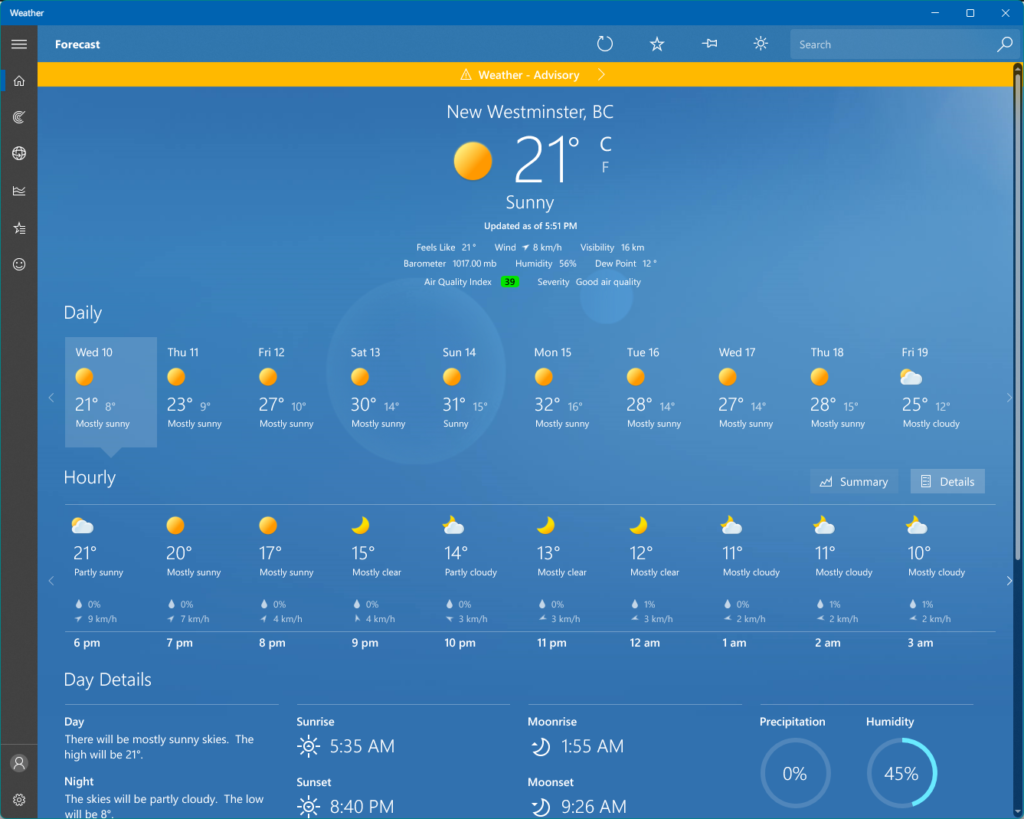
I’d been using my Mac for the past few days and didn’t realize Microsoft had updated the weather app in Windows 11. This is actually a surprisingly comprehensive and handsome-looking app, showing the kind of taste that Steve Jobs said Microsoft never had.
The updated version of the app is terrible. It’s pretty much exactly what Steve Jobs said about Microsoft having no taste–cluttered, ugly, and on top of that, it now has a large ad stuffed into it. It’s a built-in app, so it would be nice to escape ads while I’m using it. What next? Calculator sponsored by Crest? Terminal with a 10-second rolling ad before you can type anything?
Fortunately, I used my internet smarts to do the following:
Uninstall the odious new app
Download the old version and re-install it
Disable auto-updates in the Microsoft Store, hopefully insuring the new app will not come back on its own
Provide feedback through Microsoft’s handy Feedback Hub to tell them to stop stuffing ads into every corner of Windows
It’s like Microsoft has resigned itself to most people just switching to Macs, so they’re going to squeeze the remaining few for everything they’ve got with ads and monetization.
OK, I actually won a free play. Someone else won the $64 million jackpot. That’s a lot of money, even if you convert it to U.S. dollars.
So instead of jetting off to some tropical paradise while leaving my noisy neighbours behind, here’s a list of what I might do if I won an unholy sum of money, written while I sit in an IKEA office chair below my noisy neighbours, who I will probably have to endure for the next million years.
I’M RICH, NOW WHAT?
Donate millions to assorted favourite charities and causes; do so anonymously
Give the people upstairs $20,000 with a note saying, “Enjoy a full and happy life.” They’ll wonder what the catch is.
Fund a few people whose work I admire and enjoy
Buy a nice single detached home where no one can live above you ever
Go somewhere nice for a little while
Provide enough to my family to smooth things out for them
Do the same for my friends
Put the rest of the money in safe investments
Work on making stuff (writing, drawing, painting, beat poetry, recording new wave albums, whatever)
Once again, I consulted my favourite AI after the Master Control Program in TRON, ChatGPT, for 10 light blog topic ideas.
Rather than spread them out over 10 separate posts, I’m going to include all of them conveniently right here!
First, the topics suggested by ChatGPT:
“5 easy DIY home decor ideas”
“10 fun outdoor activities for families”
“Healthy meal prep ideas for the week”
“7 ways to boost your productivity at work”
“A beginner’s guide to mindfulness meditation”
“The benefits of practising gratitude daily”
“How to create a successful morning routine”
“The best books to read for personal growth”
“Budget-friendly date night ideas”
“The importance of self-care and ways to do it”.
And all 10 topics covered below, squashed into this one entry for your convenience and/or reading pleasure:
5 Easy DIY Home Decor Ideas
Don’t just put your kids’ “interesting” drawings on the fridge, paper all the walls of your house with them. You may need more productive kids or many more kids to really make this idea shine.
Take the plastic off your furniture. It’s time.
Get rid of your pets. They shed all over everything. Fish are OK.
Win the lottery and hire a professional interior decorator because let’s face it, you probably don’t know what you’re doing.
Paint the walls with optical illusions that make it look like each room of your home is actually just a shabby corner of some grand palace.
10 Fun Outdoor Activities For Families
Try to get the dog in the car
Try to get the dog out of the car
Lawn darts (note: I think this might be illegal now, so maybe check first to avoid getting arrested and/or having your kids taken away by the child welfare people)
Jumping in puddles in the rain. Works best if you are under six years old.
Count the ants at your picnic in the park
Run away from the bees
Go hiking around a lake, with trees and shit*
Abuse nature with your off-road vehicle
Visit exotic sand dunes, then relive the experience for the next week while you try to get the sand out of everything
Crash your neighbour’s backyard barbecue. You’re pretty sure they like you.
Probably some more vegetables, maybe in soup this time. But no salt. Sodium is bad.
This feels like the right time for more salad
Eat out at that vegan place that curiously has no reviews after being open for four months
7 Ways to Boost Your Productivity at Work
Hire someone better than you to do your work
Put in long, grinding, soul-destroying hours
Sharpen pencils on your own time
Rig up one of those little dipping bird things to peck at your keyboard
Get ChatGPT to do all of your programming, writing or email. Basically, anything that you would type out as part of your job.
Encourage management to hire lousy slobs to make you look better in comparison
Redefine your role to best suit your limited skill set
A Beginner’s Guide to Mindfulness Meditation
Remember to breathe, or you might pass out or maybe even die
Ignore the neighbours screaming and throwing things upstairs–it’s all part of finding inner peace
If your yoga position is causing excruciating pain, just remember: The pain is all in your mind
The Benefits of Practising Gratitude Daily
Gosh, this one is tough. I mean, I guess if you’re grateful for something, your life doesn’t totally suck, so that’s good! And being grateful usually means you’re happy about something, so you’re not thinking about how that rat you thought was your friend still owes you a hundred bucks. What’s their deal, anyway? Also, if you’re grateful, maybe you’ll enter an elevated state of mind where you come up with some super genius idea like cold fusion that works, or how to lick climate change. I mean, it’s theoretically possible.
How To Create a Successful Morning Routine
Get up while it’s still morning.
Do the things you need to do.
Repeat every day until the day you die.
You probably don’t need to do this as a ghost or whatever.
The Best Book to Read For Personal Growth
Any book with “growth” in the title that is not referring to fungal growth
Any book with “habit” in the title that is not about nuns. Or maybe a book about nuns is exactly what you need, sister!
“How to Influence People Through Hypnosis and Trickery”
Oh wait, I was only supposed to mention one book.
Fine, read The Handbook of Etiquette. Sure, it was written in 1860, but that probably means it’s free now, so you save money to put toward your personal growth. And it’s bound to have some decent advice in it. What’s really changed in 163 years?
Budget Friendly Date Night Ideas
Have your date pay for everything.
Stimulating conversation at the kitchen table
$10 bottle of wine and a $15 tent bought from Walmart, in the backyard. Make sure the dog is inside. The house, not the tent.
Watching the stars from a grassy hill. You may need to move to the Australian outback for this to really work now.
Charades. I’m kidding, you probably want a second date. Or to finish the first one.
Troll people on your favourite social media site. Make it a game you play together. See who garners the most angry responses or blocks!
The Importance of Self Care and Ways to Do It
First, if you don’t brush your teeth, it’s highly unlikely someone else will do it for you. So it’s important to do stuff like that unless you have extremely close and generous friends.
Taking care of yourself is best learned through watching endless hours of self-improvement videos on YouTube. There’s too many to list, but you’ll find them. Just watch them all for a few weeks. By the end you’ll be self caring like a mofo, as the kids say.
Also, avoid donuts. I know they are delicious, but they are bad for your teeth–which you have to brush yourself–and they probably contain chemicals that cause cancer.
If you find my advice useful, please support me through my Patreon.