Today was the first day of heavy rain in quite awhile. I’d almost forgotten how much I dislike this weather. The gusting wind did remind me how I prefer, even on horrible days like these, to go sans umbrella, because getting a bit wet (okay, very wet) is still better than desperately clutching to an umbrella, hoping it doesn’t get torn out of your hands by the elements or worse, it doesn’t get torn out of your hands and instead you get whisked away with it, Mary Poppins-style.
To commemorate today, here’s a shot I took after arriving home from work that shows the front entrance of our condo building turning into a lake.
A few days ago, possibly prompted by an old song I’d heard somewhere, I thought about Gordon Downie, lead singer of The Tragically Hip, and how he was still around, more than a year after the band had completed their farewell tour due to Downie’s aggressive, untreatable brain cancer. I admired his resilience against what sounded like imminent death.
Today that death finally arrived and the way he spent this past year left me feeling not sad, but strangely happy at how he made his time–cut terribly short–truly count. He lived his life well, right up to the end.
I only ever bought one Tragically Hip album, Fully Completely (which is a great collection of songs) but there is no denying their impact on the Canadian cultural landscape. Just look at today’s iTunes Top 10 albums:
Death, as always, is a great way to boost sales.
Farewell, Gordon. May your light burn bright wherever you are.
National Novel Writing Month starts in two weeks and my current plan is non-existent. I’m still not entirely sure I’m going to participate.
This is probably not how best-selling novels are born.
Maybe I wouldn’t know how to handle the fame of being a best-selling author and it’s all for the best, anyway.
Or maybe I just need to come up with a title with the word “girl” in it. Current novels break down like this:
Self-published paranormal romances on amazon: 22%
The usual big names whose ebooks are always curiously priced higher than the paper versions: 31%
Books with “girl” in the title: 36%
Everything else: 11%
Most of the good novel titles featuring “girl” have already been used, since there are millions of these books out there, enough to form a new continent if stitched together and waterproofed.
But here’s a few from my five-second brainstorming session:
The Girl Who Wrote Novels About Girls
The Girl With the Word Girl on the Book Cover
The Girl Who Dated a Squirrel
The Girl Girl Girl Girl Girl
The important thing is I’m still trying to come up with something, even if inspiration has not only left me, it’s departed to another dimension.
Maybe I could write a novel about other dimensions. No, wait, I tried that last year and failed. 🙁
Maybe I’ll come up with more cockamamie ideas tomorrow as The Rains sweep through the area and the only choices are brainstorming or to stare out the window and despair. Yes, that’s it. Tomorrow will be a grand day of brainstorms! And real storms.
I mean, it’s a device that just spins and does nothing useful, like the U.S. president.
Although fidget spinners don’t have nuclear weapons at their disposal, so there is that.
Runner-up: Drones drones drones, as seen on Drone Daily Planet, where every other segment is about drones doing [thing] and isn’t it amazing and hey, here’s another drone story but these drones are doing [slightly different thing]. Also: drones. Hooray!
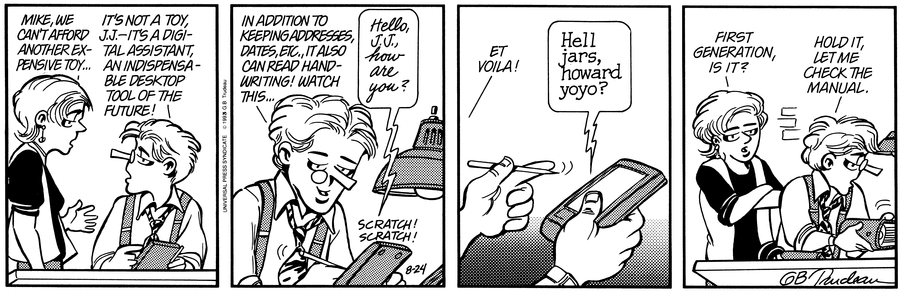
Somehow “run” becomes “her own.” Note the number of syllables isn’t even the same. Note that I’ve dictated this phrase before. Is it possible for AI to get dumber? I’m beginning to think so.
Run 544 Average pace: 5:16/km
Location: Burnaby Lake (CCW)
Start: 10:28 am
Distance: 10.02 km
Time: 52:57
Weather: Cloudy
Temp: 9ºC
Humidity: 72%
Wind: light
BPM: 169
Weight: 155.5 pounds
Total distance to date: 4232 km
Devices: Apple Watch, iPhone
It was actually a bit chilly on today’s run, with the temperature never climbing into the double digits. I do not regret wearing the long-sleeved shirt.
With clouds, cool temperatures, and a small but real threat of showers, I expected the trail to be fairly quiet, but it was actually almost as busy as a stat holiday, with several incidents of traffic clogging up.
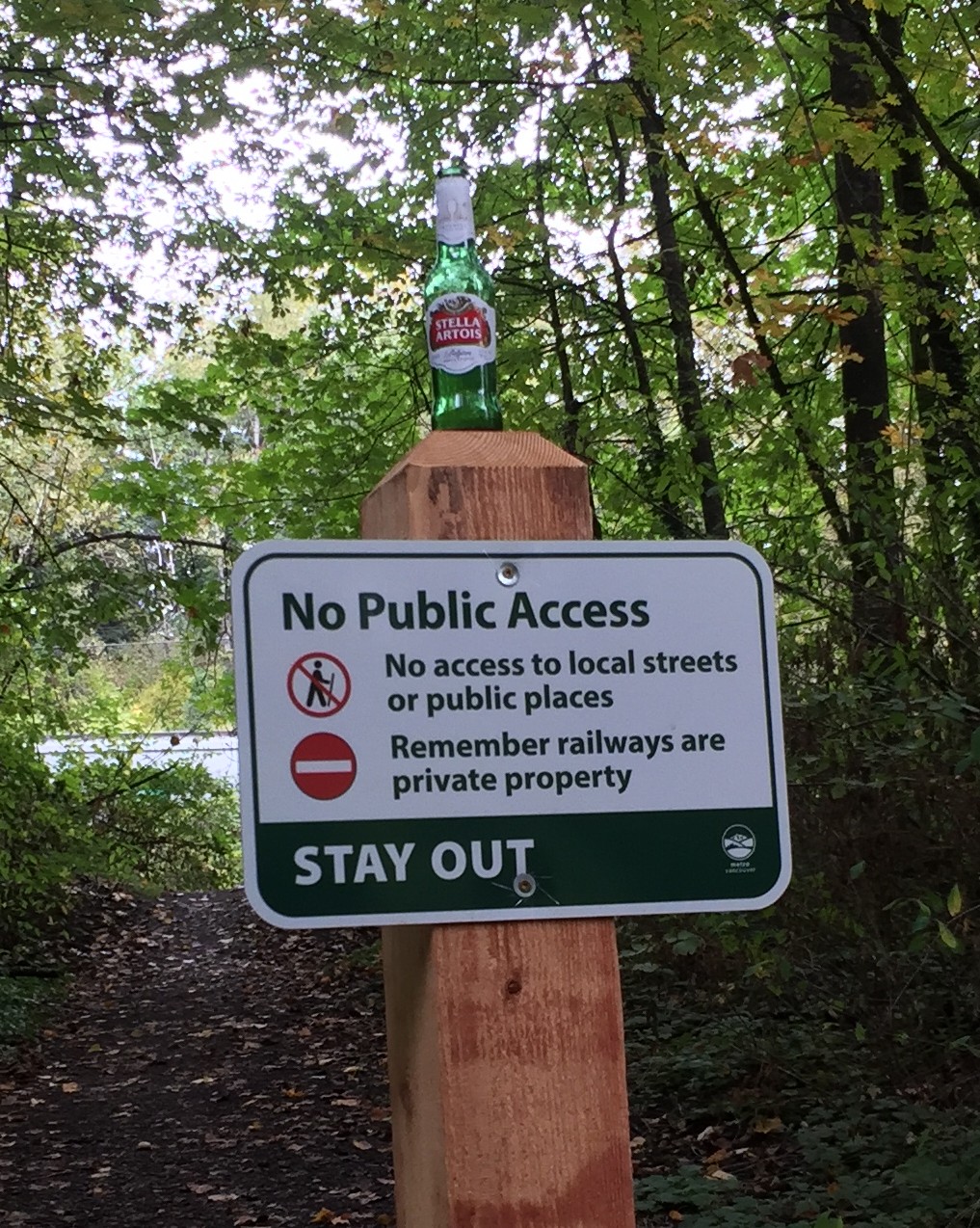
The walk to the lake was a bit slower than normal, maybe because I was still trying to get warm. I noticed a commentary of sorts on one of the new STAY OUT signs along the Brunette River trail:
Fine, I’ll just publicly consume alcohol right here.
I chose to run counter-clockwise upon arrival to the lake and was uncertain how it would go with a four-day layoff (I missed a run on one of my usual days due to illness). The first km didn’t feel sluggish, exactly, though my pace was not exactly like greased lightning at 5:23/km. I really think it was cold enough that it took me awhile to warm up and find a rhythm. My pace would prove to seesaw throughout the 10K, with the fastest stretches coming at the third, fifth and tenth km marks. In the end I finished with an average pace of 5:16/km, my best 10K of the year, so I’m pleased with that.
The extra time off seemed to help with the stiffness in the left leg. It did feel a little stiff, but only a little, and it took much longer to get there. The walk after was faster and I had no issues.
The trail, as I mentioned, was busy. There were some runners, but mostly it was people bundled up in parkas determined to enjoy the outdoors. I salute them for that, as long as they don’t get in the way, which for the most part they didn’t. The clogging incidents mentioned above were mainly just people converging from different directions at the same time.
By the sports fields there appeared to be some kind of informal run competition of sorts happening. I say this because I saw no special markers, banners, flags or anything else. I also saw, upon just rounding the corner where I head onto the part of the trail bordering the fields, about a dozen runners heading straight toward me at high speed. A wall of runners. I scooted over to the right to avoid being stampeded and they flew by in a blur. About halfway along the stretch here–so a minute or so later–another similar group came barreling at me, including a young guy cheekily running topless and pretending to not feel the cold. He was not pretending that his upper body was perfectly chiseled, however. Oh to be young and, well, perfectly chiseled. I got about 50% of that when I was his age.
There was one other thing I came across on my run, but it wasn’t a pedestrian or a runner or even an accursed cyclist (none were in view today). I was maybe 20 or 30 meters along the Piper Mill Trail when I rounded a corner and saw on the trail ahead of me a dark orange cat. Not someone’s pet, though, as it was about three times too big. It was a bobcat, making this the second time I’ve come across one at the lake. As soon as it spotted me it darted off into the bush, so I never felt threatened by it. It just looked like a really big housecat without much of a tail, kind of like this:
I sent off an email to the Metro Vancouver Parks people, just in case. I’d hate to have a bobcat eat someone’s baby.
This was the first run at the lake where I’ve used the AirPods and playback was fine until just near the 6K mark when it abruptly stopped. I checked the music app on the watch and it looked like it had paused for some reason. I tapped Play and the music resumed and continued without incident through the rest of the run.
I’m going to blame Siri, just because.
While the double-tap on the left earbud at the start of the run properly paused play, I was never able to get the double-tap on the right earbud to skip to the next song, though it’s worked before. I tried once using Siri instead (“Hey Siri, next song”) and still nothing happened.
I definitely blame Siri on that one.
It’s possible that I may not have held the watch up high enough to turn the face on (which Siri requires before it will listen). I can use the actual music app controls to skip ahead–this requires bringing the watch up, swiping left to get to the music controls, then tapping the Forward button. None of this is difficult, but it takes a few seconds to do and you have to look at the watch when you do it. Taking my eyes off the trail while running is something I’m really hesitant to do, as I’ve got direct experience in what can happen in the span of one or two seconds (it involves falling and bleeding and picking gravel out of your skin). In the end I just listened to everything that came up and thanked myself for not having completely awful taste in music.
I may reverse the control scheme on the AirPods and see if that works better.
Overall, though, this was an unexpectedly brisk run on a rather brisk day.
Today there are entire sites dedicated to how iMessage mangles text through auto-correct. Sure, some of the examples are probably manipulated for maximum comic effect (though it’s really not necessary, as the worst of autocorrect hardly needs a helping hand to look bad), but the fact that there are entire sections of the internet devoted to this stuff speaks to how ubiquitous it is. (Also the best examples are the ones where people keep futilely typing the same autocorrected word over and over. You can almost feel the despair coming though their attempted messages.)
And then there’s Siri. Siri is great when it works properly, which for me is most of the time. But when Siri decides not to work, it gets really stubborn in insisting that you are speaking different words.
Here are two to start, the first I’ve mentioned before.
Pyramid: I try to tell Siri to play the album Pyramid. It tries to play the imaginary album Pure Mind. I was never able to get Siri to play Pyramid. I had to physically interact with my phone to listen to it. How 2007.
Winner: Siri
Pasta: I try to send the message “The pasta will be ready in two minutes.” Siri says, “The pastor will be ready in two minutes.” I keep trying different pronunciations/inflections/accents for “pasta” and get these results:
pasta = pastor
pasta = pastor
pasta = pastor
pasta = pastor
pasta = pasta
I don’t know what finally made it work and I have no confidence it will ever work again. I’m just glad I wasn’t sending the message to a pastor.
Winner: Me
I don’t have a sassy wrap-up for this (it’s my first entry, cut me some slack) but I will note that I just spent half an hour at that stupid autocorrect site, laughing more than I’d like to admit.
The “brain science” part in the title might make you think this is a dry, analytical approach to story construction, but Lisa Cron peppers this book with plenty of humor, often painting herself as the target, as she details a very specific approach to outlining and planning the story that will drive a novel. The brain science is basically recognition that humans are hardwired to enjoy a good story, due to how important stories were to the survival of early humans. Cron explains this better than my glib rundown would suggest, but don’t mistake this for a book about brain science. It’s not, it’s about writing a novel.
She comes down hard on so-called “pantsing” where a writer just grabs an idea and then wings it, hoping that over the course of 300 or so pages it all somehow works out (hint: most of the time it won’t and the writer will abandon the story. I can vouch for this by my amazing tower of unfinished stories, now in the running as one of the wonders of the modern world). Instead, she favors an approach where you, as the writer, are always asking questions about your story and its protagonist, the most persistent question being,”Why?”, followed closely by “And so?” The latter is asked at the end of a scene, to prompt the writer to explain how the end of the scene leads into the next. The questions prod the writer into thinking through the character’s actions and motivations before committing to the actual writing. No winging it allowed!
Cron is also an advocate of what she calls Scene Cards where each scene of the novel is explicitly detailed on a card (she recommends virtual over physical), with items like the Alpha Point, the plot (cause and effect), the consequences and so on. She rightly observes that writing software like Scrivener is pretty much tailor-made for the level of organization and planning she advocates.
You might think all of this planning would result in a story that is so predictable as to be rote and not especially fun to write, but Cron notes that there is always plenty of room for developments to grow organically and take off in one of several directions–as long as those directions continue to work in service to the protagonist and her motivations/beliefs.
I’m not sure I could commit to the level of planning Cron suggests, but I can’t deny that a writer who does is bound to come up with a story that is solid and able to pull a reader through to the end. In a way the approach reminds me of bestsellers that are derided for the quality of the writing (Shades of Grey, Dan Brown novels) but are successful due to other strengths, such as the storytelling (I’ll admit to never having read a Dan Brown novel, so I’m assuming there’s something other than the prose that compels people to read his books). Even if you don’t write deathless prose, following Cron’s method may still produce something people will enjoy reading.
Story Genius is made more entertaining as Cron enlists one of her friends and fellow author/writing coach, Jennie Nash, to follow Cron’s technique in developing a new novel. The reader gets to watch the development of this novel’s protagonist (a woman who refuses to get close to others for fear of getting hurt and ends up kidnapping a dog and, well, it gets complicated) and how all the parts of the story–background, supporting characters, motivations and so on, come together to create a compelling whole. I was a bit disappointed that the end result of Nash’s work was not made more clear.
All told, this is a meticulous approach to novel-writing and one that will likely bear fruit for the writer who is willing to commit to the techniques described. Heck, even only following some of the techniques, like always asking why, or compiling Scene Cards in the way Cron describes, will likely result in a stronger story. Recommended especially for people who love plotting.
I’ve had a MacBook Pro, officially known as the MacBook Pro (13-inch, 2016, Two Thunderbolt 3 ports) model when checking About This Mac from the Apple menu, for the better part of the year, and in that time I’ve grown used to the extremely low travel keyboard it uses, but I’ve finally realized I don’t like it.
Others have mentioned it’s not fun to type on and that may seem somewhat glib, but it’s true, at least as far as my own experience goes. My greatest fear–that the low travel and extreme firmness of the keys would lead to sore fingers during long typing sessions–was unfounded. I’ve typed thousands of words over hours on the thing and my fingers have emerged intact.
But it’s still an oddly joyless experience, something I hadn’t even thought in relation to typing until I started using it. I always feel like I’m on the verge of making mistakes by hitting the wrong keys, it’s annoyingly clicky without any of the benefits of a mechanical keyboard and every time I go back to any other keyboard I regularly use, like the Logitech K780 or even the previous wired Mac keyboard with numeric keypad, I’m reminded of how much more pleasurable the typing experience can be. The new MacBook keyboard feels like something that’s meant to be used only sparingly. Maybe that’s why the touchpad is so gigantic on the newer models.
The 2016 MacBook Pro is kind of an odd thing. Parts of it are great, like the display and touchpad, while others, like the keyboard, are unsatisfying compromises.
It’s actually got me thinking about getting a Windows laptop again because there is no escaping this keyboard now. Apple is on the verge of killing off their last models that used the old-style keyboard (the models date back to 2015).
HP has a new edition of their Spectre x360 coming out later this month. I’ll give it a test drive if it’s carried locally. If the touchpad is tolerable and the keyboard is better, they may just have a sale.
Anyone want a slightly-used MacBook Pro (13-inch, 2016, Two Thunderbolt 3 ports)?
UPDATE April 2, 2018: My search for a replacement laptop is documented here and here. I am still mulling over a replacement as of this update.
Now that my MacBook Pro is out of warranty, I am starting to experience what I call KA, which is not related to the mumbo jumbo in Stephen King’s The Dark Tower. KA is Keyboard Anxiety, the fear that something will happen to your keyboard, necessitating an expensive repair.
And across the scores of professional reviews and hundreds of online comments we’ve seen since this keyboard design debuted, few people say they love typing on it. Many people admit that, like us, they’ve gotten used to the new keyboard, while others actively dislike using it.
Here’s another article on the new MacBook keyboard that highlights issues with the design, which notes how it’s all but impossible to remove the space bar for repair without breaking it, so if the space bar is not working right, you’re likely looking at getting the entire top assembly of the MacBook replaced, since the keyboard is an integrated part of it. The cost of the replacement, out of warranty, can be hundreds of dollars, even if it’s just that single key that is not working. This keyboard design was done in the name of making the laptops ever-thinner and lighter. I think this is probably peak Apple form over function, as they have retreated on their “thin or die” philosophy since the development and subsequent fallout over the butterfly mechanism the new keyboard uses. The iPhone 7/8, Series 3 Watch and new iPad are all thicker and heavier than their immediate predecessors (though not by much).
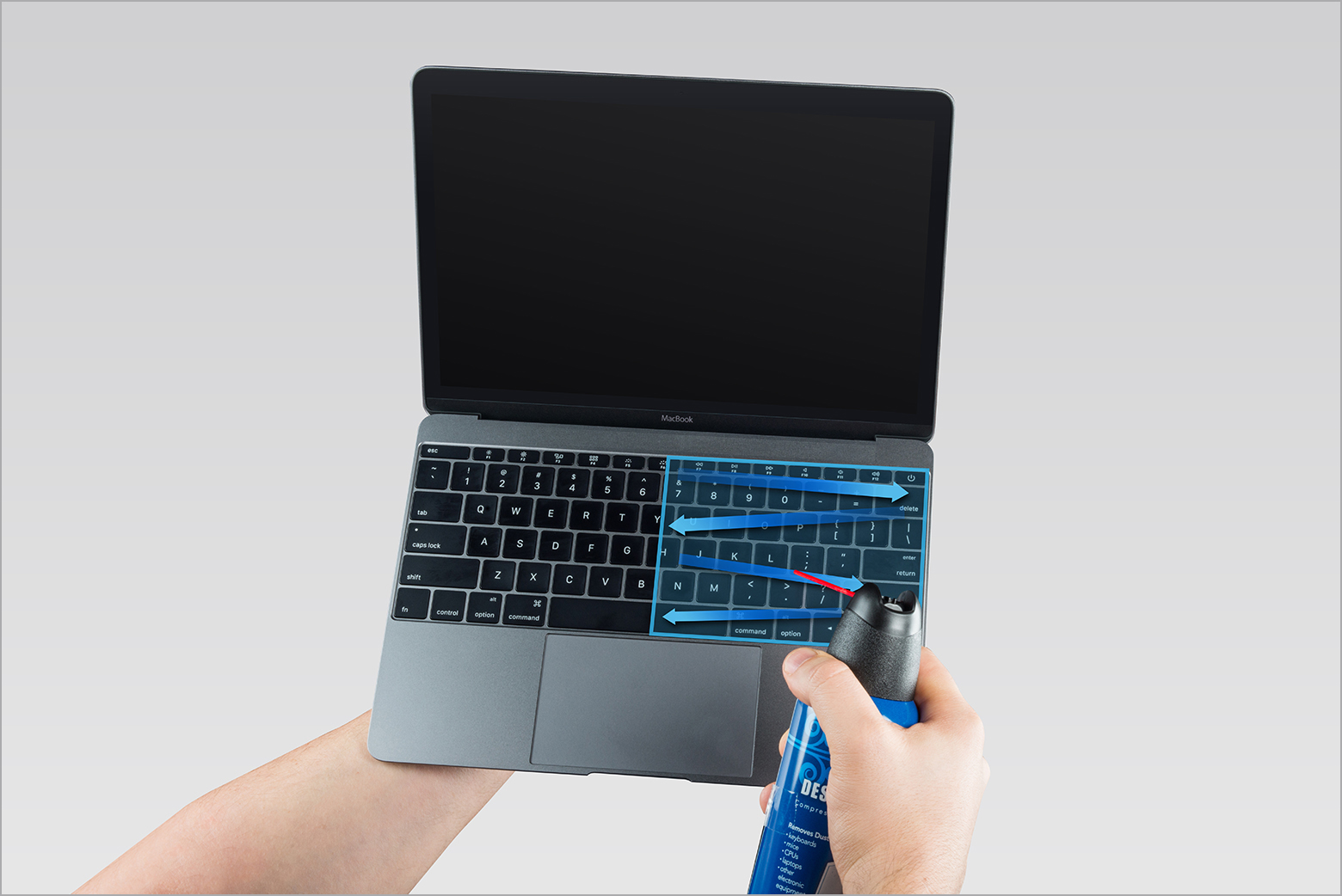
Also amusing is the official Apple support document on How to clean the keyboard of your MacBook or MacBook Pro. Hold your MacBook (minimum cost $1729 Canadian before tax) at an absurd, near-upside down angle and spray air into it. I especially like the second image where the guy doing the cleaning is apparently palming the MacBook instead of actually gripping it. He’s putting a lot of faith in that left hand:
If reliability problems are as bad as they may be, I suspect this will be a rare case of Apple retreating on a design, though I expect them to spend at least another generation trying to fix it first. If they do abandon it, the result will probably be slightly thicker and heavier laptops, but other companies have demonstrated that light and thin is still quite possible while retaining a more traditional laptop keyboard design.
UPDATE April 3, 2023: Yes, almost exactly to the day, five years later, another update! It turned out I was right, as Apple did indeed continue to use the butterfly keyboard on early 2019 models, but finally stopped with the 16-inch MacBook Pro introduced in fall 2019, which switched back to a scissor switch mechanism. I traded in my MacBook Pro (13-inch, 2016, Two Thunderbolt 3 ports) just as its four-year keyboard warranty plan was expiring, getting a nice 2020 M1 MacBook Air. I sold the Air a few weeks ago, as I no longer need a laptop at all, and my Mac needs are now provided by a Mac Studio, which came with no keyboard at all.
UPDATE, November 21, 2025: Just noting that Apple revealed the iPhone 17 in September 2025. I am still using my iPhone 12.
UPDATE, September 9, 2024: Just noting that Apple revealed the iPhone 16, etc. today. I am still using my iPhone 12.
UPDATE, January 19, 2021: Added the iPhone 8 (RIP) and iPhone 12, corrected several egregious typos
Way back in the primitive days of 2008 I had something now known as a landline. This consisted of a telephone that was connected, via physical wires, to a dedicated telephone system that connected not just to my abode, but to pretty much all others, as well as businesses and even little structures known as phone booths. Any time of the day or night the landline meant I could pick up the receiver and hear the comforting drone of a dial tone, ready for me to punch in some numbers and get with the calling.
Today I have no such device. After getting my first cellphone in 2009 it grew increasingly obvious that I did not need two phones that did the same thing and especially two bills that did the same thing–expect me to hand over money willingly. And also especially considering my propensity to rarely call people or otherwise receive calls. Why pay two bills totalling $70? (This turned out to be a naive question now that we have companies like Telus trying to entice people into two year plans for a mere $95 per month.)
But never mind that, this is a list because I like lists and so here are the cellphones I’ve owned since 2009.
2009: The Year I Make Contact (with a cellphone)
Device: Samsung M320 (retail value: $40) Fun Fact: Samsung has released 15 billion different cellphone models
My first cellphone was a Samsung M320, which sounds more like an airliner model than a cellphone, though to be fair, the phone could fly–briefly–if hurled with enough force.
I got this phone with my first mobile carrier, Virgin Mobile. When I eventually switched from Virgin to Telus, the customer support person at Virgin called me a “naughty boy” for switching. Things were different back then.
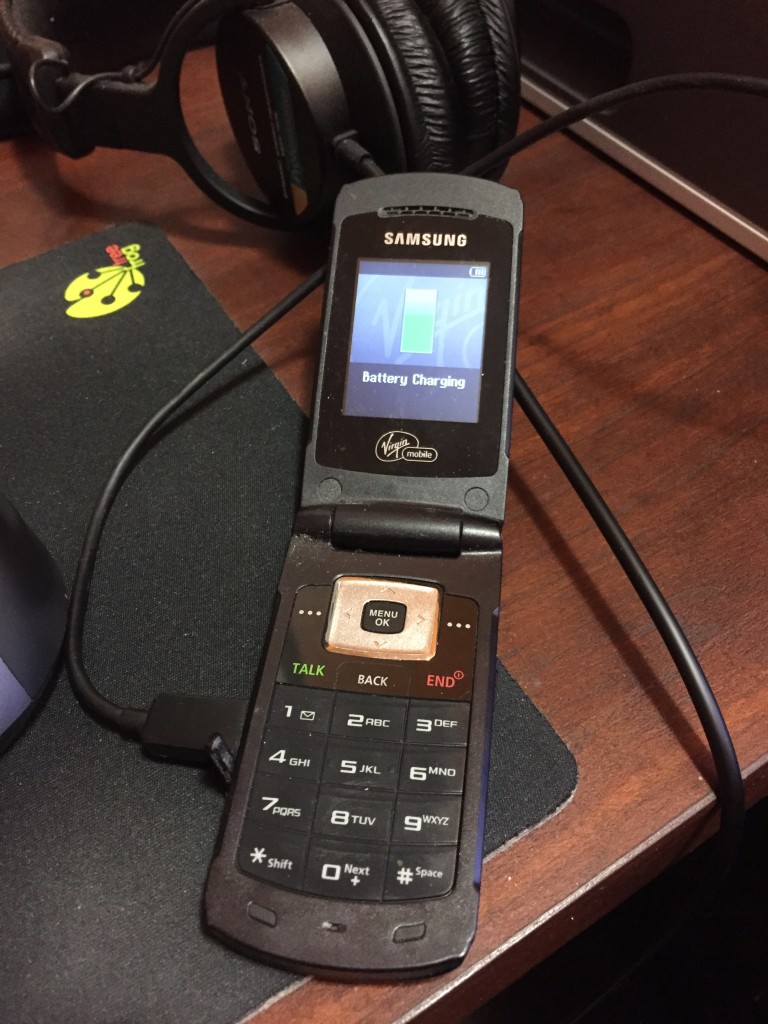
I actually still have this phone and on a lark connected it to USB and..it’s charging! Here it is in all its charging glory:
I still think having a red button labeled ENDis a bit ominous.
In terms of style, this is my favourite phone, though it’s a mere “feature phone,” meaning it doesn’t have a fancy touchscreen interface and all that jazz. While it’s not a smartphone, it’s not entirely dumb, either. It’s more of a dim phone. The best part is it flips open like a communicator on the original Star Trek. I confess to flipping it open multiple times and uttering, “Beam me up.” This was especially confusing to people when I did it while I was on a call with them. The phone had a low resolution colour display, a Tetris demo that worked about as well as you’d expect, and had TALK and BACK buttons next to each other, which I’m sure was just a coincidence. It was neat to me in that whole “wow, you can actually take your phone with you anywhere” way, but in 2009 it was already obsolete thanks to a little phone introduced two years earlier you may have heard of. I moved on quickly to…
2010: I phone, You phone, We All iPhone
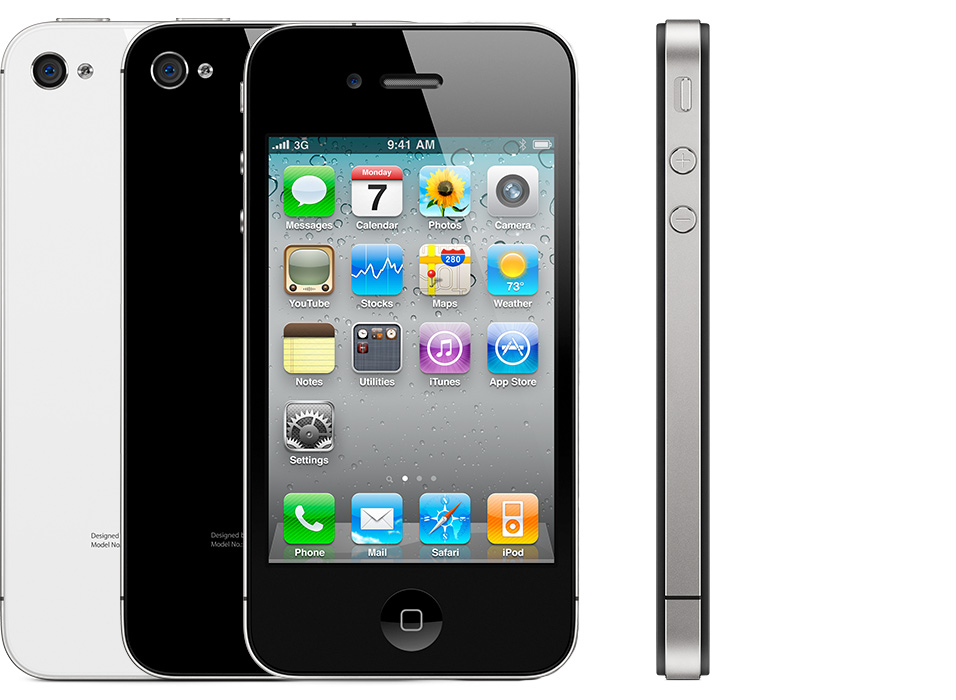
Device: iPhone 4 Fun Fact: Steve Jobs made out on stage with the iPhone 4 at the 2010 Worldwide Developers Conference (WWDC)
Here is a stock photo of an iPhone 4 from Apple’s support page because mine has probably been recycled into a transistor radio by now:
My iPhone 4 was black back when black was black and not space grey.
What convinced me to get my first iPhone was the Retina display. It really did look sharp. Steve was right! I downloaded bunches of apps that I promptly ignored, because apps were new and amazing. I kept a handful that were actually useful. Actually, I lie, I kept all of them because for the longest time I had no idea how to get rid of them. I was now ensconced in the iOS ecosystem, but it turned out that in 2010 that wasn’t enough. I wanted more. I wanted something…bigger.
2013: Bigger is Better (in theory)
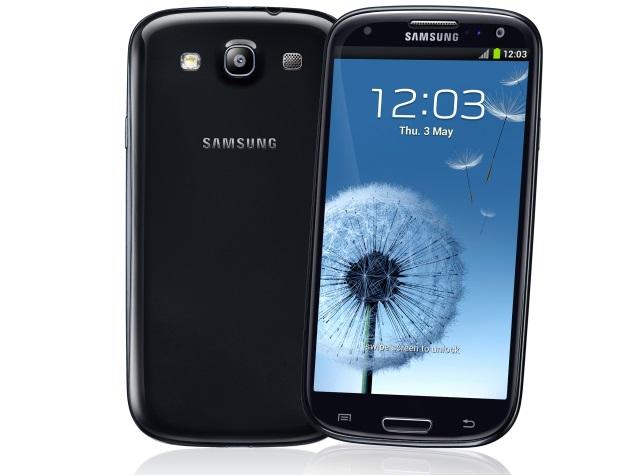
Device: Samsung Galaxy S3 Fun fact: I spent more time moving icons around on screen than actually using this phone
Stock photo because my Galaxy S3 by all rights should have been shot into the sun (see below):
Now picture this phone going dead after a few hours of not doing anything at all. Grr.
Three years later (phone contracts were three years long in the olden days) I jumped ship to Android, or at least to Samsung’s version of it, dubbed TouchWiz, which reminds me too much of Cheese Whiz. What seduced me away from the iPhone was again the display–this time due to the Samsung Galaxy 3 offering an absurdly spacious (at the time) 4.7” display. I loved the larger screen. The phone was a little slippery to hold, though. Very slippery, really. It would squip out of my hand like a bar of soap. And to be honest, it felt pretty cheap and plasticky, pretty much the opposite of the classy iPhone 4. Also, it turned out the phone had a mysterious battery drain issue that could not be resolved. It would sit on the desk while I was at work, in sleep mode, and be drained before my shift ended. I spent oodles of time troubleshooting it, turning on power-save modes, disabling Wi-Fi, placing it in a pentagram on the floor and offering my first born. Nothing worked. It was the first time this fancy new technology let me down. Telus kindly allowed me to swap the S3 for any other phone they carried, up to the same value. This led to…
2013, Part 2: Back to the Fruit
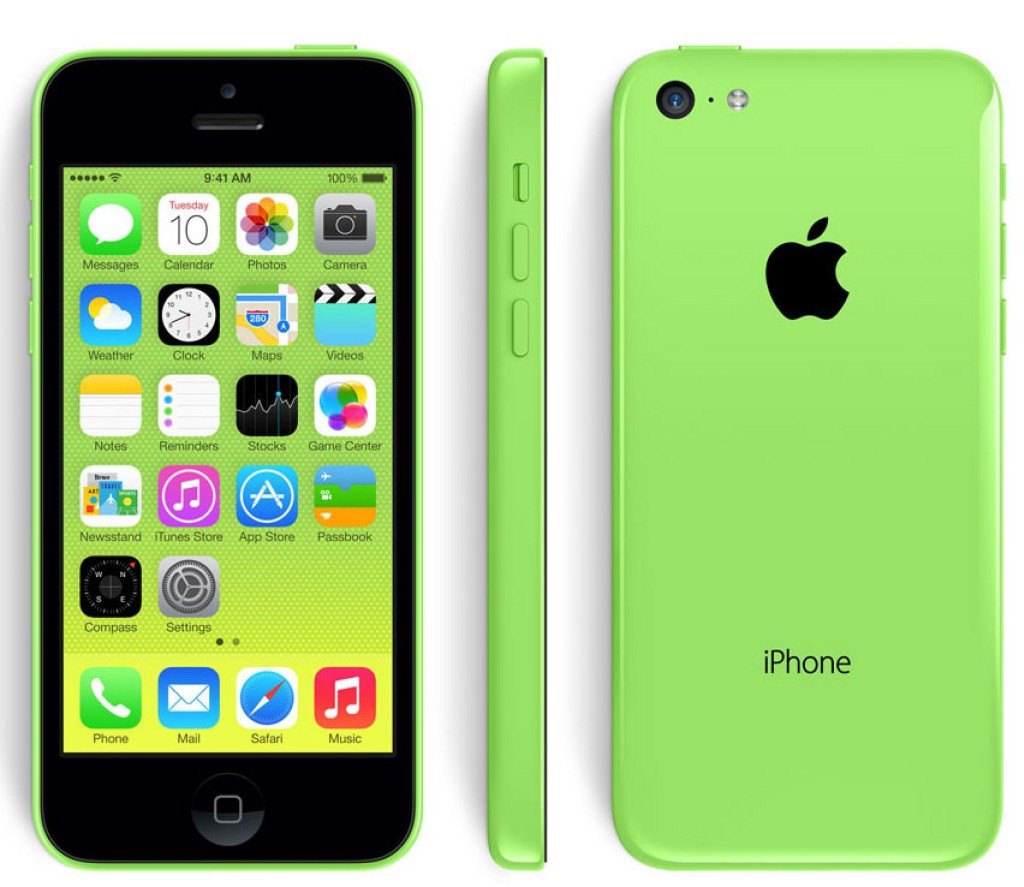
Device: iPhone 5c Fun Fact: This phone was an experiment of sorts for Apple. I loved it and so it was killed dead after one year.
So green. So groovy. Image courtesy of MacRumors.
By the fall of 2013 I had returned to the Apple fold by getting a funky green iPhone 5C. Design-wise, this is still my favourite phone. It also fit nicely in hand without needing a case. It wasn’t slippery like the S3 and the plastic looked nice, not cheap. The display was larger than the iPhone 4 at 4 inches, but still smaller than the S3. I didn’t mind, though, it was enough for me. I downloaded more apps and for a time was content, but eventually chafed at the 16 GB of storage. My music collection alone would come to surpass this. So my next phone was based on something other than the display or battery/reliability.
2014: Big and Not Really Beautiful
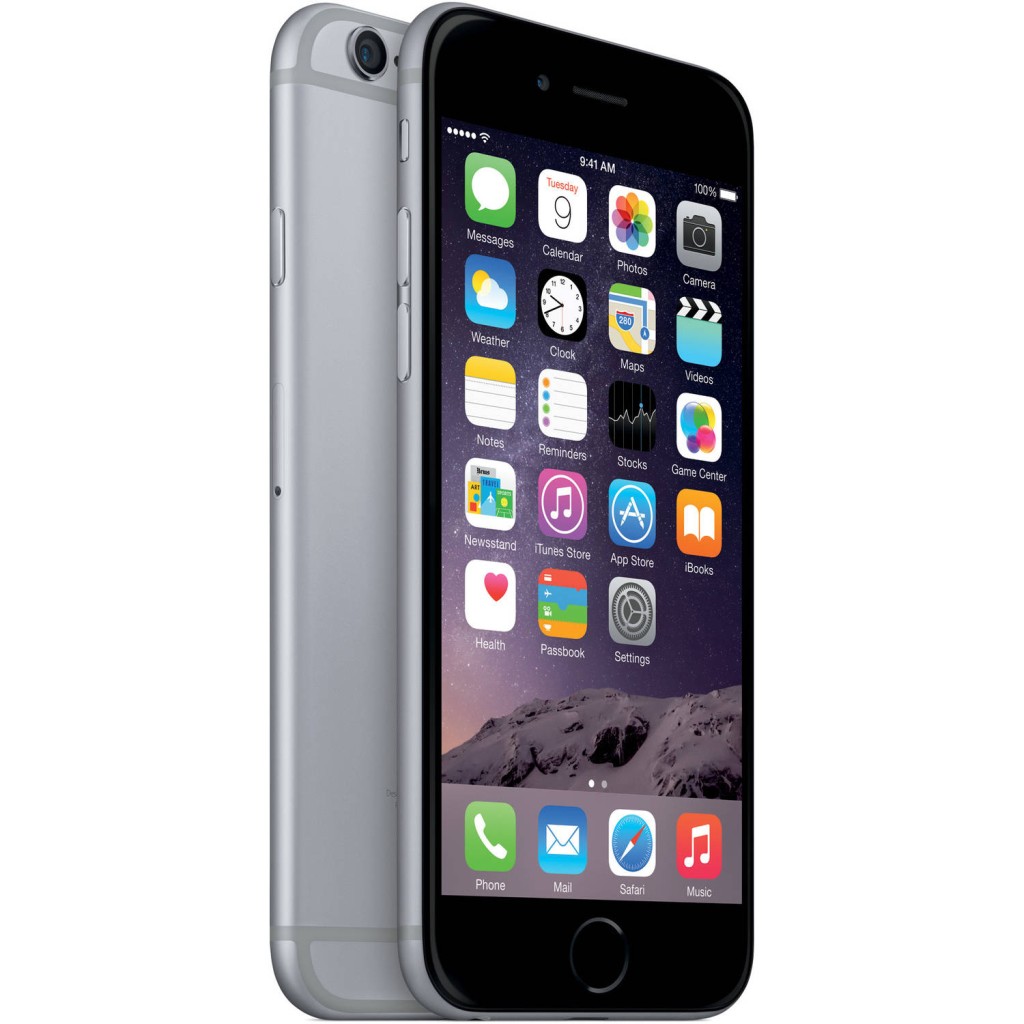
Device: iPhone 6 Fun Fact: I’m pretty sure Steve Jobs rolled over in his grave at the design
Space Grey: The new not very black
In late 2014 (like, a few days before the year ended) I got an iPhone 6 after nearly three months of searching for a store that had the model I wanted in stock–a 64 GB Space Grey. The iPhone 6 was the first “big” iPhone and was popular as all get-out. This had the same 4.7” display as the S3, and like the S3 it was also very thin and slippery to hold. I got a green silicone case for it, to make it look a bit like my beloved 5c and to keep it from shooting out of my hand. That case turned out to be a little too grippy, making it somewhat difficult to get the phone out of my pocket. I opted for a black leather case instead, since green leather cases were not available and would probably have been hideous, anyway. Speaking of hideous, I am 100% certain that Jobs would have barfed at the way-ugly antenna cutouts on the back of the phone (the Space Gray colour made them a little harder to see, at least). I didn’t care about the looks, though, because with 64 GB of storage I was able to comfortably load all of my music on the phone, plus all the apps I’d never use.
Three years later and that same iPhone 6 is trucking along, albeit more sluggishly than before. I’m long past my two-year contract, so I’ve been eyeballing possible replacements and trying to decide what’s important to me now. Really, if the iPhone 6’s performance was still top-notch I wouldn’t even be looking at all. Since I have an Apple Watch I am more or less beholden to Apple (I rather like the watch) and where once Apple offered an iPhone and that was it, they now sell:
iPhone SE
iPhone 6s
iPhone 6s Plus
iPhone 7
iPhone 7 Plus
iPhone 8
iPhone 8 Plus
And next month (November), the iPhone X (that’s 10, not the 24th letter of the alphabet)
Yes, Apple has gone from the simplicity of offering one phone model to octupling the choices. The Canadian prices range from $469 to $1319, or from the sublime to the ridiculous, if you prefer.
I have made no decision as of yet and so my cell phone story has reached a pause, for now. I’m finding it hard to imagine I could justify $1300+ (before tax) on a phone that doesn’t actually do impossible things, like shoot money at me or do the laundry, so the iPhone X is probably a no-go. Plus it’s all-new first generation technology and Apple is pretty good at borking that sort of thing. Better to wait a couple of versions, then get the second generation at a discount.
Or just buy a cheaper phone, because as I mentioned near the start of this, I have a propensity to rarely call people or otherwise receive calls, which makes a $1300 phone seem a little silly, even if it can recognize my face.
UPDATE, January 19, 2021
I have acquired two more phones since this post was originally made. See below!
2017: Slightly improved
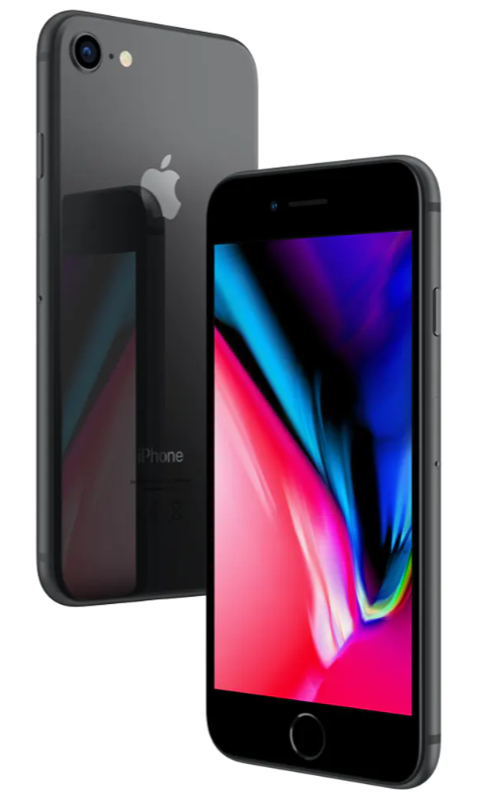
Device: iPhone 8 Fun Fact: Really just a refinement of the 6, though with a glass back, so Steve Jobs is probably no longer rolling over in his grave
By 2017 the performance of the iPhone 6 was getting noticeably slower, thanks to Apple’s “We’re totally not trying to get you to buy a new iPhone” updates to iOS. I decided to upgrade and because I was off contract, opted to buy the phone outright (I did a comparison and buying the phone and paying monthly over two years would have saved me about $20), so I took my 6 to an Apple store, considered the $1,300+ price of the then new iPhone X, chuckled quietly, then got an iPhone 8 in space gray with 64 GB of storage. I was essentially getting a faster version of the 6, with a better camera, wireless charging and Force Touch1Or 3D Touch, or whatever name Apple gave the phone version. This was maybe part of the problem–even Apple seemed confused by the feature. (which Apple later went on to kill, anyway). I immediately got a case and the phone never left it. It is in that same case right now.
Phone-wise, the 8 is so close to the 6 that I can’t really say anything new about it. I did appreciate the camera improvements and it led me to ultimately getting an actual camera, so that was a plus (except to my bank account).
The iPhone 8 served me faithfully for over two years, but in its third year, things turned sour. See below.
2021: The future is notch-shaped
Device: iPhone 12 Fun Fact: My biggest phone yet that strangely doesn’t feel that big
In 2020, the Worst Year Ever, my trusty iPhone 8 started developing battery issues. Specifically, the battery was not able to hold a decent charge. Then it got worse. The battery would drain so rapidly that it would go from 100% to 4% to “I’m shutting off now” in a matter of minutes. It got to the point that if I went out taking photos with Nic, I would need to bring along a portable power bank and run the iPhone tethered to it. At first I considered getting a new battery, but given the age of the phone, I ultimately decided to wait for Apple’s new models to come out and maybe get something on contract again, and using the “spread the pain over multiple years” to get a so-called Pro model with a telephoto lens.
In the end, I did everything differently, in a way:
I replaced the battery of my iPhone 8. With a new battery I can sell the phone used. Without a new battery, no one would want it unless they were mad. Or willing to deal with the hassle of replacing the battery themselves. But the battery replacement was more complicated than expected and the phone had to be shipped off to Apple.
The delay prompted me to finally move forward on getting a new phone, but in the meantime I had also decided to get an actual camera, so I went from considering the iPhone 12 Pro/Pro Max to settling on the regular iPhone 12.
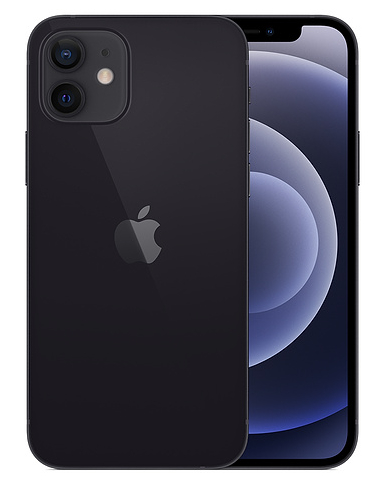
The iPhone 12 model I have is Graphite, which is apparently Apple’s new version of Space Gray. I also bumped the storage up to 128 GB just to be on the safe side, even though I will now be taking more photos on my actual camera (a Canon EOS M50–more on that in another post).
This is my first iPhone with the new design language of “full screen” display, camera notch at the top and such. The larger display (6.1″ diagonally) is nice, and because the bezels are so much smaller, the phone is not actually much bigger than the 8. The flat sides also feel nice for holding it. It feels solid.
The camera is improved again and night mode works as advertised–handy for grabbing pics when lighting is bad and I am sans dedicated camera.
Other than that, it’s an iPhone and works like an iPhone. It’s fast and slick, but I use my phone much less than other tools these days. I made a rule only to install apps as I need them and I’m keeping the home screen free of any apps I don’t use regularly. It’s mostly empty.
Oh, it has 5G support. I have not noticed this making a difference anywhere at any time. So woo on that.
UPDATE, August 21, 2022: The update is just to fix minor typos I noticed when reading through this post years later. I do have to LOL (as the kids say) when I refer to my pace being "plodding" at 5:20/km, when today that would be blazing fast. Good ol' aging!
Run 543
Average pace: 5:20/km
Location: Burnaby Lake (CCW)
Start: 12:01 pm
Distance: 5.02 km
Time: 26:48
Weather: Party sunny
Temp: 12-13ºC
Humidity: 63%
Wind: light
BPM: 173
Weight: 153.3 pounds
Total distance to date: 4222 km
Devices: Apple Watch, iPhone
Note to self:NEVER RUN ON A STATUTORY HOLIDAY
I didn’t feel like running today, but by late morning, a combination of guilt and rainy skies predicted for tomorrow prompted me to head out.
Today is Thanksgiving in Canada, a stat holiday. It is also a day I normally don’t run.
I started walking down the river trail, undecided on what to do, but leaning toward some kind of 5K. As I entered the river trail, I noted a couple with a lovely small dog. The dog was leashed. What smart and responsible dog owners, I thought! They stopped for a moment by the Canine Code of Conduct sign and the woman unclasped the dog leash, freeing her mutt. I was still 20 minutes from running and already annoyed. Later, I watched a pair of people look at one of the new STAY OUT signs posted at the entrance to one of the unofficial trails, then promptly take off down it. They probably had no idea where the trail led, but no sign was going to boss them around! I predict traffic on these trails will increase as a result of these signs (UPDATE, August 21, 2022: All the signs were vandalized and removed within about a month of going up and were never replaced).
I ended up doing a rather plodding 5K, sticking to the usual counter-clockwise route. The first three km were strangely sluggish, despite an equally strangely high BPM of 173. By the fourth and final km my pace improved significantly, but I opted to end it there rather than continue, netting an average pace of 5:20/km. If I had done a full 10K I probably would have finished with a decent pace rather than a mediocre one.
The left leg’s tendon felt a little tight toward the end, but was otherwise manageable. Conditions were also fine–dry and cool, temperatures hovering around 12-13ºC throughout my non hour run time.
As is always the case on a stat holiday, lots of people were out, especially people who like to clump awkwardly and block the trail. Multiple times I had to slow down, divert (in one case entirely off the trail) or even briefly stop. As I was coming out of the Conifer Loop trail, I saw three people ahead of me. Two moved forward to study the map at the intersection of the trails. The third–who clearly saw me–hesitated, then moved forward at precisely the right time to get in my way. How do people pull off these inept moves with such precision? I do not know.
Likewise, I continue to be baffled by my amazing ability to flip small rocks into my shoes now while running. I’m not sure if my gait has changed or if it’s the newish Brooks Cascadia shoes I’m wearing, but I have become expert in the whole “flip a small sharp piece of gravel into the air and have it land on the back of your shoe and then promptly slip down into it and lodge uncomfortably under your foot” thing. This time the gravel was sharp enough that I had to pause the run to fish it out of my shoe and toss it aside while muttering colorful metaphors.
By the end of the run I just wanted to leave, so I turned and headed back to the Burnaby Lake SkyTrain station instead of walking out. I don’t regret my choice.
The rise of the Internet has not only hit newspapers hard, but other print media, too. A few days ago I walked by Mayfair News on Broadway for the first time in quite awhile. This was once one of my favorite places to buy magazines as they had a huge selection. Today they have what appears to be half of one aisle devoted to magazines, about 1/6th of what they used to have, with the rest of the store converted over to a dollar store model, shelves stuffed with cheap plasticware and other small goods. On the one hand, it makes me sad to see the change, but on the other I admire their resilience and ability to adapt to a changing market.
I was recently in the area of Broadway and Granville and noticed Mayfair News seemed…not busy. I went over and sure enough, it was shuttered, its space sitting empty for perhaps months after I made the comment above. The book store/art shop beside it had also closed. The demise of Mayfair News meant the single best magazine store in Vancouver was gone.
Related, I noticed the current issue of Rolling Stone on Save On Foods’ tiny magazine shelf a few days ago while not shopping for eggnog. Despite having Trump on the cover, I picked it up and was shocked at how thin it was. It was less a magazine than a robust leaflet.
It was kind of depressing.
The Rolling Stone website, on the other hand, is packed full of content and covers events that have happened just today.
It’s hard to imagine why anyone would choose a print magazine now, unless they needed something to read right now and had no access to the internet or had an aversion to reading magazine-style articles on a smartphone/tablet/laptop.
Nothing lasts forever, but if you had told me 20 years ago that the magazine market would be seriously ailing shortly into the 21st century, I would have laughed and gone back to trying to make DOS games work in Windows 95.