I still really dislike a subscription model for a writing app, but for $36.99 per year, I’m willing to try it again…for at least the next 12 months. And I have missed it, as the app itself I still consider pretty faboo. I lament that the closest equivalent on Windows is a shameless rip-off. Nothing else matches its UI and interface, though some come close.
This, of course, means I’m committing to writing on my MacBook Pro again, though I am still no fan of the keyboard. I think I may be part-masochist.
And for home, I’m thinking of a better solution than the dongle mess I’m currently using, either a Mac mini or a Hackintosh. Time to ponder.
In one of those “down the rabbit hole” journeys that happens when I get caught up searching for something on the web and get inexorably drawn into finding and poring over a bunch of unrelated things, I came across the D2D YouTube channel.
Dave Lee seemed personable enough, and I liked his low-key style, so I kept watching for videos that would interest me and lo, he had one featuring one of my weirdly favorite computer topics: keyboards.
I used to collect computer mice like no one’s business and I still change up semi-regularly (my current mouse is a Logitech G703 wireless, which I’ll review separately. Super-short review right now: Great mouse except for battery life.) but the pace of collecting mice has dropped off over the last few years, perhaps because mice are generally improved enough that I don’t see the need to keep searching for something better.
Which brings me to keyboards.
For some years after I got my first PC (way back in 1994) I just used whatever cheap keyboard I could find, ones that would go for $10-15 today. They were all pretty much the same. The biggest change was when they started including a dedicated Windows key. It seemed weird at the time.
But after I’d upgraded my rig a few times I became more particular and started looking for keyboards that had backlighting or extra keys. I eventually decided the extra keys/macros were something I never used, but backlighting was nice to have, as my computer space was not brightly lit.
Fast-forward to around five years ago when mechanical keyboards became a big thing. I didn’t pay much attention at first because they seemed absurdly expensive. Well, they were absurdly expensive, really. I was intrigued, but not enough to buy.
As I spent more time working on laptops, I found myself starting to prefer the low-travel keys they featured and settle on a desktop keyboard that emulated the style. Although it was not backlit, my computer space was now brightly lit, so it was no longer a priority. The keyboard was wireless (nice, but inessential) and runs off solar power. This is nicer than expected because it meant that I literally never have to worry about batteries.
The worst aspect of the Logitech K750 is probably the glossy sheen the keys and surrounding surface have. Under bright light it can produce surprisingly annoying glare. Glossy is never good on keyboard.
Although happy enough with the keyboard, curiosity got the better of me and I got a Cooler Master Trigger mechanical keyboard. It has red backlighting, extra macro keys, and a weird setup that disables the Windows key by default. I never warmed to it at all and quickly set it aside, regretting the decision to buy.
But buyer’s regret never stopped me, so I next picked up a more business-oriented Das keyboard. It had blue switches and I learned to love the CLACK. However, like the K750, it had a glossy design I came to dislike and it was big and bulky. A tenkeyless design (without the numeric keypad) would be better ergonomically and take up less space. From here I experimented with some tenkeyless designs using red, brown and blue switches. They were all fine, but none really clicked (so to speak), though the blue switches remained my favorite.
Then Dave Lee posted a video for what he declared the best keyboard ever, the CTRL keyboard, featured on Massdrop. I was intrigued and liked the clean look. The drop ended before I could buy, but eventually came back and I placed an order.
It took a few weeks to show up and I had to pay an additional fee to actually collect it, so it came out to be very expensive in the end–over $200 Canadian. Although it has a few flaws, it has become my favorite mechanical keyboard and the reason has nothing to do with anything Dave mentions in his video, but rather in the choice of switches.
I was intrigued by the description of Halo Clear switches as having the clickiness of cherry switches, but with a smoother, more “velvety” feel, so I took a chance and ordered the keyboard with them, trusting they would live up to the description.
And they did. And they are the key (ho ho) reason why I really like the keyboard and have finally ended my great keyboard quest.
For now.
The good points:
Halo Clear switches are clicky, but smoother than blues and a bit quieter, too
Backlighting offers a good set of options
USB Type-C connections on opposite ends of keyboard allow for easy cable management
Switches are actually hot swappable if you’re into that
Aluminum chassis is very solid
Works great with both Windows and Mac
The not-so-good points:
With the backlight off, the lettering on the keys is very difficult to see. Not a big deal if you’re a touch typist, but something to be aware of.
The removable feet will almost always pop off if you try moving the keyboard by sliding it around the desk. Folding legs would have worked better.
The default backlight mode is a strobing rainbow effect, which you will see every time you connect the keyboard. It is pretty, but entirely impractical, so you have to go through a series of FN-key shortcuts to get back to something “normal.”
I found all but the white backlight color to be too garish, even after adjusting the brightness down.
Sometimes the backlight controls will stop responding, forcing you to unplug the keyboard and start from the strobing rainbow again.
The keyboard configurator is clumsy
Really, I think any reasonably well-made keyboard with Halo switches would win me over, but even apart from them, the CTRL is a sold offering. Overall, I’m happy with the purchase and typing is once again a satisfyingly clicky experience, though now with a pleasingly softer touch.
Run 602 Average pace: 5:59/km Location: Brunette River trail Start: 11:34 am Distance: 5:04 km Time: 30:14 Weather: Cloudy Temp: 7ºC Humidity: 79% Wind: nil BPM: 185 Weight: 167.9 pounds Total distance to date: 4590 km Devices: Apple Watch Series 2, iPhone 8
It took 11 days, but I finally ran again outdoors. Woo.
This time I accepted that I am out of shape and scaled things back a bit. Instead of a walk and full loop around Burnaby Lake (over 18 km in total) I walked to the river trail–about 1.5 km–ran the 5K and walked back, taking roughly an hour total.
Good news: Nothing broke, there were no cramps or other issues, though a stitch in my left side threatened, but never materialized. Pace was unsurprisingly improved over the previous run, as the river trail is a lot broader and flatter than the lake’s. I came in at 5:59/km. Or if you check the time on the phone app, it’s rounded it up to an even 6:00/km, being a complete party pooper. Despite numerous dogs off leash, none came over to sniff/jump/accost me. Finally, the lack of serious sweating by running in the cold continues to please me. I mean, you still sweat, but it’s not exactly the same as running in 30º C temperatures in the middle of August. Now that I’ve said that, I am pining again for the return of warm weather, despite the copious sweating.
Less than good news: If accurate, my BPM was up again. This is in itself not surprising, as the easier trail here encourages me to push a little more, but it topped out at an average of 185. That’s kind of really high. Yikes. I may need to focus on less strenuous treadmill runs until I am in better condition.
Weather-wise, it was virtually identical to the last run, with cloudy skies and close to zero wind. Perfect weather for a winter run, really.
Overall, I’m pleased to complete another outdoor run on my slow climb back into being in shape, though the high BPM is a concern.
Today is the day I make the decision on what software to use for my writing and the hardware platform for said software. Below is a partial list of the options.
Software:
Ulysses (Mac, iOS)
Scrivener (Mac, iOS, Windows)
WriteMonkey (Windows, Mac [beta only])
FocusWriter (Mac, Windows)
Hardware/OS:
macOS on a genuine Mac, either a Mac mini, iMac or MacBook
macOS running on a Hackintosh (PC built to run macOS on the sly)
Windows 10 on current PC or shiny new PC
Windows 10 on a new NUC PC (separated out from the above because it would not be used for any gaming)
Amiga 500 bought from eBay running WordPerfect 4.2
And the winner is…
mumble mumble mumble
No, really. The winner is:
Nothing. Nada. I am plagued with doubts at every turn and am still undecided. However, I said I would make a decision today and I’m sticking to that, so here is my decision of sorts:
I will resume Road Closed in Ulysses (Olde Version) on the MacBook Pro and when I work on it at home I will use the power of The Dongle to connect the MBP to the 24″ monitor and a keyboard that clacks in a pleasant way.
So this is decision deferred. I’m not sure I’m ready for a Hackintosh experiment, I still want to get an actual new PC, and none of the current Mac offerings are very appealing. If the $1399 Mac mini option was the $999 entry-level offering, I’d probably go for that, but it’s not, so YOU LOSE TIM COOK LOL. Seriously, I hope the blatant moves to extract as much money from buyers as possible (while getting increasingly shoddy with quality) bites Apple in its metaphorical ass. I don’t expect or event want Apple products to become cheap, just reasonable. They are not reasonable now.
And so, quasi-decision made, the writing journey continues. I will report on my success on that front next Friday, February 1st. Excelsior!
Today is the 35th anniversary of the original Macintosh. Since I am old enough to have lived through personal computer prehistory, I remember the original Mac well.
In 1985–only a scant year after its introduction–I worked on a Macintosh Plus as part of a job entry program in a small publishing/advertising firm in Duncan. The Macintosh Plus came with what was then a staggering one megabyte of ram and this particular model had two floppy disk drives, one internal, one external, so you didn’t need to switch out floppies. Convenient!
I mostly worked on simple ad blurbs and also did entry for a database (I forget the actual software, but it would be pretty easy to find, I imagine). I spent most of my time writing a parody of Friday the 13th using MacWrite. I printed out hard copy on the LaserWriter Plus (this company either had lots of money or lots of debt) and still have that same hard copy kicking around somewhere. I may even have the floppy disks stuffed away in a box.
Since the Macintosh was ludicrously expensive back then (even more than today’s models in relative terms), my own computer was a Commodore 64, which was inferior to the Macintosh in most ways, except it had color graphics and about ten million more games.
The closest I came to owning a Mac back then is when the Macintosh was offered for student discount while I was attending university in 1990. It was around $1,000 as I recall. By then I had an Amiga, which in many ways was a better machine and cost a lot less, so I never went Mac.
That changed in 2013 when I finally got my first laptop, a MacBook Air, then regarded by many as the best all-around laptop. I was too used to Windows, though, and the display was actually not that great, so I ultimately sold it for a Surface Pro 3 the following year.
I returned to the fold (while keeping the SP3) in late 2016 when I picked up the updated MacBook Pro without the goofy Touch Bar (the Touch Bar-free version was the most reasonably-priced–and it still cost $1799). macOS had matured and was a lot more refined, the haptic trackpad was awesome and it had a bright, sharp display. The battery life was only average, but it met my needs. Unfortunately, the ultra-shallow keyboard was something I learned to merely tolerate, not really like, and when you use a laptop for writing, that’s not a great thing. And this was before all the issues with the butterfly keyboard mechanism became known.
I still have the MacBook Pro, with two years left of free service if the keyboard goes south. I’ve actually been using it more recently, as I toy with the idea of going back to Macs for writing (I make the decision tomorrow, per my self-imposed deadline).
When I look at the current Mac line, it makes me a little sad. It could be so much more, but Apple has gotten so big and so reliant on the iPhone that the Mac is playing not just second fiddle, but third, after the iPhone and iPad.
Apple’s attempts at innovation on recent Macs have all been failures:
The 2013 Mac Pro was fatally flawed by its design, which led to heat issues and throttling. Apple also seemed to assume “pros” wanted a small computer that they would plug every sort of upgrade into, creating an ungainly mess of cables and peripherals. Nope.
The 2016 update to the MacBook Pro introduced the Touch Bar and raised the prices significantly. A couple of years later and the Touch Bar has really been a bit of a dud. It’s never been expanded beyond the Pro laptops and feels like an afterthought now.
The MacBook in 2015 introduced the butterfly keyboard, which was divisive due to its extremely shallow keys. Some people love it, as it requires a very light touch, but many dislike it for the same reason. It was also kind of loud for a laptop keyboard. Worse, it was prone to a number of flaws, like keys getting stuck, or registering multiple times, or just not working at all. Apple has revised the keyboard twice and the same issues are still being reported. They really need to chuck the design altogether, especially since it is now used across all of their laptops. I give this a 50/50 chance of happening in 2020.
Even the revised Mac mini, after being neglected for four years, emerged with flaws–cheap thermal paste that results in the machine throttling easily, expensive and with piddly specs on the base model. At least they finally killed the 5400 rpm hard drive it came with in favor of SSDs (that are glued and cannot be upgraded or replaced by the user).
So while I consider a return of sorts to the Mac, it’s only as an adjunct to my PC and likely through either a dock with my MBP or through a hackintosh I’d build from an Intel NUC.
Still, happy anniversary to the first personal computer to popularize the graphical user interface. Despite my gripes, the Macintosh had a huge, undeniable impact on personal computing.
When I was a kid I was nearly double-jointed. I could bend my thumbs back to touch my arms with ease. Today I could do the same if I surgically removed the thumbs first. I am, in a word, inflexible.
As this can have negative effects for both runners and those getting older, two groups I am a member of, I picked up Stretching to Stay Young to see if I could return to at least a little flexibility in my body vs. the immovable board it is now.
I can’t say how effective the book is as I haven’t applied its exercises yet, but I will say that the presentation is thorough, accessible and clear. Jessica Matthews starts with explanations and background on stretching, its benefits, the various muscle groups and so on. She moves on to instructions for a multitude of stretching exercises, each accompanied by a clear color illustration of how to do it. They look simple, even fun.
The bulk of the book then covers sets of stretches tied to recovering from or preparing for specific activities, everything from walking, running and cycling, to sitting for hours in an office chair, talking on a phone and more. She further includes sets for conditions like sore shoulders, necks and more, ending with tips on customizing your workouts.
After reading, I unrolled my exercise mat, recently found buried behind some junk I got rid of, and tried a few simple exercises. Imagine taking a log and laying it down on its side, then asking it to stretch. I am that log. But Matthews addresses this, regularly advising the reader throughout the book to never push to the point of pain, to take it slow, and to allow time for results to appear (she has a chapter devoted to debunking myths, including the old “no pain, no gain.”)
For anyone looking to incorporate stretching into their daily or weekly routine, this guide provides everything you need in a stylish, straightforward format. Recommended.
My beard. I sort of have a stubbly version going right now, because when it’s really short the white doesn’t stand out. The reason I don’t have a full beard is because it would be white and I don’t fancy the “distinguished gentleman” look. Yes, I’ve thought of growing a beard and dying it. I think it would be weird, but I’m more open to weird these days.
10 cent candy bars. This is the lowest price I can remember, circa 1970 when I was six or seven years old. This is not a bad thing, though, because if they were still 10 cents apiece, I would weigh 300 pounds.
A full head of hair. I shaved my head seven years ago, and I’ve made peace with never having a proper head of hair again, but I still kind of miss having hair on my head.
That section of my National Novel Writing Month novel that got eaten when Scrivener didn’t sync properly. My fault, I’m sure, but I’ve never experienced that “afraid to lose stuff” with software before and it is always in the back of my mind now when I use Scrivener.
My original copy of The Ever-continuing Saga of the Round Balls comic I wrote back around 1984 or so. I did 11 issues of varying length and at some point tragically lost them, probably left in a box under the stairs of a townhouse I used to live in.
Not completing my swimming lessons in 2007. Technically I can swim, but it’s more accurate to describe it as “not drowning.” Living on the coast it always seemed like a good skill to have. But water kind of terrifies me. Probably because I can’t swim.
Run 601 Average pace: 6:08/km Location: Burnaby Lake (CW) Start: 1:16 pm Distance: 5:03 km Time: 30:52 Weather: Sunny Temp: 7ºC Humidity: 76% Wind: nil BPM: 177 Weight: 169.2 pounds Total distance to date: 4585 km Devices: Apple Watch, iPhone 8
Nearly three months after my last outdoor run, I finally returned to Burnaby Lake, eager (?) to see how the long layoff would affect my effort.
And it did affect my effort. But there was good news and bad news.
Good news: I finished the full 5K without any difficulty. I never felt like I was pushing too hard, never had any cramps (one on the abdomen threatened at one point, but never materialized) and my first km was a reasonably zippy 5:41/km. It was also cool, but sunny and with no wind at all. Once I got underway, it actually was quite comfortable. Best of all, my knees behaved. The left knee did start to twinge a little about two-thirds of the way through, but this was more of a “not used to running like this” thing and not related to the sore knee tragedy of 2018. I also picked up steam, with the last two km being faster than the first three.
Bad news: My BPM was up to 177. Yikes. That is a lot higher than I’d like to see. By comparison, my run on October 20, 2018 had a BPM of 167. I am also nearly four pounds heavier than that run, too (working on it). My overall pace was a sloth-like 6:08/km, a full 14 seconds off the October run, but about what I expected.
As noted, conditions were good, though I was heading into the sun at the start and the Avalon Trail was covered with a glistening mud that was shining so brightly I actually had to shield my eyes. Once I got onto the main part of the loop, it was fine, and the trail overall was in good shape,. with only a bit of a muddy stretch leading up to the athletic fields.
After, the knees still seem to be holding together. though I’ll see how everything feels tomorrow. It could be a thousand agonies, or one agony or maybe no agony at all. I really can’t say. But I am pooped. It’s a lot (when you also add the 14 km or so of walking) after only a handful of treadmill runs leading up to it.
Still, I am pleased that I managed the full 5 km without any difficulties. I kept a more deliberate pace and it seemed to work. As I get in more runs, I expect my BPM to drop, but it’s definitely the thing I’ll be watching closest over the new few runs.
Once again Goodreads 5-star system fails me, as this is a solid 3.5 star effort for me. But if I have to choose between 3 or 4 stars, I’ll go with 3, because while I enjoyed the ride, there are some flaws in The Oracle Year that bring down the overall experience.
First, I love the premise. An unremarkable bassist in New York named Will Dando has a dream in which 108 predictions over the next year are revealed to him and he uses these predictions to create the persona of The Oracle. He enlists his business and security-savvy friend full-time to create a website that allows people to see a subset of the predictions, along with providing an email address for people to inundate The Oracle with requests for winning lottery numbers and such.
Will Dando’s friend, Hamza, starts orchestrating selling certain predictions by offering 10-minute chunks of time to corporate interests looking to get a leg up on the competition. Soon the pair of friends has amassed literally billions of dollars. But Hamza presses on, saying they need more before they can reach a point where they will be completely secure.
This didn’t strike me as particularly believable, but even if it is, the morality of what Will and Mamza are doing is only treated in a weird, offhand manner. Will is unhappy, but doesn’t stop the pointless accumulation of more money than he could ever use. His friend, Hamza, seems to have no reason to be best friends with an ordinary, struggling musician, but at least has a convincingly obsessive, detail-oriented personality.
This also touches on another issue–Will Dando is not a very interesting person. He is a loner (apart from Hamza and Miko, his wife) and spends most of the story trying to avoid people and relationships. He has no real arc, no growth. He starts out bland and unremarkable, and ends the same, albeit richer and happier. He does create an elaborate system to track and correlate the 108 predictions, to try to see the big picture that binds them all together, but there is nothing to suggest how he has this ability. Most of the novel shows him making bad decisions and treating others poorly, because he can’t keep his inner voice from being an outer one.
The opening of the book also suggests a lighter tone and it bubbles up occasionally, but overall the story is dark, world-ending stuff, and I can’t help but wonder if the cipher-like quality of Will would have been better-served with a more deliberately humorous approach similar to what David Wong uses in John Dies at the End (and related novels).
Also, almost all of the supporting characters are unlikable. The subplot featuring the evangelist Hosiah Branson doesn’t really pay off, except as a late punchline, and could have been cut entirely. The liberal use of fictional countries also undercuts some of the drama, because it starts to feel manufactured for the plot.
And, though this is not something author Charles Soules has any control over, it’s hard to imagine a president acting in a mature manner (the fictional President Green and various staff and associates play key roles as the story unfolds), given the destruction of the office by its present occupant.
On the positive side, I was invested enough to keep going and the effects on the world of predictions destined to come true is played out in interesting, if ultimately bleak, ways. For me, this is an almost irresistible premise, story-wise, a kind of ultimate “What if?” scenario. Overall, then, The Oracle Year is recommended, with some reservations.
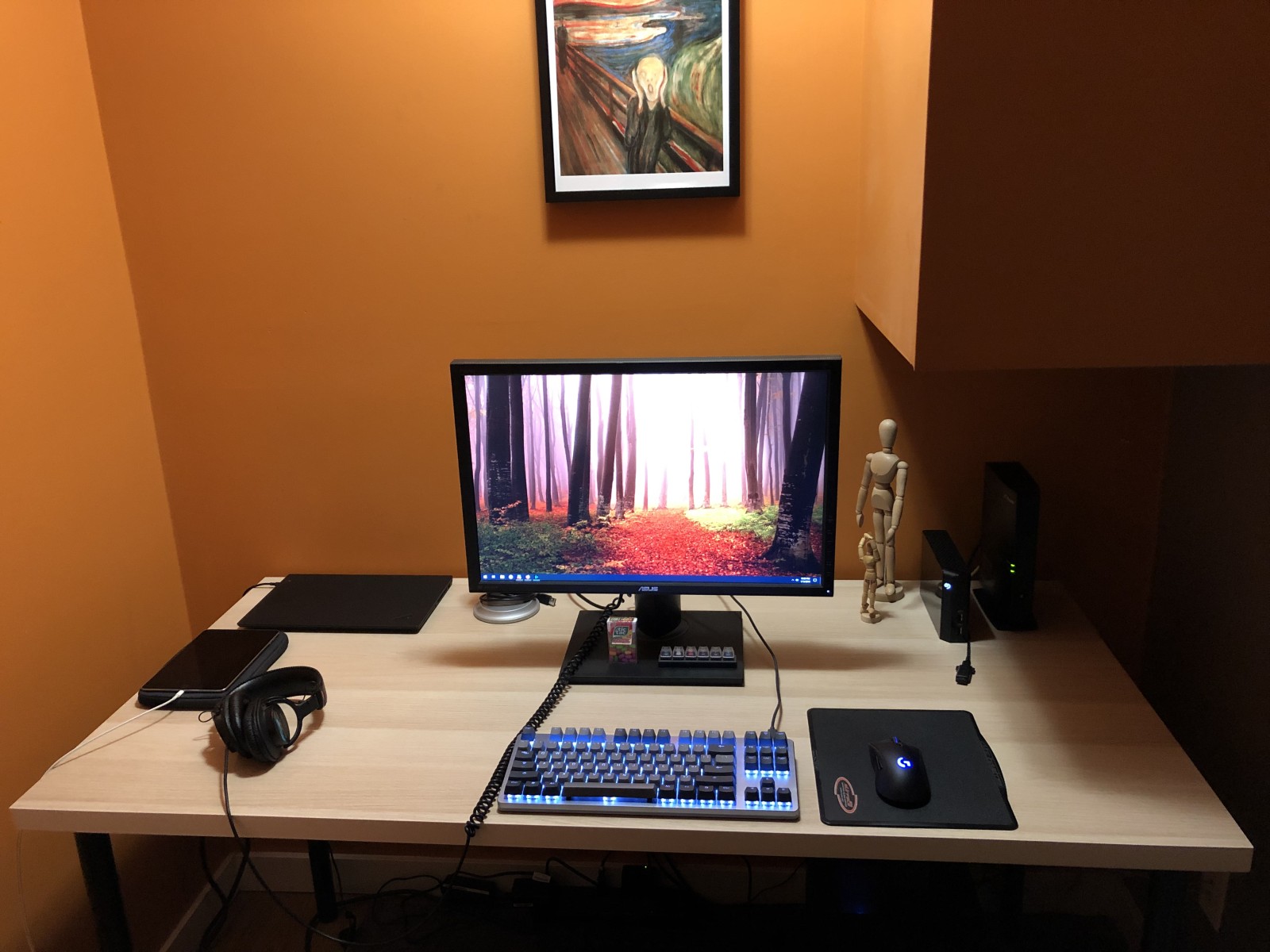
I got a new computer desk from IKEA. It is fairly simple–just a big plank of wood with four legs. It replaces an L-shaped desk that fit the nook I have the computer in, but it was kind of awkward, otherwise. It was too shallow, too narrow and too faux executive office-looking, with a fake dark wood surface.
The new desk comes with a fake light wood surface, which is brighter, happier and will inspire me to previously unforeseen levels of stuff and junk.
What you can’t see in the mediocre shot below is the printer has moved from the left side of the desk to a pseudo-printer stand to the left. I say pseudo because it’s really the old end table from the living room temporarily repurposed to hold the printer. It has two shelves which handily hold all the junk I had scattered across the old desk but did not need quick access to.
Also helping to inspire me is Edvard Munch’s The Scream, as seen on the all behind the desk.
The gear, from top-left, clockwise: Lenovo ThinkPad X1 Carbon, Blue Yeti microphone (hidden partly by the monitor), Asus P248 24″ monitor (on the monitor stand are Tic Tacs and a WASD 6-key Cherry switch tester), two escapees from a Robax commercial, a Seagate 4TB backup drive, my gateway/router, Logitech G703 wireless gaming mouse, CTRL mechanical keyboard (Halo Clear switches), Sony MDR-7506 headphones with absurdly long cable, and iPad mini 4, which has a battery life similar to whatever bug dies after about four days.