
- After three days of non-use, my AirPods have died a mysterious death and will not charge, pair or play. This has forced me to go back to wired earbuds and it makes me realize how nice it was to not have to untangle the spaghetti of wires every time I listened to music. I will probably look for an alternative for now, rather than paying what would likely be a ludicrous repair bill from Apple.
- We had a more traditional Vancouver snow this week. It started out like recent years, with it staying cold and several days of snow piling up. Then it warmed up past freezing and started raining. Fortunately there was a gap between the snow and rain, so we have not seen a slushpocalypse. Also, the rain stopped and the snow is just melting on its own. Yay.
- The Lego Movie 2 was all right, but not as good as the original. Several of the new songs are catchy, but “Everything is Awesome” is still the one that got stuck in my head after.
- Nic did not want to watch Close Encounters of the Third Kind, despite never having seen it. He is now DEAD to me. Or mostly dead.
- It seems like people have mostly and finally stopped quoting from Monty Python now. I’ve watched some of the original episodes on Netflix recently (Nic will watch those) and it’s very stream of conscious, clever, funny, but also uneven, with some sketches not really going anywhere.
- Speaking of watching things on Netflix with Nic, the Star Trek animated series is not bad at all, but the animation is terrible. Too bad there isn’t money in redoing the episodes with modern (good) animation, while keeping the original voice work and music.
- Let’s keep talking about Netflix. Jaws just turned up and I must watch it again. Nic also won’t watch this because he doesn’t like movies about sharks eating people or something. I loved sharks as a kid (after seeing Jaws). I would draw sharks all the time. And dinosaurs. And roller coasters. But never all three at once (which I would totally do now).
- I broke my rule of not snacking in the evening tonight and feel bad. And full.
- I have been weirdly and correctly predicting little things lately, like I’m a low wattage psychic.
- I have actually started working on Road Closed again. One might say Road Opened, ho ho.
- Somehow my iTunes folder has bloated to around 50 GB. That is a lot of “onion on the belt” (old guy) pop music.
- As always, I like lists
Six super powers that might not be so super: A short list
- Flight: What if you had a fear of heights? Also, flying into electrical wires would be a constant hazard.
- Super strength: Almost everything you could do (and pretty much anything fun) would get you charged/arrested or kicked out of some place.
- Invisibility: A lot of stuff could suck if you’re invisible. You could have the type where only your body is invisible, so you’d have to run around naked to be unseen. Would not work well in the winter. Or if everything you touch also turns invisible, you’d never be able to check your watch for the time or use your smartphone. That could be an upside, too…
- Telekinesis: Assuming you didn’t go full Carrie, the utility of this seems limited. You’d be a sort of living smart home device, able to turn on the stove or adjust the lights without having to touch anything.
- Manipulating fire: You’d be a hit at barbecues and beach bonfires. Anywhere else, not so much. Also, probably really easy to accidentally burn down your house.
- Super speed: Running into something would probably hurt a lot. Like, hurt you to death.
Fighting my Mac: Part 2 of an ongoing series
To be fair, this is more about fighting Logitech’s software, so the Mac is kind of off the hook for this one.
Even though I got the G703 mouse working in Part 1 I ended up moving it back permanently to the PC, mainly due to the hassle of plugging and unplugging the USB charging cable.
Instead, I switched over to a spare Logitech Marathon M705 mouse that I bought on sale “just in case.” And just in case has arrived!
It’s a nice mouse, has side buttons, works wirelessly, and has incredibly long battery life. Best of all, the Unifying receiver that plugs into any standard USB port is tiny. I plugged in said receiver and the mouse began working immediately…but with only the left, right and middle mouse buttons working (see Part 1 for more gruesome details on this).
However, the Logitech Unifying Software (LUS) would allow me to program all the buttons. All I had to do was flip the power button on the bottom of the mouse, flip it back on and wait for the LUS to detect it. Once detected, smiles all around.
Except this happened:

Undaunted, I turned to the tips hidden behind the Troubleshooting information button. This lead me to discover I had another unifying receiver and a not-unifying-but-still-Logitech receiver plugged into my PC. I removed those (the devices they were used for are long gone), but this made no difference. Another tip said to shut down any device that might be synced up to a receiver and I do have a Surface Pro 3 (in the bedroom) and a ThinkPad (to my immediate left). I may have used this mouse with one of them, but the knowledge is lost to the sand of time. Or the sands in my brain. The ThinkPad is currently installing a Windows update because that’s what Windows computers do, but when it’s done, I’ll shut it down. The SP3 is probably on the edge of where a receiver would reach, but I’ll also shut it down and see what happens. But not right now, because it’s getting late and my wrangling-with-technology timer just went DING.
I am not giving up hope, but am leaning toward needing a third party tool or divine intervention to get those precious mouse side buttons working.
I will update this post with a Part 2a soon™.
Fighting my Mac: Part 1 of an ongoing series
I’ve had a few days to acclimate to working with a Mac for an extended period of time. I normally use my MacBook Pro for an hour or so at most and haven’t spent a lot of time tweaking with its settings like I would a desktop computer. Now that I have a Mac mini, which indeed sits on my desktop, I’ve been diving into settings to make it work the way I want it to. The experience has been…interesting.
Today I am going to talk about one thing: mouse support.
Mouse support in macOS is bad. It’s like a lot of Apple’s mice in that regard. Bad hardware, meet bad software!
Here are some of the bad things:
- No “snap to default button in dialogs” like in Windows
- No automatic support for third or fourth mouse buttons
- Even with some settings maxed out, the mouse still feels a bit sluggish compared to how it operates in Windows
While the first and third items on the list are either subjective or more “nice to have” features, supporting the side buttons on a mouse is pretty fundamental. It’s not 1985 anymore. Mice have more than one button.
I was not actually aware of this because most of my Mac experience has been using a keyboard or a trackpad. When I plugged in my wireless Logitech G703 mouse, it was instantly recognized and worked without any fuss. Yay. But then I discovered the two side buttons would not work. Or rather, they worked in weird ways. In Firefox, pressing Button 3 (the one normally assigned as Back) would result in the same action as pressing the middle mouse button, which is to produce a weird little circular symbol on screen that lets you scroll up and down by moving the mouse. It’s a feature that I’m pretty sure no one ever has ever used on purpose after scroll wheels became a thing.
A mini mouse crisis was now underway.
The Logitech Gaming Software (LGS) showed the buttons correctly mapped as Forward and Back, but the Mac remained unconvinced. I began to investigate using my well-honed Google skills. This led me to try third party tools like BetterTouchTool, which did indeed allow me to map the buttons the way I wanted–nay, the way nature intended! But I didn’t really want to use a separate program just to get the buttons to function the way they would in any sensible operating system. I poked around some more and found that Command-[ is a near-universal key command for Back.
I went into the LGS and assigned Button 3 to Command-[. After doing this the LGS software now showed the button labelled with the keyboard shortcut as seen below.
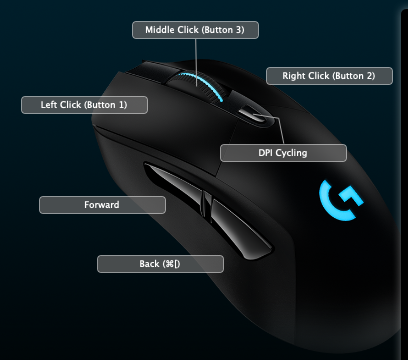
And at least for now, using the Back button on the mouse does just that–it goes back. It’s even working in Finder, which kind of surprises me.
Searching, testing and playing around with settings for this consumed a decent chunk of the evening. For something that works without any configuration needed at all in Windows. I’m not saying Windows is better. But in this case, Windows is way better.
Perhaps mouse support will be improved in macOS XI.
Photo of the Day, February 10, 2019
A few hours into the first big snow of the winter, as seen from the entrance to the condo building mid-Sunday afternoon.

A drawing per…month?
One of the things I did when making my resolutions for 2019 was lower the bar. In some cases I didn’t just lower the bar, I gently set it down on the ground. I wanted as little friction as possible to make progress, hoping the ease in doing so would provide sufficient psychological boost to push me beyond my terribly modest goals and reach for the sky, or at least something that requires me to stand on my toes.
One might make the argument that since I obviously know I’m trying to “trick myself” into improvement, it will never work. And that’s possible. But I like to think I’m at least willing to meet my brain halfway on this.
And so I am adding another resolution for the remaining 11 months of 2019: A drawing per month. Not one per week or day, just one every month–a modest goal that can be built on.
I have 20 days to keep pace going forward. Will I draw a blank (lol)? Find out on February 28! Or hopefully sooner. You never know.
Book review: Contagious

Contagious: Why Things Catch On by Jonah Berger
My rating: 3 of 5 stars
This is a short book that feels a bit like a magazine article that got padded out, but it is accessible and both provides explanations for why things are popular, along with tips on how to make your own product/event/thing popular. It generally manages to not feel too much like a sales pitch.
While a lot of what Berger offers seems obvious when he explains it–people are more likely to remember something and share it (“go viral”) if the product is an inextricable part of the message you craft, rather than not being connected at all to an otherwise clever ad, for example–I was left feeling that you can do everything right and still not have your whatever-it-is catch on. Call it luck, karma, coincidence, or something else, it still seems that most products, stunts, messages and so on get put out to the public and die quiet deaths, no matter how carefully they have been created and nurtured to become successes.
Berger outlines the mnemonic STEPPS as the key to how things catch on: Social Currency, Triggers, Emotion, Public, Practical Value and Stories. Each makes sense. For example, we are by nature inclined to enjoy narratives, so a good story can be an effective way to transmit a message (one of the examples used is the story of the Trojan Horse and how it serves as a warning to be suspicious when an enemy turns friendly without cause). There is also some pop psychology fun in examining how easy it can be to manipulate people (line-ups = product good, no line-ups = product bad), but in a way it’s also a bit depressing to realize how much of everything we see and experience hasn’t just been made for us to enjoy, it’s been crafted in a calculated, even cynical way, to work on our emotions.
Although not especially revelatory, Contagious is a quick, easy read.
View all my reviews
Photo of the Day, February 5, 2019
Cathedral Place, downtown Vancouver.

Photo of the Day, February 4, 2019
Front to back: Vancouver Art Gallery, Hotel Vancouver, Cathedral Square.

The first February treadmill extravaganza
Today, as a few winsome flakes of snow fell for the first time this winter, we headed out to the Canada Games Pool for some exercise and relaxation. My original plan was to run in the snow, which can be strangely delightful if it’s not waist-deep or turning to torrential rain, but given how light the snow was and how high my BPM was on last weekend’s river run, I chose to hit the treadmill once again.
I ended up falling into an interval pattern based on my heart rate after seeing how high it was getting even on the treadmill. I would run until it reached 164 or 165, then switch to a fast walk until it got down below 140, then start running again.
It worked out decently enough and I feel a bit better not pushing quite so hard as I normally would. I’ll see if the BPM starts trending downward as the runs get more frequent (it should), because if it doesn’t I may need to See a Doctor before continuing on with more rigorous or rigorous-like exercise.
When compared to my last treadmill run, the distance is shorter (because I walked more), but the calorie burn was higher and my BPM was exactly the same at 153, which means it was actually higher than last time, as I walked more, so my overall heart rate should have been lower. This is not great, though I feel fine now and felt fine immediately after the run, too, apart from that usual moment of vertigo when you step off a treadmill onto a floor that doesn’t move at all
The stats:
Distance: 4.27 km
Time: 30:14
Average pace: 7:05/km
BPM: 153
Calories: 342
Things I may or may not believe in, 2019 edition
Who really knows?
- God: Maybe?
- Bigfoot: Seems plausible, but probably not
- Loch Ness Monster: Got to say no here. We’d have found some tangible evidence by now.
- UFOs: By definition, these exist, because people do see objects flying in the sky that can’t be identified. I’ve seen them, though they were probably meteors or distant planes, rather than spaceships piloted by grey-skinned aliens.
- The innate goodness of people: Sometimes
- The soul: Yes, I think there is some part of us that exists outside of the physical body. There is some scientific evidence to suggest this. Think of it as being a kind of energy that persists after the body has kicked off.
- Ghosts: Although I can’t say they’d exist as the traditional ghosts we think of in the western world, I can see them being some form of the soul (see above). So…maybe!
- Aliens: Absolutely. It seems silly (and arrogant) to think the only life in the universe could exist on one planet. Ancient Aliens? Not so much.
- Alien abductions: Maybe? There is some physical evidence and I believe a lot of alleged victims are sincere, but the mind is a strange place and isn’t always trustworthy.
- Reincarnation: Maybe. Again, this has some evidence behind it.
- The Bermuda Triangle: No. Ships and planes crash or vanish in equal numbers all over the world’s oceans.
- Fate or destiny: No.
- Global warming: I’m not a right wing politician who rejects science and logic, so yes.
- World peace: Maybe, eventually. Odds seem low right now, but the optimist in me hasn’t been completely snuffed out.
January 2019 weight loss report: Down 0.2 pounds
Good news! As predicted, my weight dropped this month.
Not as good news: It dropped the equivalent of a rounding error–0.2 pounds–and body fat was actually up 0.4%.
But somewhat better news: Body fat as a percentage has been trending down over the last few weeks overall.
The trend, then, is slowly moving in the right direction. For the month overall, I improved notably in several areas, especially in terms of post-dinner snacking, which has been greatly reduced. I’m also drinking more water and taking in fewer calories at lunch, while still having small snacks to tide me over.
I am thus far donut-free in 2019. 11 months to go for the full year!
February is a short month, so less time to lose, but I am going to be bold and commit to not only losing more weight, but losing enough that rounding errors are not a possibility. Woo.
Here are the stats for the month and year which are conveniently the same thing right now:
January 1: 167.5 pounds
January 31: 167.3 pounds (down 0.2 pounds)
Year to date: From 167.5 to 167.3 pounds (down 0.2 pounds)
And the body fat:
January 1: 19.2% (32.2 pounds of fat)
January 31: 19.6% (32.8 pounds of fat) (up 0.6 pounds)