I woke up fat and unrested. Is unrested a word? Apparently not. I will add it to Nedlish!
Day 10 my remaining symptoms are the same, but milder in all cases. The nose is a bit stuffy, the chest feels a bit congested (though no coughing unless I contort into a cough-friendly position) and the ears are just a touch plugged, depending on which way I turn my head.
Despite feeling better in all regards, I had an allegedly poor sleep last night and also managed to gain 1.2 pounds, like secret night gnomes were directly injecting fat into my body as I (poorly) slept.
It’s 2023 and that means the big thing is AI (that’s Artificial Intelligence, not some guy named Al). If you are reading this in some other year, you may be wondering what the fuss is all about from your tiny, climate-ravaged hovel. Or you may be wondering the same as a gleaming machine built on AI yourself! Who can say what the future holds?
As for the present, it started in 2022 when AI-generated art became a thing. That’s still ongoing (see the controversy over Marvel using AI-generated art for its opening credits to Secret Invasion), but things kicked into high gear right near the end of the year when OpenAI unveiled its ChatGPT website to the public, allowing you to query an AI built on all kinds of data scraped from the internet through 2021. You could ask for recipes, have it write haikus, or generate code, or just write your crappy books and list them on Amazon for you. There are concerns, as you might imagine.
Given the recent implosion over at Twitter over what Elon “Galaxy Brain” Musk has called “extreme levels of data scraping”, I wondered, might my own humble blog be subjected to the same? It is, after all, a treasure trove of my collected thoughts and wisdom, stretching back 18 years! In internet time, that’s like going back to the dinosaurs. Or at least mastodons (not to be confused with the social media platform). What can I do to protect my sacred words from evil, exploiting AI? How could I stop some young lad from going down the wrong path by using text from creolened.com to, in some small way, help write his homework, leaving him bereft of critical thinking and writing skills, and therefore destined to a life of petty crime and indolence?
I have the answer.
I’ll fill every post with words I’ve made up. Eventually, Nedlish will become the universal language Esperanto could only ever dream of becoming. This is a perfect plan. Let’s get started.
narnar
flembock
poddle
wistern
lugpuppy
droofus
edumatainmentification
yubbo
More to come. Get to work, AI, on the glorious Nedlish future!
I searched for images for “sick” and this one made me laugh, so it wins. Photo by cottonbro studio on Pexels.com
As noted previously, being sick sucks. I had forgotten how much through the benefit of not being sick for a long time, but now that I am reminded, here are a few aspects of the misery I wanted to record for posterity.
5 Worst Things About Being Sick
Lousy sleep
Nose gets sore from all the sneezing/being stuffed up/runny
It’s the end of June, I’ve lost weight, it’s been sunny, and I got sick.
So, a mixed bag.
And now ten words that rhyme with June:
Spoon
Moon
Prune
Loon
Tune
Rune
Boon
Croon
Zune1According to Microsoft, this is totally a real word
Dune
Now, take these ten words and use them in a story! Surprise writing prompt!
I sat by the window, listening to a tune on the radio, staring out and up at the fat moon. I used a spoon to shovel up ice cream from a bowl, directing it to my mouth. The night was silent, save for the plaintive cry of a loon. I did not want to listen to it croon its sorrowful song, so shut the window.

I picked up my Zune, which still worked all these years later, quite the boon. I played a song at random and did not like it. Why had I bought it? I would need to prune my playlist. I laid back on the bed and closed my eyes, seeing before me in the dark an image of endless sand, one giant rolling dune after another. Had I been here before, or only in a dream? I opened my eyes and reached over to the nightstand, picking up a small wooden talisman I had been given by a stranger, a burnished, dark rune, whose etchings defied explanation. I held it up before my face and turned it over.

"Soon," I whispered. "Soon."2Bonus rhyming word for extra credit
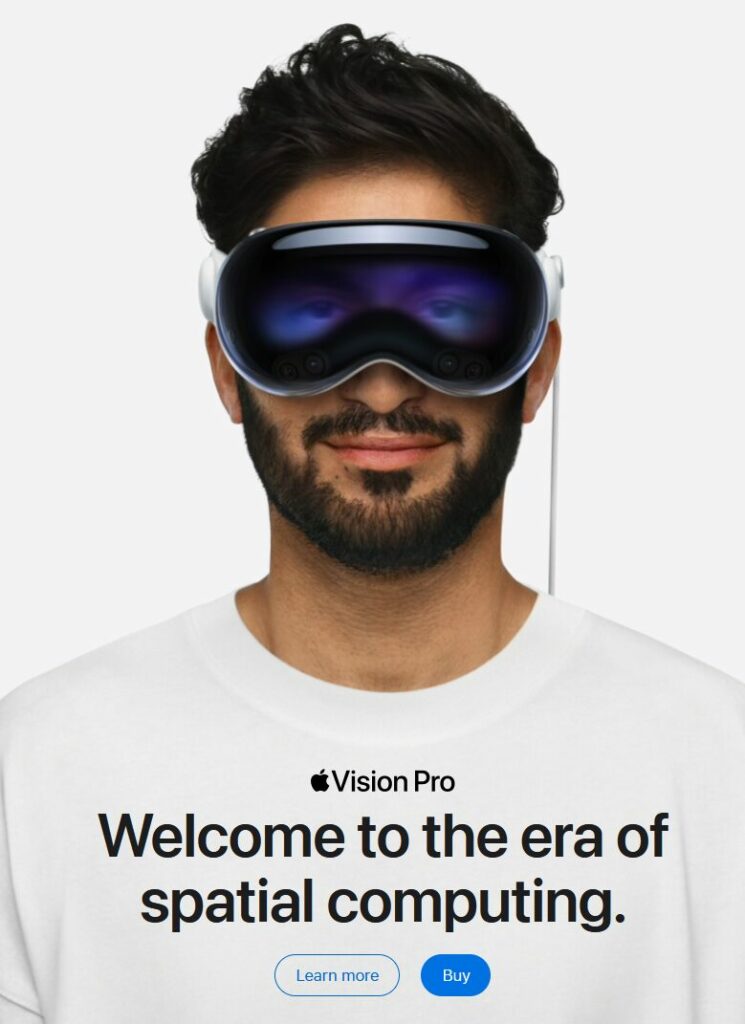
UPDATE, July 133, 2024: Apple is promoting the Vision Pro on the Apple Canada site, as it is now available for purchase by moose and other Canadians.

The image on the landing page is below. It basically reverses everything I list about the original image in this post.
Original post:
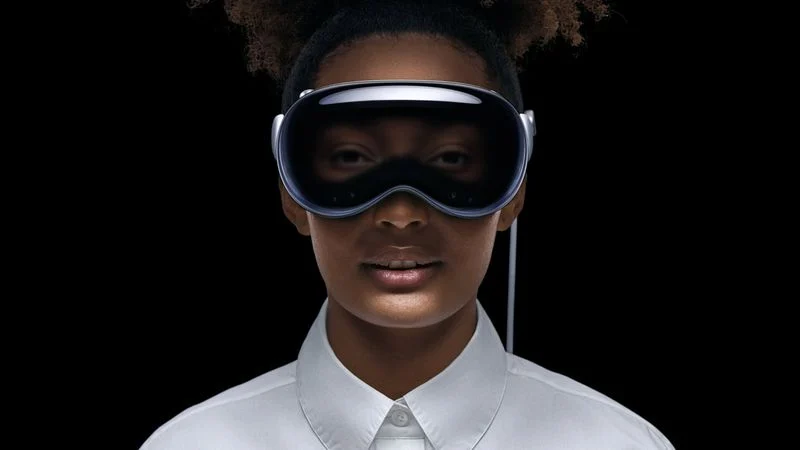
If you’ve seen anything about the Vision Pro, Apple’s new don’t-call-it-AR headset, you’ve probably come across this photo:
I’m here to tell you why it’s creepy and bad, and Apple should feel bad for using it.
In a list, of course!
The black void behind the person is off-putting. Where is she? Is she just floating in nothing?
The ultra-white starched dress shirt with the buttons done up to the top. This is incredibly twee and so very Apple. It’s a look that comes pre-dated. No one dresses like this.
The light around the fake eyes make them look dopey, as if the person is tired and wants a nap. They also look unreal and your brain will constantly be reminding you of this every time you see them.
The slightly-parted mouth is off-putting. She’s not smiling1You may argue that she is, in fact, smiling, but the fact that we have to debate it proves the point. So says I!, so why is she showing her teeth? It’s like she got a shot of Novocaine and her jaw is hanging slightly slack as a result. Also, the way the light bounces off her lips and chin is unnatural. Is she holding a flashlight at her waist and pointing it up? I used to do that to tell spooky stories when I was 12 years old. I also didn’t need a $3500 headset to do it.
The hair. It’s hipster hair. I’m willing to let this one go, though, because it is, in the end, just hair.
The ears do not look like they are part of her head. Again, this is a lighting issue.
Airbrushing. Yes, every face gets airbrushed in ads, and it still makes the skin look plastic and fake, like a glossy mannequin.
Other than the above, it’s a perfect photo to represent Apple’s Vision Pro don’t-call-it-AR headset (it’s totally AR).
In some ways, the reset of Windows was a success. It got rid of a lot of junk I’d collected over the years on my current PC, and now I’m just installing stuff as I need or use it, resulting in a leaner, tidier system. This pleases the OCD side of me.
But in other ways, it has not really helped, which makes me believe my issues are either hardware-related, a result of some weird software interaction, or a manifestation of minor and probably bored demons.
The wallpaper issue, which I was relatively sure the reset would resolve, continues unabated. Sometimes the wallpaper changes to one I used last winter (always the same one, which seems like it should be a clue) and the past two mornings it’s just changed to a solid colour (also the same colour).
Diablo 2 crashed upon exit. So much for stability! At least it didn’t take down the entire system.
I suppose I should be happy this is all I’ve encountered so far in terms of bugs or glitches. But I am in a position now that would have been unthinkable in the olden days: If I could do everything in Linux–yes, Linux!–I would ditch Windows. But alas, I cannot.
I’d also switch full-time to a Mac, which comes tantalizingly close to doing everything, but still sucks for gaming. It’s getting a little better, though. Good enough for me? Probably not. Plus, Apple locks things down way more than I like.
Anyhoo, I have installed more stuff:
PowerToys (I started to miss some of its features)
Vivaldi (which will be my Chromium-based alternate browser for now)
Stella (an Atari 2600 emulator I’d been mucking around with just prior to the re-install)
Diablo 3 (I know, I know)
Diablo 2 (technically it was still installed, the battle.net launcher just couldn’t “see” it)
EarTrumpet, which allows me to better manage multiple audio sources
Also at the suggestion of a gaming pal, I bumped up my mouse DPI from 1600 to 3200. It definitely takes less movement to do stuff, which is good. I am still overshooting a bit, but will hopefully adjust. I’m still trying new things, look at me! Maybe I’ll get into metal next.
A few glitches and things following last night’s reset of Windows 11:
Despite uninstalling all the non-included software, my Start menu settings were preserved, which means it’s littered with uninstalled apps. This is suboptimal, but not a dealbreaker or anything. I can manually prune the Start menu by going here: C:\ProgramData\Microsoft\Windows\Start Menu\Programs, and I’ve kept some of the stubs as reminders of stuff I may want or need to install later.
The wallpaper–which had been randomly changing on its own despite me turning off or tweaking every conceivable option to make sure it wouldn’t do that–had randomly changed when I logged back in this morning. I went through to see if one of the possible triggers had gotten reset in the reset. It’s resets all the way down.
I’ve re-installed Signal–because I was using it!
I re-installed ShareX because it is totally skookum for screenshots, of which I take a lot
I remembered to bump the refresh rate of the monitors, since they support 144 Hz
I still haven’t opened Edge
I disabled those weird streaming Steam audio settings I’ll never use but always show up as options cluttering yup audio settings
The audio on the monitors, which have speakers that can be described generously as “tinny” seem louder than before. Maybe that’s just me.
I can’t say I regret the reset yet. But it’s still early!
Next on the list:
Install Unity
More will follow along after Unity, but that will get me going.
UPDATE: The following additional software has been installed, as noted below.
Unity Hub and Unity editor
iCloud for Windows. It’s crappy, but it lets me get photos from the iPhone into Windows.
Steam client. Once Steam found all existing games, I uninstalled a bunch of them.
Epic Games Launcher. I tried the same thing here, but it doesn’t work as seamlessly, so I just nuked a bunch of game folders. At least I know there’s no lingering registry entries! I installed Torchlight 2 as a test case.
Canon EOS3 Utility software. To allow photos to be transferred from my camera to the PC.
Tonight I was playing Diablo 3 (I know, I know) and it started getting very laggy. Then it froze. Then I realized my entire PC had seized up, something that hasn’t happened in a long time. I thought about it, then decided to go ahead and nuke my Windows 11 install, using the handy Reset PC function:
I chose the less destructive first option, Keep my files.
The process went smoothly and a little faster than I expected. When it was done, I was prompted to log in and was greeted by all the yucky Windows 11 defaults and none of my previously installed apps. Windows 11 comes with a fairly large number of apps on its own, however.
I am now following my usual rule (that I always end up breaking) of only installing apps as I need them. We’ll see how it goes.
The list of re-installed software so far:
Firefox (I got this through the Microsoft Store, so I didn’t even need to open Edge to get it and switch over)
Discord (I tried getting this through the store, but it threw out an error, so I got it from the Discord site)
Obsidian (from the website, it’s not on the MS Store)
MS Office (from the included stub app)
Diarium (from the store)
TickTick (from the website)
As of this post, that’s it! This covers the essentials I use on a daily or near-daily basis. After this, I’ll only install an app when I am about to use it and gasp in horror because it is not there. Totally.
There are plenty of apps I’ll continue to install, but only as I use them. I mean it this time. Totally.
In terms of drivers, the only ones I’m really concerned with are for the mouse and video card. I decided to install the GeForce Experience to make the Nvidia drivers easier to install, but logging into it has turned into a gong show because it doesn’t seem to remember me. Or I don’t remember it. Fun! Actually, having investigated some more, I managed to get into my Nvidia account, get logged into the GeForce Experience app…only to have it tell me I already have the latest drivers installed. OK!
Anyway, I think this is enough PC fun for one night.
If Windows 11 continues to misbehave after this, I will do one of the following:
We went on a two-day trip to Kamloops for a wedding, so I packed way more stuff than I would ever need for two days. This is my way. But just going by the tech stuff, let’s see how sensible I was.
Things I packed and actually used
iPhone 12. I mean, I carry this with me all the time, so it doesn’t really count. But I’m putting it here anyway.
Apple 12 watt USB charger and lightning cable (to charge the phone)
Lenovo ThinkPad X1 Carbon laptop (2018 vintage). Used for journaling and my to-do app.
Canon EOS M50 camera. I took about a hundred or so shots with it.
Things I packed and did not use:
Kobo Libra e-reader. I did not e-read.
iPad Pro with pencil. I did not draw, noodle around with, or at any time take the iPad out of my backpack.
My drawing glove. See above.
The charger for the ThinkPad. Not needed!
USB-C charger for iPad. Not needed, obviously.
A USB-C to USB-A cable I packed for some reason. This wouldn’t have actually connected to anything I had with me. Whoops!
Sony wireless headphones. Never listened to any music.
Probably a few other miscellaneous cables.
Lesson: Pack sensibly for a two-day trip, not like you’re going away for two months.
Everyone is talking about the Apple Vision Pro and will keep talking about it…until the end of the week.
Here’s my summary in handy list form, after watching the WWDC keynote:
MacBook Air 15 inch: Appears to be exactly that, the same M2 Air but with a bigger display. Price is reasonable! Keeping the M1 Air in the line-up when it’s only $100 less than the M2 version is odd. Apple does this sort of thing a lot. Apple is odd.
Mac Studio with M2: Nice to see this new product getting updated. No price change on the default config, but it should still come with a 1 TB SSD standard (it comes with 512 GB).
Mac Pro: WTF LOL etc. After being very late in completing their transition to Apple Silicon because of the Mac Pro, what they released is kind of baffling. First, they re-use the Intel case from 2019. OK, no real issue there, but in terms of specs, this is a Studio with some PCI slots, a few more Thunderbolt ports and it costs…$3000 more. Also, unlike the Intel version, you can’t have separate graphics (integrated on the SoC, like the Studio) and ram is limited to 192 GB instead of 1.5 TB (!). In several important ways, this is worse than the Intel Mac Pro and unless you absolutely need PCI slots for…something (other than graphics cards), it’s a terrible value and not really expandable in the way a traditional desktop PC is. Apple should just kill the Pro, they have basically been botching it for a decade now. Also, I predict this Pro will receive no updates, just like the last two Pros they released that were left to wither and die.
Mac gaming for real this time! Proof: Another four-year old PC game is getting ported, this time it’s Death Stranding.
iPadOS: The pattern is now clear: This gets one or two token new features, then last year’s leftovers from the iPhone. Apple can and should do better.
Speaking of better: They didn’t really show it, but Stage Manager sounds like it’s close to the state it should have been when they introduced it a year ago.
iOS: Some nice little things, nothing really outstanding. I think it’s due for a major redesign, but Apple is probably too conservative now to do that.
watchOS got a new widgets interface that look interesting. I’m not sure about devoting a button to Control Centre, considering how seldom I used it when I had various Apple Watches.
macOS: I had to actually edit this back in, after forgetting about the Mac completely (I am even typing this on a Mac, ironically). Again, a few nice little things added (widgets again, so Dashboard has been sort-of revived), but nothing remarkable.
The Home app was not mentioned and remains bad.
You can now say Siri instead of Hey Siri. But is Siri itself any better? They didn’t really say!
The Journal app1Cleverly called Journal (iPhone only) sounds kind of creepy, drawing from other apps on your phone to suggest/cajole. I don’t need my phone watching me and making suggestions on what to do or write about.
Craig is the only one who seems natural at presenting and obviously loves the meme-generating moments. He also has a boffo announcer-style voice.
The Vision Pro headset is even more expensive than the rumours suggested, at $3500. This is ultra-niche territory, and I have a hard time thinking how Apple could scale this down to something “affordable” for a non-pro version. And Apple’s idea of affordable is probably $2000, anyway.
The fake eyes on the Vision Pro are super creepy.
Apple showed nothing that came even close to a killer app for the thing. In fact, they didn’t show ANYTHING that was compelling, just “all the stuff you normally do, but now in 3D floating in front of you!” Some have suggested watching movies/TV will be the killer app, but for $3500? No.
The Vision Pro has two hours of battery life, which means you could watch the first two-thirds of the regular version of The Fellowship of the Ring before it dies.
The media is saying it’s the best VR headset out there. I mean, for $3500, it kind of better be.
The stuff with Bob Iger was cringy and fake. And that sweater looked weird, not causal.
But hey, you can now have Snoopy on your watch face.
I think Vision Pro is going to amount to a whole lot of nothing2Yes, I am ready to be openly mocked if I turn out to be completely wrong about this. It’s vastly too expensive and inessential. When Apple can shrink this down to a pair of discreet-looking glasses and cut the price by $2000, then, maybe it will become a thing. And we’re probably 10 years out from that.
Overall, lots of nice little updates and tweaks, the new hardware is fine, if unexciting (save for the Mac Pro, which they should have just sent off to join AirPower in the Apple graveyard), and the Vision Pro is, I think, going to be the first major new Apple product to not really have much impact.
EDIT: Honeybog in the comments on Ars Technica actually says some things about the Vision Pro that make sense to me. I’ve almost changed my mind. What he said is below. The Ars article is here.
I wasn’t very enthusiastic about Apple getting into AR/VR, but one thing that really impressed me with that keynote presentation was how thoroughly they made a case for using these, which is something no other company has been able to do beyond gaming. Facebook’s most compelling case was what if your employer subjected you to living in a world that was part 2006 Wii graphics and part 1984.

In some ways, Apple being able to make a case for why this space should exist is a bigger deal than the technology behind it or how many they sell.

It made me want to work on my Macbook on a plane and not have the person next to me or behind me viewing my screen.

It made me want to have a workspace with adjustable windows, have a standing desk just by standing, not have to deal with monitors.

It made me want to watch a movie on this.

It really made me want to smoke some pot, put on some music, and look through old travel photos with this.

I don’t want any of these things for $3,500, but I don’t think that matters. Apple managed to make the first non-gaming compelling case for these, and I don’t see that genie getting put back in the bottle. It’s too expensive for most people, but I think the fact that they started with “Pro” tells you everything you need to know about how this is going to get segmented. Apple is clearly starting at the high end, because they can’t afford a flop, but I have no doubt we’ll see a version below $2,000 (I think the sweet spot is $1,200) within a year or two.
If someone had a time machine, travelled back 66 million years and managed to nudge the asteroid that wiped out the dinosaurs so that it never hit Earth, would I be awkwardly typing this now with the tiny arms of an Acheroraptor?
Shirts with vertical stripes look weird. I can’t even explain why, they just do.
Why do some people litter?
Would interviews be better or worse if everyone in the interview was compelled by magic/technology to answer all questions with complete honesty?
What do billionaires think about on their deathbeds?
There’s a cereal you can get only in the U.S. called Quisp and when you think about it, it’s a pretty odd name. Maybe it’s a portmanteau of Quaker and crisp? Still odd.
If I could uninvent autotune, I probably would.
Male names I like (these will show up as character names for protagonists in stories of mine): Ethan, Christian, Jacob
Something I would never wear: Plaid shorts
What’s better, warm soda or a stale cookie?
I am still kind of amazed every time I see a jet take off and fly. I know the science, it still amazes me.